OpenAIMCP
A Model Context Protocol (MCP) server for OpenAI API access using AceDataCloud.
Interact with OpenAI models for chat completions, image generation, text embeddings, and more — directly from Claude, VS Code, or any MCP-compatible client.
The AceDataCloud distribution is mcp-openai-pro. The unrelated
mcp-openai package on PyPI is not maintained by AceDataCloud. Update existing
uvx configurations to the new package name; the hosted MCP URL is unchanged.
Use GPT Image in Glama
The GPT Image-only Glama guide uses the published mcp-openai-pro --profile gpt-image package and its five image/task tools. The existing OpenAIMCP source listing is the general server; it is not a dedicated GPT Image Connector. A separate Glama profile listing and ordinary install flow remain unverified.
GPT Image in goose
Use the independent GPT Image by Ace Data Cloud native goose plugin: install and API Token guide · 简体中文. It reuses this MCP server and does not imply goose Marketplace or default-provider inclusion.
GPT Image service profile
Use GPT Image by Ace Data Cloud when you only need image generation, editing and task retrieval. It runs mcp-openai-pro --profile gpt-image, exposes five image/task tools, requires an explicit GPT Image model, and shares this package's maintained API client. The general OpenAI server remains unchanged. The separate mcp-gpt-image Registry entry is active at 2026.10.18.2 (read back 2026-10-19), matching the public package. A catalog client must preserve --profile gpt-image; do not substitute the generic remote or infer that every client install has been verified.
Regional catalog visibility
The Platform catalog hides OpenAI image API/model entries and companion image guides in mainland China (cn). This is catalog presentation metadata, not a new MCP-side API restriction or removal of the global image tools. Check the current Platform catalog and account access before submitting; a local model list does not verify regional availability. The package remains mcp-openai-pro.
Features
- Chat Completions — Access GPT-4, GPT-4o, GPT-5, o1, o3, o4-mini, and many more models
- Responses API — Extended model variant support including dated releases and search-preview models
- Image Generation — Create images with gpt-image-1, gpt-image-2, GPT Image 2.5/2.6 Flare/Sunburst standard, reverse or official variants, dall-e-3, and nano-banana models
- Image Editing — Modify existing images with AI
- Text Embeddings — Generate vector representations with text-embedding-3 models
- Audio — Convert text to speech and transcribe audio with whisper-1 or gpt-transcribe
Image quality
For generation and editing, GPT Image models accept quality: "auto", "low", "medium" or "high". GPT Image 2.5 and 2.6 Flare/Sunburst, including their :reverse and :official variants, additionally accept "xhigh" and "max". Official variants bill actual token usage; check current pricing and usage rather than treating a pre-request estimate as the final charge. DALL-E 3 generation accepts "hd" or "standard"; DALL-E 2 accepts only "standard".
gpt-image-2.5-flare:reverse and gpt-image-2.5-sunburst:reverse are explicit aliases of their unsuffixed models for both generation and editing. Keep the full requested name. GPT Image 2/2.5 unsuffixed and :reverse models bill per successful image at a base price of 0.19 Credits/image; account discounts and final charges follow current pricing and usage records. During recovery, 2.0/2.5 reverse requests may be fulfilled by compatible GPT Image 2.5 Flare without changing the requested model or per-image billing.
Chat and Responses billing
Accepted compatible-model requests are billed by the selected model's input, output and cache usage, not a fixed fee per request or interface format. Chat Completions prompt_tokens and the Responses input total include reported cached tokens; the cached portion is charged at the corresponding cache price. Current model prices and the response's usage.cost are authoritative. Billing support does not expand the MCP tools' published model lists or grant account access.
Connect: hosted OAuth, API token, or local stdio
The hosted endpoint is https://openai.mcp.acedata.cloud/mcp. Choose one route for the MCP client:
| Route |
When to use it |
Credential setup |
| Hosted OAuth |
The client supports remote MCP OAuth |
Add only the URL, then sign in to AceDataCloud and approve access. No token needs to be pasted into client configuration. |
| Hosted API token |
The client cannot finish OAuth, or you need an explicit integration credential |
Send an AceDataCloud API token in the Authorization: Bearer … header. Keep it in a local secret store or environment variable. |
| Local stdio |
The client runs a local MCP process |
Install mcp-openai-pro and pass ACEDATACLOUD_API_TOKEN to that process. It still calls the AceDataCloud API. |
The hosted service advertises OAuth metadata and Dynamic Client Registration (DCR). DCR registers the client application; it is not an API key. OAuth signs you in and the client sends the resulting Bearer token; it may reuse or create an API credential for the account. Browser sign-in still requires an AceDataCloud account. The hosted service can be metered: review current service documentation and displayed pricing before a real operation. Do not configure both an OAuth login and a fixed Authorization header for the same server.
Hosted OAuth examples
- Claude and Claude Desktop chat: Add a remote custom connector in
Customize → Connectors → Add custom connector, enter https://openai.mcp.acedata.cloud/mcp, select sign-in, and choose Register automatically if Claude asks how to register its OAuth client. Complete consent. Claude Desktop's local claude_desktop_config.json is a separate setup. Claude connector guide.
- Claude Code:
claude mcp add --transport http --scope user openai https://openai.mcp.acedata.cloud/mcp, then claude mcp login openai. Check /mcp. Claude Code MCP guide.
- Cursor: Add a remote server with only
https://openai.mcp.acedata.cloud/mcp. For a project, merge the entry below into <project>/.cursor/mcp.json; for personal use, use ~/.cursor/mcp.json. Cursor MCP guide.
- VS Code / Copilot: Run MCP: Add Server, select HTTP, enter
https://openai.mcp.acedata.cloud/mcp, then finish the browser sign-in. New portable workspace configs use <project>/.mcp.json; the VS Code-specific format below uses <project>/.vscode/mcp.json or the user profile. Check MCP: List Servers. VS Code MCP setup.
- Codex:
codex mcp add openai --url https://openai.mcp.acedata.cloud/mcp, then codex mcp login openai. Its user settings are in ~/.codex/config.toml. Official Codex MCP guide.
Cursor project config (OAuth):
{
  "mcpServers": {
    "openai": {"url": "https://openai.mcp.acedata.cloud/mcp"}
  }
}
VS Code-specific workspace config (OAuth):
{
  "servers": {
    "openai": {"type": "http", "url": "https://openai.mcp.acedata.cloud/mcp"}
  }
}
Hosted API token
- Open Ace Data Cloud → Applications. Sign in, or register an account first.
- Find General application. If it has not been created, choose Initialize General Application. A general key can use the services available to your account; a dedicated application's key is limited to its service. Check the required service/model access and current pricing.
- Copy the API Key from the application card, or open Keys / Manage Keys → Create to create a separate key for this integration. Give it a recognizable name so you can revoke or rotate it independently.
- When creating a key, review Expiration Time, Set Usage Limitation, and Allowed APIs. Enable only the restrictions you need, allow the operations you will call, then click Create and copy the token from the key list. Task lookup does not grant permission to submit a generation. Confirm the application's balance can cover your first request; any trial allowance is whatever your account currently displays.
- Copy only the token value, without quotation marks, spaces, or
Bearer. An API Key / API Token field expects this raw value; only a manually configured HTTP Authorization header needs the Bearer prefix. A platform-... account-management token cannot replace a generation API key.
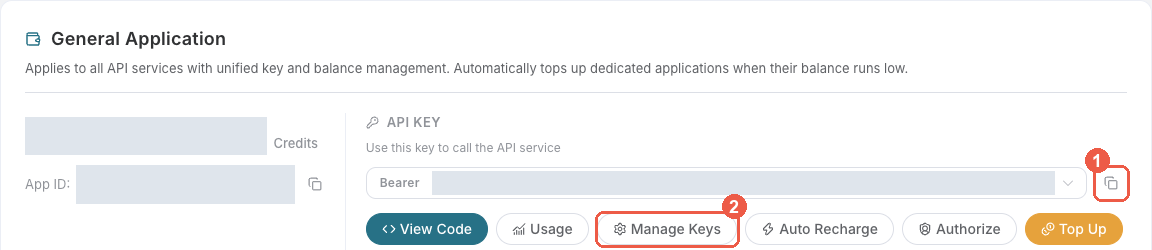
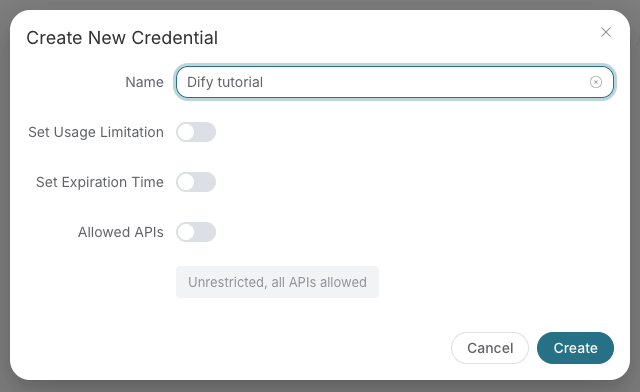
Save the key in the client's credential store or the environment variable shown below. Never put it in a prompt, shared workflow, screenshot, or Git commit. If authentication fails, check the full copied value, application/service access, expiration, usage limit, and balance before creating another key.
A fixed Bearer header bypasses OAuth. If the header is invalid, remove it before trying browser sign-in; keep the saved credential private.
For Claude Code, the shell expands the token when you add the server; treat the saved user MCP config as a secret:
export ACEDATACLOUD_API_TOKEN='YOUR_API_TOKEN'
claude mcp add --transport http --scope user openai https://openai.mcp.acedata.cloud/mcp \
  --header "Authorization: Bearer $ACEDATACLOUD_API_TOKEN"
For a Claude Code project config, put a variable reference in <project>/.mcp.json and set that variable in the environment that launches Claude Code:
{
  "mcpServers": {
    "openai": {
      "type": "http",
      "url": "https://openai.mcp.acedata.cloud/mcp",
      "headers": {"Authorization": "Bearer ${ACEDATACLOUD_API_TOKEN}"}
    }
  }
}
Cursor uses a different environment-variable syntax in ~/.cursor/mcp.json or an uncommitted project config:
{
  "mcpServers": {
    "openai": {
      "url": "https://openai.mcp.acedata.cloud/mcp",
      "headers": {"Authorization": "Bearer ${env:ACEDATACLOUD_API_TOKEN}"}
    }
  }
}
In VS Code, run MCP: Open User Configuration and merge this server plus its masked input; ${input:...} is for VS Code's user/workspace format and is not portable to the Agent Host .mcp.json format:
{
  "inputs": [
    {"id": "acedata-openai-token", "type": "promptString", "description": "AceDataCloud API token", "password": true}
  ],
  "servers": {
    "openai": {
      "type": "http",
      "url": "https://openai.mcp.acedata.cloud/mcp",
      "headers": {"Authorization": "Bearer ${input:acedata-openai-token}"}
    }
  }
}
For Cline, use its MCP configuration UI or CLI file ~/.cline/data/settings/cline_mcp_settings.json; its remote transport value is streamableHttp. For JetBrains AI Assistant, add a remote URL from Settings → Tools → AI Assistant → Model Context Protocol (MCP). For Zed, use a context_servers entry with the URL only for OAuth or add a local Bearer header. These clients have different configuration schemas; follow their current UI rather than copying another client's JSON. Cline · JetBrains · Zed.
Local stdio
Install the package and give the local process an API token:
python -m pip install mcp-openai-pro
export ACEDATACLOUD_API_TOKEN='YOUR_API_TOKEN'
mcp-openai-pro
For Claude Desktop local MCP, merge this entry into the file opened by its developer settings (~/Library/Application Support/Claude/claude_desktop_config.json on macOS). uvx requires uv on PATH:
{
  "mcpServers": {
    "openai": {
      "command": "uvx",
      "args": ["mcp-openai-pro"],
      "env": {"ACEDATACLOUD_API_TOKEN": "YOUR_API_TOKEN"}
    }
  }
}
Keep this user-level file private. Self-hosted HTTP uses mcp-openai-pro --transport http --port 8000; expose it only with suitable network and TLS controls. Local execution still calls the AceDataCloud API.
Check before using the service
https://openai.mcp.acedata.cloud/health returning {"status":"ok"} checks endpoint reachability only.- Confirm that the MCP client loads tools.
openai_get_usage_guide is a reference tool; it does not verify downstream API access or balance.
- If you need a full API check, call
openai_generate_image with your own valid input after reviewing current service documentation and displayed pricing. If the result contains a task ID, call openai_get_task on that same ID until terminal success or failure. Do not resubmit the operation just to check progress.
For 401, check which auth route the client used and whether the token or OAuth session is valid. A 403 may mean an account permission or content moderation failure; read the returned error. Insufficient balance and downstream service failures need their own diagnosis. A listed tool or submitted task does not prove a successful result.
Available Tools
| Tool |
Description |
openai_chat_completion |
Create chat completions using OpenAI models |
openai_create_response |
Create responses using the Responses API |
openai_generate_image |
Generate images from text descriptions |
openai_edit_image |
Edit existing images with AI |
openai_create_embedding |
Create text embedding vectors |
openai_text_to_speech |
Convert text to spoken audio |
openai_transcribe_audio |
Transcribe audio from a URL |
openai_list_chat_models |
List available chat/completion models |
openai_list_image_models |
List available image models |
openai_list_embedding_models |
List available embedding models |
openai_get_usage_guide |
Get comprehensive usage guide |
Supported Models
Chat Completion Models








