Scan your whole stack


From OX Research Newsroom






Latest version: v2026.11.24.0
io.github.AceDataCloud/mcp-luma was last scanned on 24 Nov 2026 at version 2026.11.24.0. Risk score 0 of 100. No malicious behavior was detected.
| Version | Published | Status |
|---|---|---|
| 2026.11.24.0 LATEST | 24 Nov 2026 | No rules fired |
| 2026.11.22.0 | 22 Nov 2026 | No rules fired |
| 2026.11.15.0 | 15 Nov 2026 | No rules fired |
| 2026.11.1.0 | 1 Nov 2026 | Not shown |
| 2026.10.18.4 | 18 Oct 2026 | Not shown |
Findings for v2026.11.24.0. The score is a capped sum of the weights of the rules that fired — not CVSS, not exploitability, and not a probability. It is not comparable across packages with different scan coverage.
The score describes 2026.11.24.0; other versions have their own rules, not their own score.
The publisher’s own README, as collected from the registry.




A Model Context Protocol (MCP) server for AI video generation using Luma Dream Machine through the AceDataCloud API.
Generate AI videos directly from Claude, VS Code, or any MCP-compatible client.
| Tool | Description |
|---|---|
luma_generate_video |
Generate AI video from a text prompt using Luma Dream Machine. |
luma_generate_video_from_image |
Generate AI video using reference images as start and/or end frames. |
luma_extend_video |
Extend an existing video with additional content. |
luma_extend_video_from_url |
Extend an existing video using its URL. |
luma_get_task |
Query the status and result of a video generation task. |
luma_get_tasks_batch |
Query multiple video generation tasks at once. |
luma_list_aspect_ratios |
List all available aspect ratios for Luma video generation. |
luma_list_actions |
List all available Luma API actions and corresponding tools. |
The hosted endpoint is https://luma.mcp.acedata.cloud/mcp. Choose one route for the MCP client:
| Route | When to use it | Credential setup |
|---|---|---|
| Hosted OAuth | The client supports remote MCP OAuth | Add only the URL, then sign in to AceDataCloud and approve access. No token needs to be pasted into client configuration. |
| Hosted API token | The client cannot finish OAuth, or you need an explicit integration credential | Send an AceDataCloud API token in the Authorization: Bearer … header. Keep it in a local secret store or environment variable. |
| Local stdio | The client runs a local MCP process | Install mcp-luma and pass ACEDATACLOUD_API_TOKEN to that process. It still calls the AceDataCloud API. |
The hosted service advertises OAuth metadata and Dynamic Client Registration (DCR). DCR registers the client application; it is not an API key. OAuth signs you in and the client sends the resulting Bearer token; it may reuse or create an API credential for the account. Browser sign-in still requires an AceDataCloud account. The hosted service can be metered: review current service documentation and displayed pricing before a real operation. Do not configure both an OAuth login and a fixed Authorization header for the same server.
Customize → Connectors → Add custom connector, enter https://luma.mcp.acedata.cloud/mcp, select sign-in, and choose Register automatically if Claude asks how to register its OAuth client. Complete consent. Claude Desktop's local claude_desktop_config.json is a separate setup. Claude connector guide.claude mcp add --transport http --scope user luma https://luma.mcp.acedata.cloud/mcp, then claude mcp login luma. Check /mcp. Claude Code MCP guide.https://luma.mcp.acedata.cloud/mcp. For a project, merge the entry below into <project>/.cursor/mcp.json; for personal use, use ~/.cursor/mcp.json. Cursor MCP guide.https://luma.mcp.acedata.cloud/mcp, then finish the browser sign-in. New portable workspace configs use <project>/.mcp.json; the VS Code-specific format below uses <project>/.vscode/mcp.json or the user profile. Check MCP: List Servers. VS Code MCP setup.codex mcp add luma --url https://luma.mcp.acedata.cloud/mcp, then codex mcp login luma. Its user settings are in ~/.codex/config.toml. Official Codex MCP guide.Cursor project config (OAuth):
{
  "mcpServers": {
    "luma": {"url": "https://luma.mcp.acedata.cloud/mcp"}
  }
}
VS Code-specific workspace config (OAuth):
{
  "servers": {
    "luma": {"type": "http", "url": "https://luma.mcp.acedata.cloud/mcp"}
  }
}Bearer. An API Key / API Token field expects this raw value; only a manually configured HTTP Authorization header needs the Bearer prefix. A platform-... account-management token cannot replace a generation API key.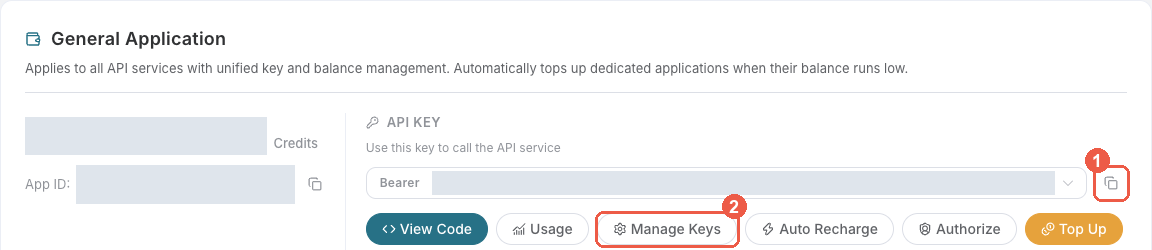
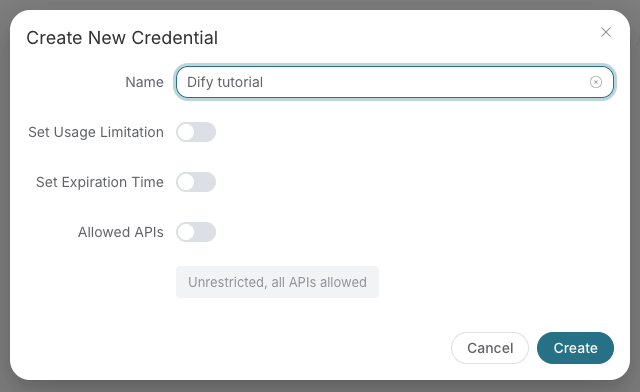
Save the key in the client's credential store or the environment variable shown below. Never put it in a prompt, shared workflow, screenshot, or Git commit. If authentication fails, check the full copied value, application/service access, expiration, usage limit, and balance before creating another key.
A fixed Bearer header bypasses OAuth. If the header is invalid, remove it before trying browser sign-in; keep the saved credential private.
For Claude Code, the shell expands the token when you add the server; treat the saved user MCP config as a secret:
export ACEDATACLOUD_API_TOKEN='YOUR_API_TOKEN'
claude mcp add --transport http --scope user luma https://luma.mcp.acedata.cloud/mcp \
  --header "Authorization: Bearer $ACEDATACLOUD_API_TOKEN"
For a Claude Code project config, put a variable reference in <project>/.mcp.json and set that variable in the environment that launches Claude Code:
{
  "mcpServers": {
    "luma": {
      "type": "http",
      "url": "https://luma.mcp.acedata.cloud/mcp",
      "headers": {"Authorization": "Bearer ${ACEDATACLOUD_API_TOKEN}"}
    }
  }
}
Cursor uses a different environment-variable syntax in ~/.cursor/mcp.json or an uncommitted project config:
{
  "mcpServers": {
    "luma": {
      "url": "https://luma.mcp.acedata.cloud/mcp",
      "headers": {"Authorization": "Bearer ${env:ACEDATACLOUD_API_TOKEN}"}
    }
  }
}
In VS Code, run MCP: Open User Configuration and merge this server plus its masked input; ${input:...} is for VS Code's user/workspace format and is not portable to the Agent Host .mcp.json format:
{
  "inputs": [
    {"id": "acedata-luma-token", "type": "promptString", "description": "AceDataCloud API token", "password": true}
  ],
  "servers": {
    "luma": {
      "type": "http",
      "url": "https://luma.mcp.acedata.cloud/mcp",
      "headers": {"Authorization": "Bearer ${input:acedata-luma-token}"}
    }
  }
}
For Cline, use its MCP configuration UI or CLI file ~/.cline/data/settings/cline_mcp_settings.json; its remote transport value is streamableHttp. For JetBrains AI Assistant, add a remote URL from Settings → Tools → AI Assistant → Model Context Protocol (MCP). For Zed, use a context_servers entry with the URL only for OAuth or add a local Bearer header. These clients have different configuration schemas; follow their current UI rather than copying another client's JSON. Cline · JetBrains · Zed.
Install the package and give the local process an API token:
python -m pip install mcp-luma
export ACEDATACLOUD_API_TOKEN='YOUR_API_TOKEN'
mcp-luma
For Claude Desktop local MCP, merge this entry into the file opened by its developer settings (~/Library/Application Support/Claude/claude_desktop_config.json on macOS). uvx requires uv on PATH:
{
  "mcpServers": {
    "luma": {
      "command": "uvx",
      "args": ["mcp-luma"],
      "env": {"ACEDATACLOUD_API_TOKEN": "YOUR_API_TOKEN"}
    }
  }
}
Keep this user-level file private. Self-hosted HTTP uses mcp-luma --transport http --port 8000; expose it only with suitable network and TLS controls. Local execution still calls the AceDataCloud API.
https://luma.mcp.acedata.cloud/health returning {"status":"ok"} checks endpoint reachability only.luma_list_actions is a reference tool; it does not verify downstream API access or balance.luma_generate_video with your own valid input after reviewing current service documentation and displayed pricing. If the result contains a task ID, call luma_get_task on that same ID until terminal success or failure. Do not resubmit the operation just to check progress.For 401, check which auth route the client used and whether the token or OAuth session is valid. A 403 may mean an account permission or content moderation failure; read the returned error. Insufficient balance and downstream service failures need their own diagnosis. A listed tool or submitted task does not prove a successful result.
| Tool | Description |
|---|---|
luma_generate_video |
Generate video from a text prompt |
luma_generate_video_from_image |
Generate video using reference images |
luma_extend_video |
Extend an existing video by ID |
luma_extend_video_from_url |
Extend an existing video by URL |
| Tool | Description |
|---|---|
luma_get_task |
Query a single task status |
luma_get_tasks_batch |
Query multiple tasks at once |
| Tool | Description |
|---|---|
luma_list_aspect_ratios |
List available aspect ratios |
luma_list_actions |
List available API actions |
User: Create a video of waves on a beach

Claude: I'll generate a beach wave video for you.
[Calls luma_generate_video with prompt="Ocean waves gently crashing on sandy beach, sunset"]User: Animate this image: https://example.com/image.jpg
Claude: I'll create a video from your image.
[Calls luma_generate_video_from_image with start_image_url and appropriate prompt]User: Continue this video with more action
Claude: I'll extend the video with additional content.
[Calls luma_extend_video with video_id and new prompt]| Aspect Ratio | Description | Use Case |
|---|---|---|
16:9 |
Landscape (default) | YouTube, TV, presentations |
9:16 |
Portrait | TikTok, Instagram Reels |
1:1 |
Square | Instagram posts |
4:3 |
Traditional | Classic video format |
3:4 |
Portrait traditional | Portrait content |
21:9 |
Ultrawide | Cinematic content |
9:21 |
Tall ultrawide | Special vertical displays |
| Variable | Description | Default |
|---|---|---|
ACEDATACLOUD_API_TOKEN |
API token from AceDataCloud | Required |
ACEDATACLOUD_API_BASE_URL |
API base URL | https://api.acedata.cloud |
ACEDATACLOUD_OAUTH_CLIENT_ID |
OAuth client ID (hosted mode) | — |
ACEDATACLOUD_PLATFORM_BASE_URL |
Platform base URL | https://platform.acedata.cloud |
LUMA_DEFAULT_ASPECT_RATIO |
Default aspect ratio | 16:9 |
LUMA_REQUEST_TIMEOUT |
Request timeout in seconds | 1800 |
LOG_LEVEL |
Logging level | INFO |
mcp-luma --help

Options:
  --version          Show version
  --transport        Transport mode: stdio (default) or http
--port Port for HTTP transport (default: 8000)Not yet probed. This server declares a remote endpoint but we have not observed it, so nothing below is known either way.
Find threats in your stack.
OX Radar can check high-priority threats, like critical package CVEs, against your context.
Each incident is marked Detected or Not Detected with a remediation plan and proof all tracked in the Response Center.
The probe returned only these fields for this server — auth requirement, protocol and tool list weren’t observed, so they’re not shown (never guessed).
The publisher’s own links, as the registry reports them. These are not sources for the assessment on this page.