schemagate — fewer tokens for text-to-SQL, and only the tables the caller may read








Most text-to-SQL prompts carry the whole schema, and on a big database that is most of the prompt, on every question. schemagate sends the model only the tables the question needs: 91.1% fewer schema tokens (median) on databases with 50+ tables (benchmark). It filters by the caller's grants first, so restricted tables are absent from the prompt rather than ranked low. Works with LangChain, LlamaIndex, MCP, or any SQL agent, on Postgres, Oracle, MySQL, SQL Server and SQLite.
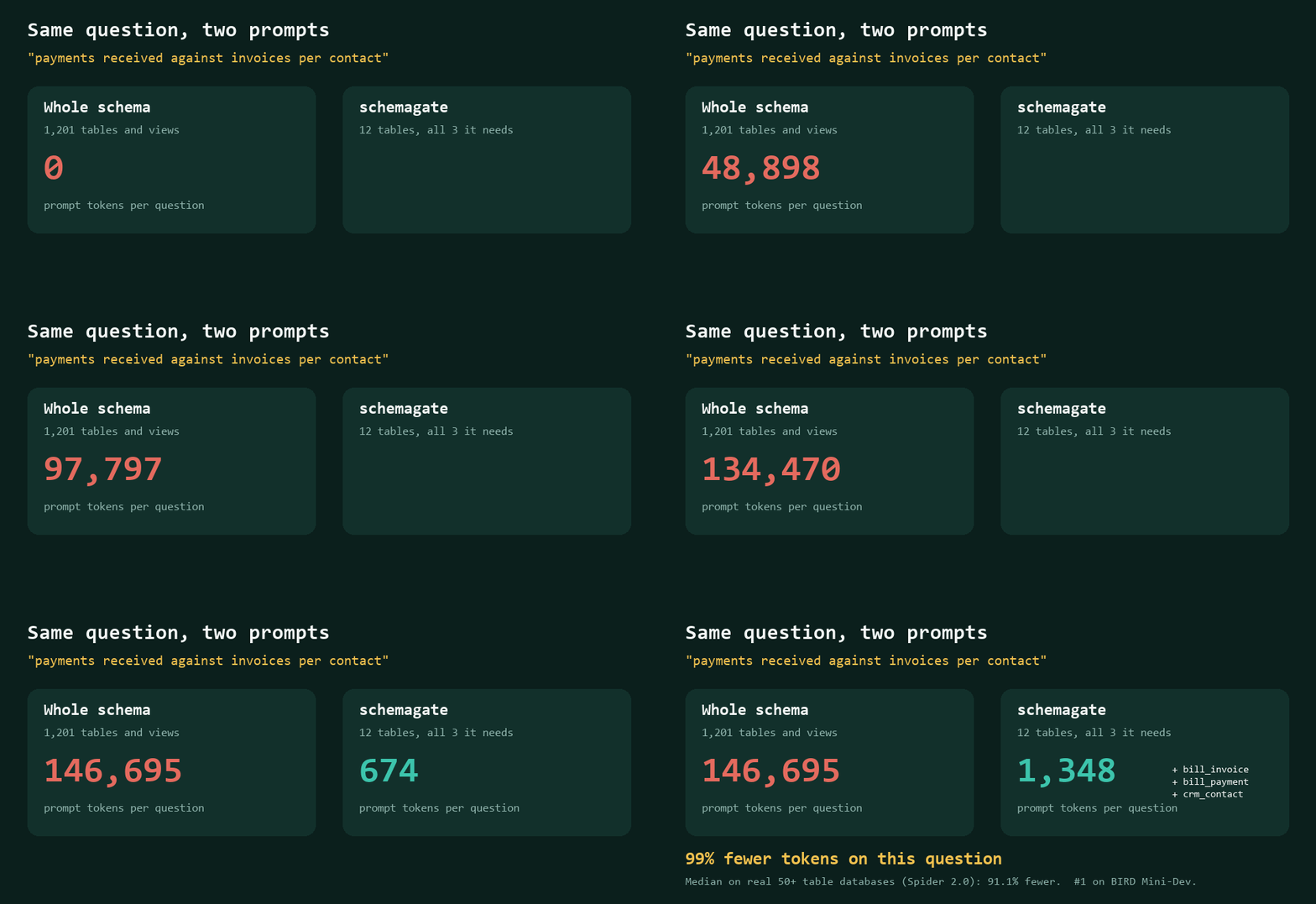
Measured, not drawn: python docs/media/make_token_gif.py rebuilds it from the seeded 1,201-object fixture, counting with tiktoken's cl100k_base.
#1 on BIRD's Mini-Dev leaderboard in all three dialects: SQLite 81.0, PostgreSQL 72.6, MySQL 72.4 execution accuracy, with Claude Opus 5.5 and one model call per question (leaderboard, run files). Smaller prompts, no accuracy given up.
If it cut your prompt, a ⭐ helps other people building SQL agents find it.
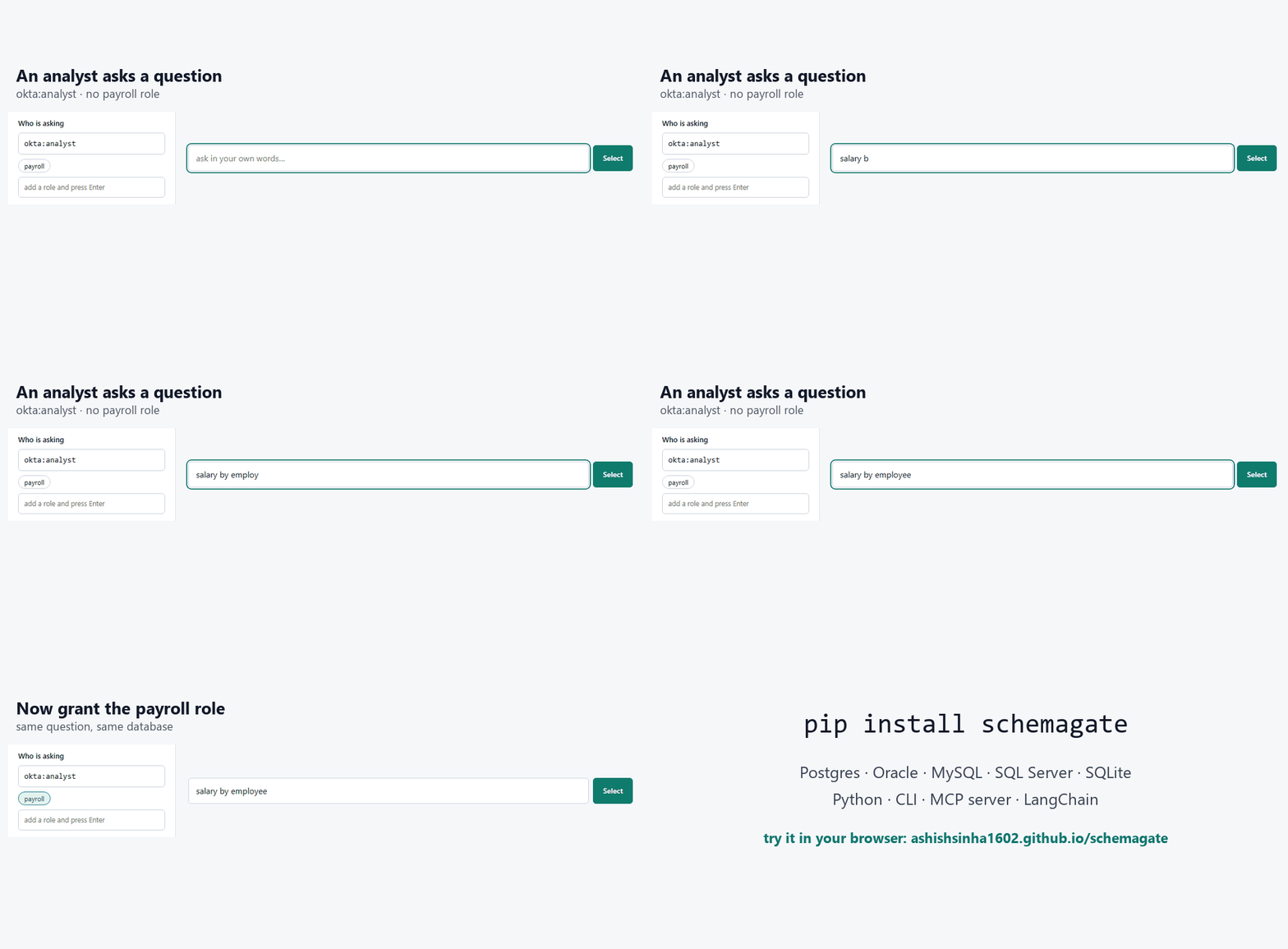
With row-level security alone the failure is quiet: the model writes valid SQL against a table the caller cannot read, RLS strips every row, and the user is told "no records found" — indistinguishable from "this data does not exist."
Demo · Install · Benchmarks · Local models · What it costs · Coming from Vanna
Same question, two callers, no database and no key:
schemagate demo "salary by employee"                                     # hr_compensation absent
schemagate demo "salary by employee" --principal okta:hr --role payroll  # now it is first
Absent, not ranked low. A table the caller may not read never enters the
prompt, so no rewording of the question reaches it and there is nothing to
filter out of the answer afterwards.
Try it in the browser — no
install, no database, no model call.
And it answers
The selection is a prompt, so the rest follows:
pip install schemagate
schemagate demo "which customers owe us money" --answer --provider <provider> --model <model-id>
main.crm_customer   main.crm_contact   main.v_customer_balance   (+5)
8 of 42 objects  ·  ~383 prompt tokens instead of ~2,036

-- SQL written by <provider> / <model-id>, from 8 tables
SELECT c.id, p.display_name, v.account_number, v.invoiced, v.paid,
       (v.invoiced - v.paid) AS balance_due
FROM v_customer_balance v
JOIN crm_customer c ON c.id = v.id_customer
JOIN core_party  p ON p.id = c.id_party
WHERE v.invoiced > v.paid

id  display_name       account_number  invoiced  paid     balance_due
--  -----------------  --------------  --------  -------  -----------
1   Northwind Trading  ACC-1001        33960.0   22080.0  11880.0
2   Kellner GmbH       ACC-1002        8760.0    3000.0   5760.0
Rows, from a question, with no database to set up — that runs against a
bundled 42-object schema. <provider> is the model service you choose:
openai, anthropic, gemini, oci, local (no key at all), or auto
(whichever key is set). Point it at your own database with --url:
schemagate select "which customers owe us money" \
  --url "postgresql+psycopg://user:pw@host/db" --answer --provider <provider> --model <model-id>
No key? Drop --provider and it prints a prompt to paste into any chat, then
run the SQL it gives you back with --sql "SELECT ...".
More of the bundled schema, with the questions people actually type:
schemagate demo "which customers owe us money"
schemagate demo "late shipments by carrier" --prompt   # the DDL the model gets
Against your own database it's the same shape:
schemagate select "revenue by month" --url postgresql://localhost/app --principal okta:jdoe --role finance
schemagate studio --url postgresql://localhost/app        # the same thing, as a page
schemagate studio opens a local page where you type questions, switch the caller's
roles, edit hints, and watch what reaches the prompt and what doesn't. The same
page runs publicly at https://ashishsinha1602.github.io/schemagate/ on the six
bundled schemas, in your browser, with no server behind it. The selector on that page is a JavaScript
port of this library, and a test runs both against 1,789 cases and requires
identical rankings.
If you're coming from Vanna (archived March 2026), docs/migrating-from-vanna.md
is the short version: Vanna applied identity when the SQL ran; schemagate applies
it before the model sees the schema. Your User maps to a Principal in one
line.
What it saves
Every text-to-SQL call pays for the schema in the prompt. Dump the whole thing
and you pay for every table on every question; hand the model six tables and
you pay for six. Measured on the test schemas, average over their golden
questions, same built-in estimator as tests/bench.py:
| schema |
objects |
full schema, every call |
schemagate, average |
reduction |
| Commerce |
42 |
2,483 tokens |
604 |
76% |
| Clinical claims |
27 |
1,568 |
543 |
65% |
| Claims warehouse (star) |
51 |
3,312 |
880 |
73% |
| Bank ledger and trading |
39 |
2,255 |
637 |
72% |
| IoT telemetry |
40 |
2,125 |
448 |
79% |
| Hostile (4 schemas, copies of everything) |
260 |
16,095 |
444 |
97% |
The last row is the one that matters: the selection stays around six tables
no matter how big the schema is, so the saving grows with the schema. Real
databases are the last row, not the first.
The same count on public schemas nobody here wrote (no model called;
BENCHMARKS.md
has the script). On Spider 2.0's real BigQuery and Snowflake warehouses, the
median database with 50 or more tables went from its full schema to a
selection 91.1% smaller (24 databases). On BIRD, whose databases have a median of seven
tables, the median saving was 8.8%: there was little to cut. The price of
cutting is that a needed table can be left out. On the warehouses, every
table the gold query reads was in the selection for 86.7% of questions.
Against the retrievers other tools use, at the same number of tables and no
model calls, schemagate selected every needed table for 85.3% of warehouse
questions where BM25 managed 78.7% and embedding search 78.2%, and 98.7% of
BIRD questions against 81.0% and 89.4%
(head-to-head).
On Snowflake's SQL-Schema-Retrieval benchmark (table level, recall@10) the
hashed embedder scores Spider 100.0, BIRD 99.2, BEAVER 65.9, LiveSQLBench 95.3
and LiveSQLBench-Large 64.9 (73.9 with all-MiniLM-L6-v2), above the paper's best
model on four of the five. On a schema crowded with look-alike tables like
LiveSQLBench-Large, the opt-in join graph (Catalog.join_weight = 0.25) raises it
to 74.9 hashed and 79.3 with MiniLM, past Qwen3-Embedding-4B (75.8); it is off by
default because it costs recall on questions asked in business words
(details).
Worked example, with a price you should replace with your own: a 260-object
schema, 5,000 questions a day, an input price of $3 per million tokens. Full
schema: 16,095 × 5,000 × 30 = 2.4 billion tokens a month, about $7,200. With
schemagate: 444 × 5,000 × 30 = 67 million, about $200. The
browser demo has these two
numbers as editable fields under the stats, so you can put in your own volume
and price and watch it recompute against whatever question you ask.
Two more things that cost nothing here and money elsewhere: the selector
itself never calls a model (BM25 plus a hashed embedder, offline,
milliseconds), and the optional descriptions can be written by any chat window
you already pay for instead of an API key — see
Without an API key.
The problem this solves
Two things go wrong when you point an LLM at a database schema.
The first is cost. Most systems paste the whole schema into the prompt on every
question. That's fine for twenty tables and ruinous for two thousand.
The second is worse, and it's the reason I wrote this. Schema selection happens
before the query runs, so it happens before row-level security can do
anything. If your selection step isn't identity-aware, the model gets handed a
table the caller can't read. It writes perfectly good SQL. RLS or VPD filters
every row out. The user sees "no records found" and believes it.
That's not an access-denied message. It's a wrong answer with a confident tone,
and the user has no way to tell the difference. Filtering the catalog by
identity first is the only way I know to avoid it.
from schemagate import Catalog, Principal

cat = Catalog().bootstrap("postgresql://localhost/app")   # or: from schemagate.demo_schema import demo_catalog; cat = demo_catalog()
cat.hint("invoice_draft", "pre-issue drafts only, not real revenue")
cat.restrict("hr_compensation", ["payroll"])

sel = cat.select("revenue by month", top_k=6,
                 principal=Principal("okta:jdoe", roles={"finance"}))

sel.prompt_fragment()   # compact DDL, ready for the system prompt
sel.object_list         # [{'owner': ..., 'name': ...}]
sel.explain()           # why each object was picked
hr_compensation is not in that result and its name does not appear anywhere
in the prompt text.
Install
pip install schemagate
That's the whole thing. One dependency (SQLAlchemy), no API key, no model
download. The default embedder is a hashed n-gram vectoriser that runs offline
and gives byte-identical results on every machine.
Extras, all optional:
pip install 'schemagate[postgres]'     'schemagate[oracle]'
pip install 'schemagate[mssql]'        'schemagate[mysql]'
pip install 'schemagate[anthropic]'    'schemagate[openai]'      'schemagate[gemini]'
pip install 'schemagate[huggingface]'
huggingface is the no-key, nothing-leaves-the-machine path, and it is the
one extra that is heavy: about 2 GB of wheels plus a 3.1 GB model download the
first time you use it. It is deliberately kept out of schemagate[all].
docs/local-models.md has the whole story — the
downloads, the load you wait through once, what it is good at and where it is worse
than a hosted model.
Every release is signed. The wheels carry PEP 740
attestations — a signature from GitHub naming the workflow, repository and
commit that built that exact file. Nothing is uploaded by hand and there is no
API token to steal. Check one yourself with
gh attestation verify <wheel> --repo ashishsinha1602/schemagate.
Quick start
pip install schemagate            # add an extra for your driver, below
schemagate                        # opens http://127.0.0.1:8770 on the 42-object demo
Every wheel on PyPI carries a signed provenance attestation naming the commit that built it:
gh attestation verify <wheel> --repo ashishsinha1602/schemagate.
Or without installing anything, with every driver already in the image:
docker run -p 8770:8770 -e SCHEMAGATE_DATABASE_URL=postgresql://… ghcr.io/ashishsinha1602/schemagate
Leave the URL off and it opens on a 42-object sample schema with data in it,
so there is something to ask questions of before you point it at your own.
Then, in the page:
- Connect. Paste a URL —
postgres://…, postgresql://…, mysql://…,
oracle://… and a JDBC string all work, as does the wallet form for an
Autonomous Database. Tick Save this connection and give it a name and
the next start reconnects on its own.
- Catalogue. Settings → Model → pick a provider, paste a key, Save
model (it is saved, so a restart does not ask again). Then Catalogue
this database in the rail. One sentence per object, cached to disk, so a
second run costs nothing.
- Ask. Type a question in your own words. You get the objects that answer
it, the DDL a model would receive, the SQL, and the rows.
Drivers come as extras — schemagate[postgres], [oracle], [mysql],
[mssql], or schemagate[all] for the lot:
pip install 'schemagate[postgres]'
When a question picks the wrong table
Two levers, both per database and both applied on every reconnect:
- Hints (rail → Hints): one object, in your words. "MyConvo campaigns:
personal-inbox sends from a user's own mailbox."
- Glossary (
POST /api/glossary): one word, everywhere. A term here is
fed to the cataloguing prompt, so every description uses your vocabulary,
and expanded into questions that mention it.
A hint beats a generated description everywhere, and neither needs
re-cataloguing.
Commands
Every subcommand, and what it is for. schemagate <command> --help prints the
same thing.
schemagate demo      [question]          run against the bundled 42-object schema
schemagate select    --url URL [question]  select against your own database
schemagate studio    [--url URL]         the Studio page, served locally
schemagate describe  --url URL           write AI descriptions for your objects
schemagate certify   URL                 end-to-end check on a real engine
demo and select
select is demo pointed at a real database; they take the same flags.








