Scan your whole stack








Latest version: v0.6.0
fLMCP — FL Studio was last scanned on 29 Nov 2026 at version 0.6.0. Risk score 0 of 100. No malicious behavior was detected.
| Version | Published | Status |
|---|---|---|
| 0.6.0 LATEST | 29 Nov 2026 | No rules fired |
| 0.5.0 | 22 Nov 2026 | No rules fired |
| 0.4.0 | 22 Nov 2026 | No rules fired |
Findings for v0.6.0. The score is a capped sum of the weights of the rules that fired — not CVSS, not exploitability, and not a probability. It is not comparable across packages with different scan coverage.
The score describes 0.6.0; other versions have their own rules, not their own score.
The publisher’s own README, as collected from the registry.




Let Claude, Cursor, VS Code Copilot, Codex — any MCP
client — drive FL Studio 2024 / 2025 / 2026. Transport, patterns, the channel
rack and step sequencer, mixer (including loading effects by name), plugin
parameters, native piano-roll note editing, offline inspection of saved .flp files,
playlist, arrangements, automation, undo, rendering — plus high-level music
generators, voice-to-MIDI humming and audio-file analysis.
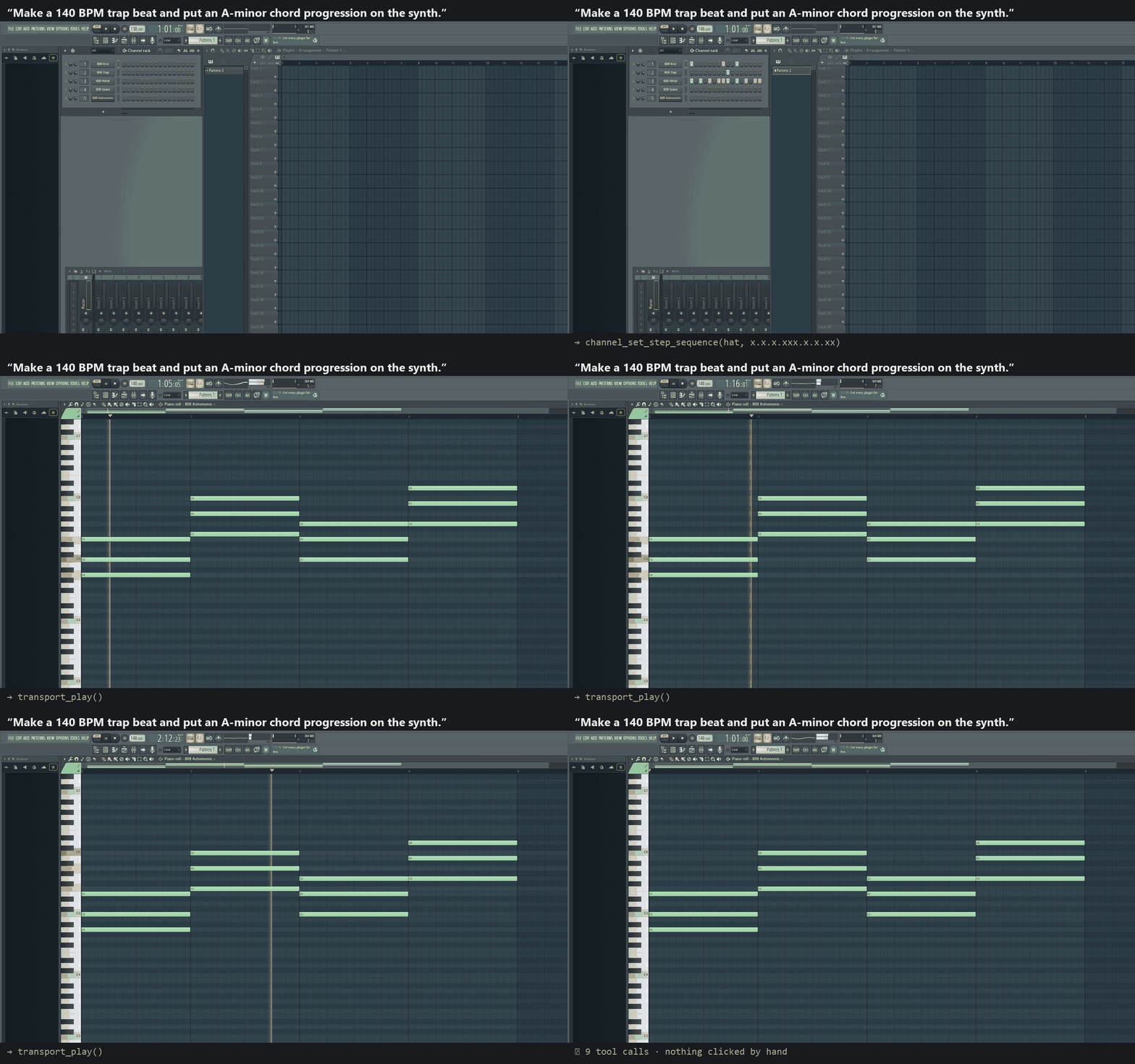
Recorded on FL Studio 2026 with the tool calls shown below the window; nothing was clicked by hand.
uvx flmcp-studio install copies the FL scripts, wires the
MIDI port and registers the server with your AI apps. flmcp doctor tells
you exactly what is wrong when something is.mixer_diagnose plays the song, holds every track's peak
and lists clipping, headroom, routing, solo and bypass problems with the
exact tool call that fixes each one.FLMCP_TOOLSETS=lean).fLMCP is an independent community project, not affiliated with or endorsed by Image-Line.
Requirements: Windows 10/11 (macOS works for most tools, see platform support), FL Studio 2024 or newer (any edition with MIDI scripting), and uv or Python 3.10+.
1. Install — close FL Studio first, then:
uvx flmcp-studio installThis:
device_FLStudioMCP.py into
Documents\Image-Line\FL Studio\Settings\Hardware\fLMCP Bridge\ and
ComposeWithLLM.pyscript into ...\Settings\Piano roll scripts\
(it reads FL's own user data folder setting, so relocated folders work);fLMCP if loopMIDI is installed (recommended, and required on
FL 2026: it gives the controller script a MIDI input to live on and wakes it
for every command);flmcp server with Claude Desktop, Claude Code, Cursor,
VS Code and Codex CLI where it finds them (existing configs are backed up to
*.flmcp.bak). Select one with --client codex or skip registration with --no-clients.On Windows, flmcp install --install-loopmidi can install loopMIDI through winget. On macOS, open Audio MIDI Setup → MIDI Studio → IAC Driver, enable Device is online, then enable the bus in FL’s MIDI settings and choose fLMCP Bridge. Set FLMCP_MIDI_PORT to the destination’s full name to select a particular bus.
2. Start FL Studio. The bridge loads with FL; uvx flmcp-studio doctor should say
All good.
If FL was running during the install (FL rewrites its MIDI settings on exit, so
the installer leaves them alone then), either close FL and re-run the install,
or enable the bridge by hand once: Options → MIDI Settings → Input → select
the fLMCP row (or any MIDI input) → Controller type = fLMCP Bridge →
make sure the row is enabled.
Piano-roll writing needs no setup on Windows: the server runs the
ComposeWithLLM script from the piano roll's Tools menu itself, without
taking over the mouse, the keyboard or the window focus. On macOS, open the
piano roll and run Tools → Scripts → ComposeWithLLM once. Keep FL frontmost
and allow Accessibility for the calling app so it can repeat the script with
Cmd+Opt+Y. If auto-triggering fails, the tool reports how to run it manually.
3. Restart your AI app and say "ping FL Studio". If it can't connect:
uvx flmcp-studio doctorEach release has a
flmcp-<version>.mcpb file. Double-click it (or drag it onto Settings →
Extensions in Claude Desktop) to add the server without editing any config.
Claude Desktop runs it with uv and lets you pick the tool groups and the
timeout in the extension's settings. You still need the FL side once: close
FL Studio, run uvx flmcp-studio install --no-clients, and start FL again. To build
the bundle yourself: npx @anthropic-ai/mcpb pack mcpb.
uvx flmcp-studio config prints ready-to-paste snippets for every client. The
canonical entry is:
{
  "mcpServers": {
    "flmcp": { "command": "uvx", "args": ["flmcp-studio"] }
  }
}| Client | Where |
|---|---|
| Claude Desktop | %APPDATA%\Claude\claude_desktop_config.json → mcpServers |
| Claude Code | claude mcp add --scope user flmcp -- uvx flmcp-studio |
| Cursor | ~/.cursor/mcp.json → mcpServers |
| VS Code | %APPDATA%\Code\User\mcp.json → servers (with "type": "stdio") |
| Codex CLI | ~/.codex/config.toml → [mcp_servers.flmcp] command = "uvx", args = ["flmcp-studio"] |
Without uv: pip install flmcp-studio, then use "command": "python", "args": ["-m", "fl_studio_mcp"]
(flmcp install --command python writes that for you).
"Make a new pattern called Verse, put a boom-bap groove on channels 0–2, a C-minor octave bassline on channel 3 and an i–VII–VI–V progression on channel 4, then play it."
"Give me an overview of the project and tell me which mixer tracks are clipping-prone or unrouted."
"Put Fruity Limiter and a reverb on the vocal track, set the reverb to 30 % wet and tell me if the master clips while the drop plays."
"I'll hum a riff for 8 seconds — snap it to C minor, quantize to 1/16 at 120 BPM and write it into the open piano roll."
"Analyse
C:\samples\break.wav, detect key and tempo, and flip it into a 174 BPM drum & bass loop with the track's own melody on top."
The built-in prompts (Make a Beat, Write a Chord Progression, Hum to
Melody, Flip Audio to Drum & Bass, Review a Mix, Project Overview)
appear in clients that support MCP prompts (e.g. the / menu in Claude).
| Group | Tools | Highlights |
|---|---|---|
meta |
7 | ping/health, reconnect, bridge info, API introspection, raw action, batch, toolsets |
transport |
16 | play / stop / record, position, tempo, time signature, metronome, count-in, loop record, overdub |
patterns |
16 | create, rename, clone, clear, color, set length, move selected patterns, double pattern data, find by name |
channels |
25 | channel rack, step fills and per-step velocity, pitch, pan, shift and repeats, routing, timed note audition |
mixer |
32 | volume / pan / mute / solo / arm, faders in dB, sends, EQ in Hz/dB, load effects by name, FX slot on/off and mix, peak meters, held peaks over playback, mix diagnosis, checkpoints, gain staging, stock FX chains |
plugins |
15 | FPC pad map, search installed plugins, parameters get / set / search, set parameters in real units ("-6 dB", "2.5 kHz"), presets, editor windows |
piano_roll |
12 | add or filter-edit notes, native slide and portamento, chords, quantize, transpose, humanize |
playlist |
10 | tracks, markers |
arrangement |
5 | select playlist sections, jump to markers |
automation |
5 | record tempo, channel, mixer and plugin automation |
project |
11 | snapshot, save, undo / redo, render and offline FLP inspection |
ui |
8 | show / hide / focus windows, plugin picker (FL 2026), hints |
generators |
12 | scales, chords, progressions, arpeggios, basslines, melodies, drum styles |
voice |
6 | record + transcribe humming (mono or polyphonic), GUI |
audio |
8 | analyse tempo / key / onsets / melody, slice, DnB flip, loudness and reference comparison |
Full reference: docs/TOOLS.md.
Resources (read without a tool call): fl://status, fl://project,
fl://transport, fl://channels, fl://mixer, fl://patterns,
fl://playlist.
Index conventions (the server also tells the model this): channel indices are global and 0-based, pattern numbers are 1-based, mixer track 0 is Master.
Some clients cap the number of tools (or get worse with 160+ of them). Choose groups at startup with environment variables:
| Variable | Example | Effect |
|---|---|---|
FLMCP_TOOLSETS |
lean · core · transport,mixer,piano_roll |
Presets: all (188 supported tools), lean (52), core (29), mix (54). Add unsupported explicitly for legacy placeholders. |
FLMCP_DISABLE_TOOLS |
fl_call_raw,project_render |
Remove individual tools. |
FLMCP_USER_DATA_DIR |
D:\Image-Line |
FL's user data folder, when it isn't found automatically (registry, OneDrive Documents). |
FLMCP_BRIDGE_DIR |
The bridge folder, when it isn't under the user data folder. |
fl_ping and fl_list_toolsets are always available; fl_list_toolsets shows
what is enabled.
"flmcp": { "command": "uvx", "args": ["flmcp-studio"], "env": { "FLMCP_TOOLSETS": "lean" } }There are several FL Studio MCP servers, and each takes a different approach. This table is based on each project's README as of November 2026. Corrections are welcome.
Find threats in your stack.
OX Radar can check high-priority threats, like critical package CVEs, against your context.
Each incident is marked Detected or Not Detected with a remediation plan and proof all tracked in the Response Center.
The probe returned only these fields for this server — auth requirement, protocol and tool list weren’t observed, so they’re not shown (never guessed).
The publisher’s own links, as the registry reports them. These are not sources for the assessment on this page.
 Read the latest findings