English · Français
@ddd-ts-kit/eslint-plugin
AST-accurate ESLint rules for the architecture of docs/ARCHITECTURE.md:
layer and context boundaries, purity of the domain and the application, clean code ordering,
layout and file shape, tactical DDD shapes, ports as abstract classes, scheduled jobs, and the
declarations of a declared-style project. Flat config only, ESLint 9
and 10.
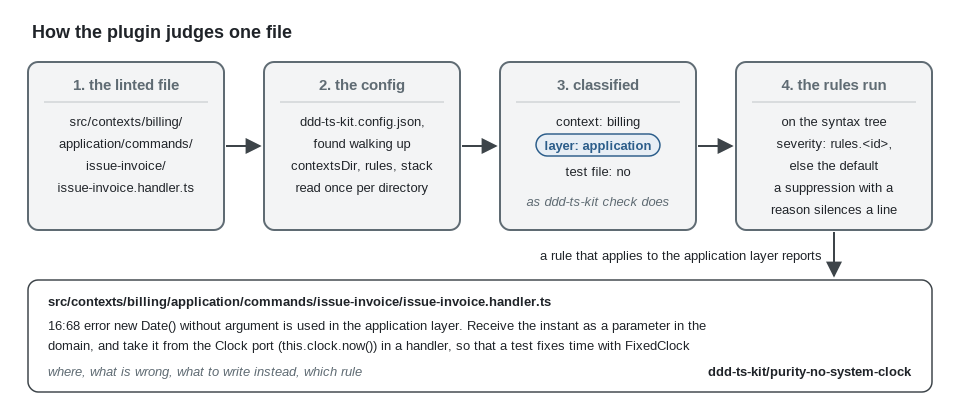
Every rule reads ddd-ts-kit.config.json (docs/CONFIG.md), found by
walking up from the linted file, and classifies the file into context and layer exactly like
ddd-ts-kit check does. It also reads stack.style there: see The two styles.
Install
npm i -D @ddd-ts-kit/eslint-plugin eslint @eslint/js typescript-eslint
@stylistic/eslint-plugin (5.x) comes with the plugin as a dependency: the presets use it for the
layout rules, and nothing has to be installed for it.
Use
import { dddTsKit } from '@ddd-ts-kit/eslint-plugin';

export default dddTsKit({ tsconfigRootDir: import.meta.dirname });
dddTsKit(options) returns a complete flat config array:
| Layer of the config |
Content |
ddd-ts-kit/ignores |
what is never linted: see ignores below |
@eslint/js recommended |
the baseline of ESLint |
typescript-eslint strictTypeChecked and stylisticTypeChecked |
with projectService (ddd-ts-kit/type-information), and without type checking on JavaScript files (ddd-ts-kit/javascript); strict and stylistic when typeChecked is false |
ddd-ts-kit/clean-code |
the standard rules backing section 6 of the architecture reference (below) |
ddd-ts-kit/architecture |
every rule of this plugin, at the severity of rules.<id> in ddd-ts-kit.config.json, else at its default, the two layout rules of @stylistic/eslint-plugin at the severity of rules."clean/blank-lines" and curly at the severity of rules."clean/braces" (default error) |
ddd-ts-kit/scripts |
curly on .js, .mjs and .cjs files, at the severity of rules."clean/braces": a branch reads the same in a script |
ddd-ts-kit/inner-layers |
no-param-reassign with props in domain/ and application/: no output argument |
ddd-ts-kit/aggregates |
prefer-readonly off in aggregates and entities, whose state is replaced by intention methods |
ddd-ts-kit/tests |
a lighter set on *.spec.ts, *.test.ts, the test/ directory of each context and the root test/: any and ! warn, the no-unsafe-* rules off, type assertions allowed |
| Option |
Default |
Meaning |
tsconfigRootDir |
the working directory |
directory of the tsconfig and of ddd-ts-kit.config.json |
typeChecked |
true |
add the rules that read types; false is faster and needs no tsconfig |
allowDefaultProject |
['*.config.ts', '*.config.mts'] |
files outside the tsconfig still linted with types |
ignores |
none |
added to dist, coverage, node_modules, reports, *.d.ts, and clients/*/src when ddd-ts-kit.config.json has "sdk" (the clients the CLI generates) |
Blocks are applied in this order, and a later block wins for the files it matches. A block of
your own goes after the helper:
import { dddTsKit } from '@ddd-ts-kit/eslint-plugin';

export default [
  ...dddTsKit({ tsconfigRootDir: import.meta.dirname, ignores: ['src/generated/**'] }),
  // a rule the kit does not enable: purity/no-environment refuses console in domain/ and application/ only
  { files: ['src/**/*.ts'], rules: { 'no-console': 'error' } },
];
To compose a config by hand, the plugin is the default export, with two presets that hold only
its own rules, the three typescript-eslint rules they delegate to, the two layout rules of
@stylistic/eslint-plugin and curly, without type information:
import dddTsKit from '@ddd-ts-kit/eslint-plugin';

export default [...dddTsKit.configs.recommended]; // or configs.strict: every rule at error
The standard rule sets of the helper are exported as standardRules (escapeHatch, cleanCode,
typedCleanCode, kitConventions, layout, braces). standardRules.braces holds curly for
clean/braces; standardRules.layout holds the two
@stylistic/* rules of clean/blank-lines at error; a config
composed by hand registers the plugin under @stylistic next to them:
import stylistic from '@stylistic/eslint-plugin';
import dddTsKit, { standardRules } from '@ddd-ts-kit/eslint-plugin';

export default [{ files: ['**/*.ts'], plugins: { 'ddd-ts-kit': dddTsKit, '@stylistic': stylistic }, rules: standardRules.layout }];
Changing a severity
The severity of a rule of the kit is written once, in ddd-ts-kit.config.json, where both
tools read it:
{
  "rules": {
    "clean/function-size": "error",
    "test/no-mocks": "off"
  }
}
// instead of: a severity in eslint.config.mjs, which `ddd-ts-kit check` never sees
export default [...dddTsKit(), { rules: { 'ddd-ts-kit/test-no-mocks': 'off' } }];
"off" in the config silences the rule even where an ESLint config enables it. Raising a
severity is free; lowering one under its default (off, or warn for an error rule) is a
deviation, and ddd-ts-kit check asks for its decision record: see
Deviations.
A severity for some files only is written the same way, with the files it is for:
"clean/stepdown": { "severity": "off", "files": ["src/contexts/ledger/infrastructure/legacy/**"] }.
The preset gives it a block of its own after ddd-ts-kit/architecture, named
ddd-ts-kit/rules/<id>, whose files are those globs: every other file keeps the severity of
the project, in ESLint as in ddd-ts-kit check.
A report, and what to write instead
Every message says what is wrong, what to write instead, and the rule. A handler that reads the
system clock, in src/contexts/billing/application/commands/issue-invoice/issue-invoice.handler.ts:
// instead of
import type { IdGenerator } from '@ddd-ts-kit/kernel';
import { Invoice } from '@/contexts/billing/domain/aggregates/invoice.aggregate.js';
import type { InvoiceRepository } from '@/contexts/billing/domain/repositories/invoice.repository.js';
import type { IssueInvoice } from '@/contexts/billing/application/commands/issue-invoice/issue-invoice.command.js';

export class IssueInvoiceHandler {
  constructor(
    private readonly invoices: InvoiceRepository,
    private readonly ids: IdGenerator,
  ) {}

  async execute(command: IssueInvoice): Promise<string> {
    const id = this.ids.next();

    await this.invoices.save(Invoice.issue(id, command.customerId, new Date()));

    return id;
  }
}
is reported, by npx eslint src:
src/contexts/billing/application/commands/issue-invoice/issue-invoice.handler.ts
  16:68  error  new Date() without argument is used in the application layer. Receive the instant as a parameter in the domain, and take it from the Clock port (`this.clock.now()`) in a handler, so that a test fixes time with FixedClock  ddd-ts-kit/purity-no-system-clock
The fix the message names: the Clock port, which a spec fixes with FixedClock.
import { AuthorizedCommand, Clock, IdGenerator, type Actor } from '@ddd-ts-kit/kernel';

// the command, the aggregate and its repository port, in their own files
declare class IssueInvoice extends AuthorizedCommand<string> {
  readonly customerId: string;
  constructor(actor: Actor, customerId: string);
}
declare class Invoice {
  static issue(id: string, customerId: string, issuedAt: Date): Invoice;
}
declare abstract class InvoiceRepository {
  abstract save(invoice: Invoice): Promise<void>;
}

// write: the instant comes from a port
export class IssueInvoiceHandler {
  constructor(
    private readonly invoices: InvoiceRepository,
    private readonly clock: Clock,
    private readonly ids: IdGenerator,
  ) {}

  async execute(command: IssueInvoice): Promise<string> {
    const id = this.ids.next();

    await this.invoices.save(Invoice.issue(id, command.customerId, this.clock.now()));

    return id;
  }
}
When the code is right and the rule is not, the deviation is recorded, not hidden: see the
suppression comment in Settings.
Rules
Ids are those of docs/ARCHITECTURE.md; the ESLint name replaces the
slash by a dash (one exception: clean-function-ceiling, the part of clean/function-size that
is an error whatever the configured limit). strict sets every rule to error.









