MCP Unison
English | 한국어
A VS Code extension (plus a CLI built on the same core) that reuses the MCP servers you already registered in Claude Code or Codex from VS Code chat (Copilot), so you do not retype them by hand. It registers them through VS Code's MCP server definition provider API, can also write them into the Copilot config file with a preview first, and tells you with a warning code whenever a server cannot be translated.
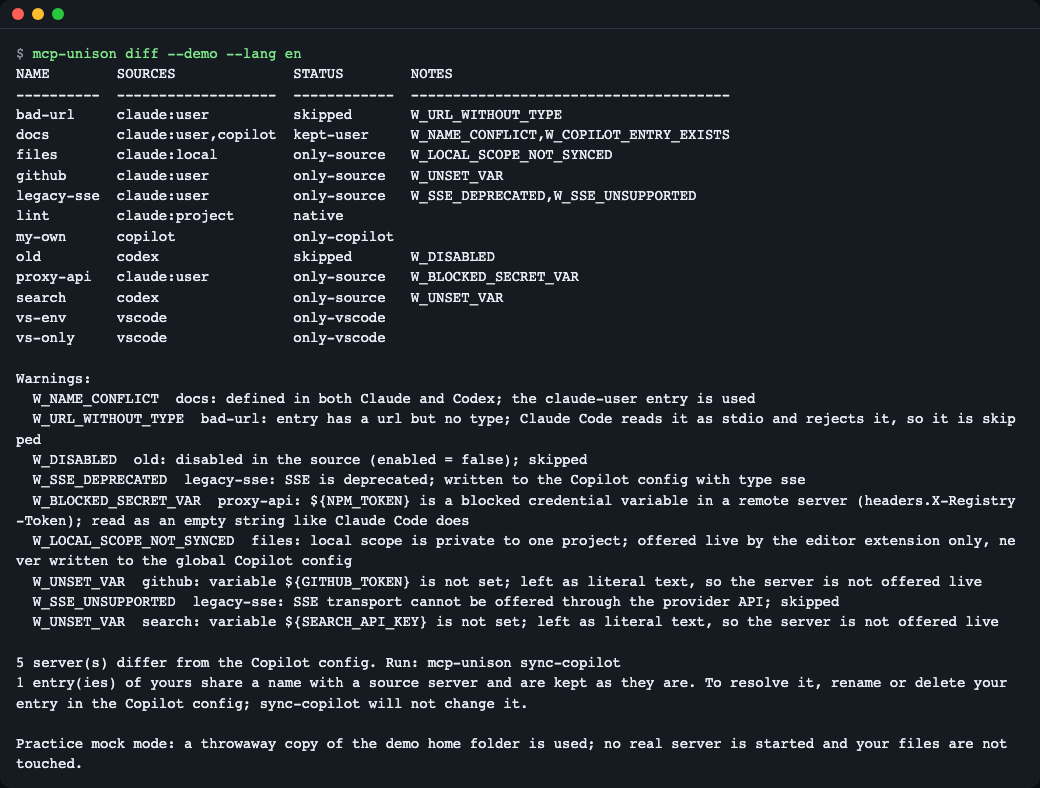
mcp-unison diff --demo: one row per server, where it is defined, and whether the Copilot config matches. Warning codes explain every server that does not carry over.
What it adds
- One source of truth. Servers from Claude Code (user and local scope in
~/.claude.json) and Codex (config.toml) are offered to VS Code without copying (mode A, "live provider").
- A safe write path.
sync-copilot previews a diff and, only with --write, adds or updates the entries it created in ~/.copilot/mcp-config.json. Your own entries, comments and other keys stay byte for byte (mode B, "file write").
- Faithful translation. Scope priority, variable rules and transport differences follow Claude Code's behavior and are pinned by tests. What cannot be moved is skipped with a reason (
W_* codes), in English or Korean.
Requirements
| Host |
Version checked |
Notes |
| VS Code |
^1.101.0 required; a probe ran against 1.146.0 |
Extension host API vscode.lm.registerMcpServerDefinitionProvider |
| Node.js |
20 or newer (checked with 26.13.0) |
CLI only; the extension runs inside VS Code |
| Claude Code / Codex |
any version that writes ~/.claude.json / ~/.codex/config.toml |
Only the files are read. Neither tool is started |
Install
The extension is not on a marketplace yet. Build the package from a clone and install it from the file:
git clone https://github.com/LeeGyeongPil/mcp-unison.git
cd mcp-unison
npm install
npm run package          # writes mcp-unison-0.1.4.vsix
Then in VS Code run Extensions: Install from VSIX... and pick mcp-unison-0.1.4.vsix.
The CLI works from the same clone:
npm start                # builds, then runs: mcp-unison diff --demo
node out/src/cli.js --help
Node.js 20 or newer is required (for example brew install node on macOS, or use the installers at nodejs.org).
Quick start (practice mock mode)
--demo is a practice mock mode. It copies the bundled sample home folder (examples/demo-home) to a temporary folder and runs the real conversion code on it. No server is started, no network is used and your own files are not touched. Real mode (no --demo) reads your actual ~/.claude.json, ~/.codex/config.toml and ~/.copilot/mcp-config.json.
npm start
Practice mock mode: a throwaway copy of the demo home folder is used; no real server is started and your files are not touched.
NAME        SOURCES              STATUS        NOTES
----------  -------------------  ------------  --------------------------------------
bad-url     claude:user          skipped       W_URL_WITHOUT_TYPE
docs        claude:user,copilot  kept-user     W_NAME_CONFLICT,W_COPILOT_ENTRY_EXISTS
files       claude:local         only-source   W_LOCAL_SCOPE_NOT_SYNCED
github      claude:user          only-source   W_UNSET_VAR
legacy-sse  claude:user          only-source   W_SSE_DEPRECATED,W_SSE_UNSUPPORTED
lint        claude:project       native
my-own      copilot              only-copilot
old         codex                skipped       W_DISABLED
proxy-api   claude:user          only-source   W_BLOCKED_SECRET_VAR
search      codex                only-source   W_UNSET_VAR
vs-env      vscode               only-vscode
vs-only     vscode               only-vscode
The table is followed by a Warnings: list and a summary line. W_UNSET_VAR lines disappear if GITHUB_TOKEN and SEARCH_API_KEY are set in your shell, so your output can differ slightly.
The output language follows --lang, then MCP_UNISON_LANG, then LANG: on a shell with a Korean locale the same command prints Korean. To pin English, run node out/src/cli.js diff --demo --lang en.
Usage
Status values
| STATUS |
Meaning |
only-source |
Defined in Claude Code or Codex, missing from the Copilot config |
same |
Present in both and equal |
different |
Present in both but not equal |
kept-user |
You own an entry with the same name. Not drift. Rename or delete yours; sync-copilot will not touch it |
stale-managed |
An earlier sync wrote this entry but it is no longer needed. The next sync removes it. Counts as drift |
native |
Already read by VS Code itself (project .mcp.json), so nothing to do |
only-copilot |
Yours alone. Never touched |
only-vscode |
Only in .vscode/mcp.json |
skipped |
Cannot be translated; see the warning code |
1. Inspect: list and diff
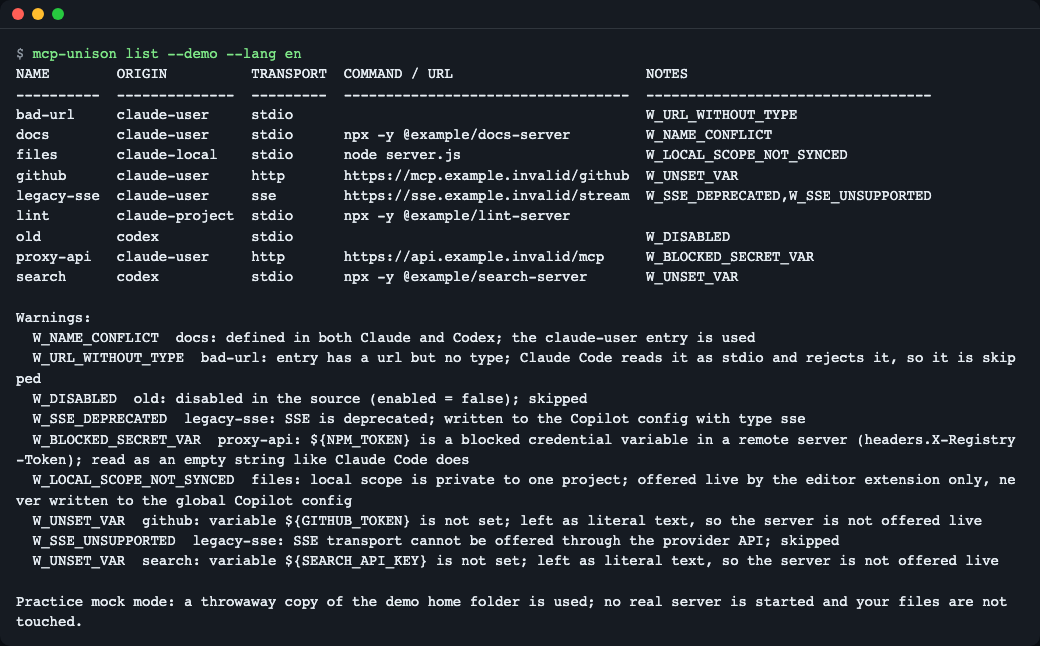
mcp-unison list --demo: what each server is (stdio, http, sse) and why some are flagged.
diff --check exits with code 1 when the sources and the Copilot config differ, which suits CI or a shell prompt hook. Add --json for machine-readable output.
2. Sync to the Copilot config: sync-copilot
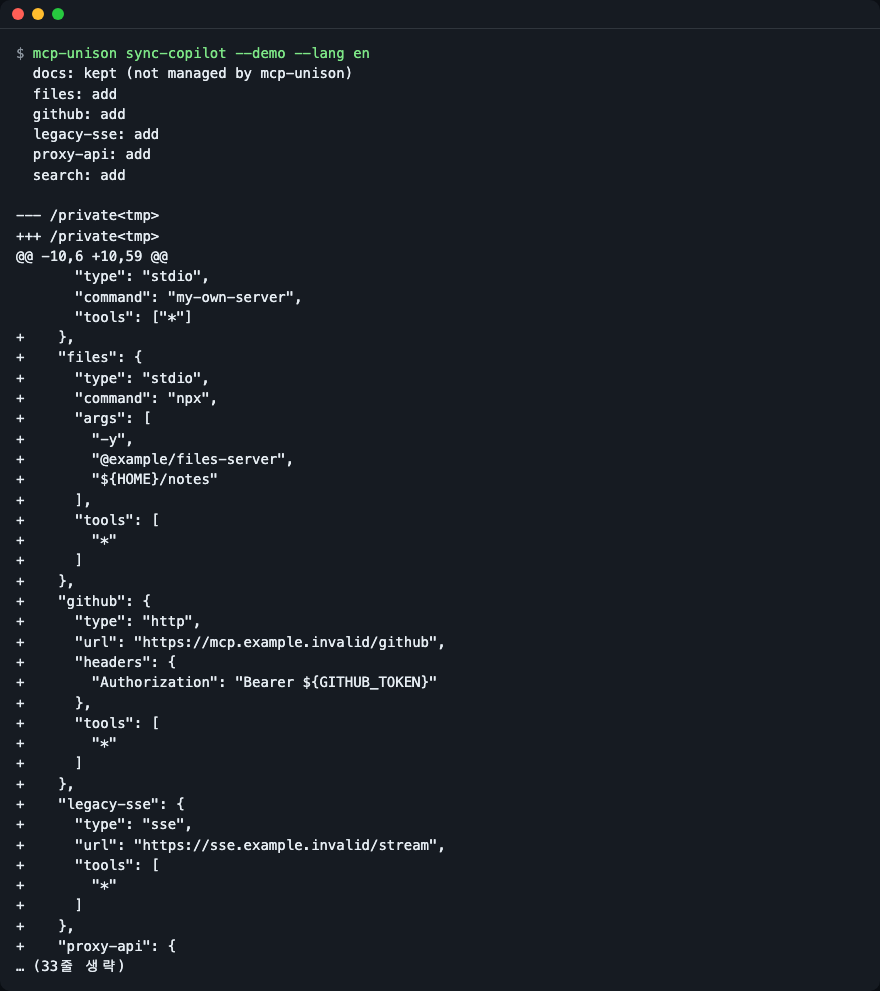
mcp-unison sync-copilot --demo: a preview only. docs is kept because you already have an entry with that name.
The default is a preview: the file is not changed. Add --write to apply. The write adds, updates and removes only entries recorded in mcp-unison.lock.json next to the config, saves a .bak backup, and reports a managed entry you edited by hand as a conflict (exit 1). Running it a second time prints no changes. An existing file keeps its permissions (a new file and the lock file get 0600), a symlinked config is written through to the real file, and the .bak copy has the same mode. Claude Code local-scope servers are not written (see W_LOCAL_SCOPE_NOT_SYNCED below). Variables are written as ${NAME}, never as their values, so no secret is copied into the file.
In VS Code the same flow is the command MCP Unison: Sync to Copilot config (diff first, then confirm).
3. Export the other way: export-claude
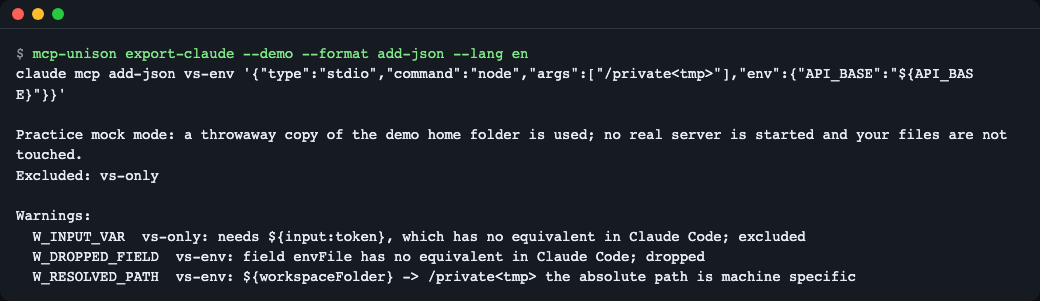
mcp-unison export-claude --demo --format add-json: ready-to-paste claude mcp add-json commands. Servers that need ${input:...} are excluded.
VS Code commands
| Command |
What it does |
| MCP Unison: Refresh |
Re-read the sources now |
| MCP Unison: Sync to Copilot config |
Preview, confirm, write managed entries |
| MCP Unison: Show Drift |
Show the same table as diff |
| MCP Unison: Export to Claude Code |
Convert .vscode/mcp.json |
| MCP Unison: Show in Copilot Sessions |
Nudge VS Code to load extension-provided servers (see below) |
| MCP Unison: Choose Language |
English or Korean, saved globally |
The VS Code window itself could not be captured in the build environment, so the screenshots in this README show the CLI. The extension's provider logic is tested against a stand-in for the vscode module, and a real-editor test exists but runs only in CI (see Development).
Settings
| Key |
Default |
Description |
mcpUnison.sources.claude |
true |
Read Claude Code servers |
mcpUnison.sources.codex |
true |
Read Codex servers |
mcpUnison.copilotSync |
ask |
off, ask or auto: whether changes are written to the Copilot config |
mcpUnison.blockedRemoteVars |
[] |
Extra variable names blocked in remote url and headers |
mcpUnison.language |
auto |
auto, en or ko. auto decides once from the editor language |
CLI language: --lang en|ko, then the MCP_UNISON_LANG variable, then LC_ALL, LC_MESSAGES and LANG. Anything other than Korean gives English. Other variables: CODEX_HOME and COPILOT_HOME move the Codex and Copilot folders; --home <folder> overrides both.
How it works
flowchart LR
  C[Claude Code<br/>~/.claude.json] --> R[Readers]
  X[Codex<br/>config.toml] --> R
  R --> M[Merge and translate<br/>scope, variables, transport]
  M -->|mode A| P[Provider API<br/>live definitions]
  M -->|mode B, preview then --write| F[~/.copilot/mcp-config.json<br/>plus lock file]
  P --> V[VS Code MCP list]
  F --> H[Copilot harness]
  P -. may not reach .-> H
- Readers parse the source files. A parse error stops with the file path (exit 2).
- Merge follows Claude Code: local scope over project over user, and a same-name entry replaces the whole entry (fields are not combined). On a Claude and Codex name clash Claude wins with
W_NAME_CONFLICT.
- Variables: an unset
${VAR} stays literal text with W_UNSET_VAR; an empty string counts as set, so ${VAR:-d} becomes empty; a credential variable (NPM_TOKEN, ANTHROPIC_API_KEY and similar) inside a remote url or headers reads as empty with W_BLOCKED_SECRET_VAR. $VAR without braces stays literal.
- Mode A hands definitions to VS Code with
vscode.lm.registerMcpServerDefinitionProvider. A server with an unset variable, SSE transport, or a url without type is not offered. Each definition has a content hash as its version, so only changed servers are reported as changed.
- Mode B writes entries into the Copilot config text with minimal string edits, because a general JSON editor re-formatted surrounding user lines in testing.
Access: the extension reads those config files, watches them by polling (once a second by default), and writes only the Copilot config when you confirm. It makes no network calls and starts no MCP server.
Why file write is the main path today
The live provider (mode A) is the cleaner idea, but VS Code's default Copilot harness currently does not always see servers that extensions provide: microsoft/vscode#343729 (open when this was written, reproduced on 1.143.1 per the report). The extension-provided collection loads lazily, and only a local chat request, MCP: List Servers or the refresh button triggers it. Sessions in the Agent Host may not list the servers. Until that is fixed, treat Sync to Copilot config (mode B) as the reliable path and mode A as a bonus for places where it works. MCP Unison: Show in Copilot Sessions nudges the lazy load.
Two more honest limits:
- Organization allow lists may not apply to extension-provided servers (#345036). On managed machines, a server can be blocked.
- The Copilot entry keys (
type, tools: ["*"]) follow the research notes for the file format. They have not been checked against a running Copilot session.
Which mode should I use?
| Situation |
Use |
| You want the servers in a Copilot agent session today |
Mode B: Sync to Copilot config (sync-copilot --write) |
| You want servers to appear in the VS Code MCP list without writing any file |
Mode A: the live provider, on by default after install |
| You want Claude Code local-scope servers (private to one project) |
Mode A only. They are never written to the global Copilot file |
| You want CI to notice drift |
diff --check (exit 1 on drift) |
| You manage an organization-controlled machine |
Check with your admin first; see Known limitations |
When this tool fits: you registered MCP servers in Claude Code or Codex and want the same ones in VS Code chat, with a diff before anything is written. For editing .vscode/mcp.json yourself, VS Code has built-in MCP support. To manage one MCP server list for many agent tools, check whether your tools document their own sharing or import options.
What gets translated and what is skipped
Field mapping (source to Copilot config entry):
| Source |
Field |
Becomes |
Notes |
| Claude Code, Codex |
command, args, env |
same fields, type: "stdio" |
Variables stay as ${NAME} text |
| Claude Code |
type: "http" + url, headers |
type: "http" |
Needs an explicit type (W_URL_WITHOUT_TYPE) |
| Claude Code |
type: "sse" |
type: "sse" in the file only |
Not offered live (W_SSE_UNSUPPORTED) |
| Claude Code |
oauth |
clientId only |
W_OAUTH_PARTIAL |
| Claude Code |
headersHelper |
skipped |
W_HEADERS_HELPER |
| Codex |
enabled = false |
skipped |
W_DISABLED |
VS Code .vscode/mcp.json |
${input:...}, envFile |
excluded or dropped on export |
W_INPUT_VAR, W_DROPPED_FIELD |
VS Code .vscode/mcp.json |
${workspaceFolder} |
absolute path on export |
W_RESOLVED_PATH |
Variable syntax:









