aas-core-codegen
.. image:: https://github.com/aas-core-works/aas-core-codegen/actions/workflows/ci.yml/badge.svg
:target: https://github.com/aas-core-works/aas-core-codegen/actions/workflows/ci.yml
:alt: Continuous integration
.. image:: https://coveralls.io/repos/github/aas-core-works/aas-core-codegen/badge.svg?branch=main
:target: https://coveralls.io/github/aas-core-works/aas-core-codegen?branch=main
:alt: Test coverage
.. image:: https://badge.fury.io/py/aas-core-codegen.svg
:target: https://badge.fury.io/py/aas-core-codegen
:alt: PyPI - version
.. image:: https://img.shields.io/pypi/pyversions/aas-core-codegen.svg
:alt: PyPI - Python Version
Aas-core-codegen:
- generates code for different programming environments and schemas
- to handle asset administration shells
- based on the meta-model in simplified Python.
Motivation
The meta-model is still at the stage where it changes frequently.
However, we need SDKs in different languages (C#, C++, C, Java, Golang, Erlang etc.) as well as different schemas (JSON Schema, XSD, RDF etc.).
Keeping up with the changes is hard, time-consuming and error-prone as each SDK and schema needs to be reviewed independently.
To make the whole development cycle of the meta-model, SDKs and schemas more maintainable, we wrote a code and schema generator.
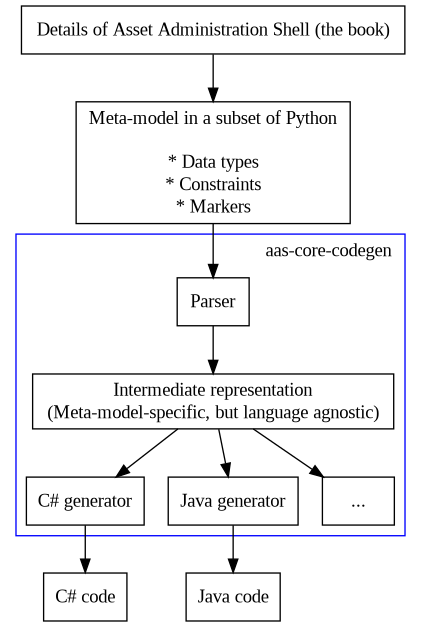
We write a meta-model in a subset of Python language, parse it and, based on this meta-model, generate the code for different languages and schemas.
Therefore we can easily scale to many languages and schemas.
Here is a diagram to illustrate the whole process:
..
digraph G {
node [shape=rect]
    details [label="Details of Asset Administration Shell (the book)"];
    metamodel [label="Meta-model in a subset of Python\n\n* Data types\n* Constraints\n* Markers"];

    subgraph cluster_1 {
        label="aas-core-codegen"
        color=blue
        labelloc="t"
        labeljust="r"

        parser [label="Parser"];
        intermediate [label="Intermediate representation\n(Meta-model-specific, but language agnostic)"];

        csharpgen [label="C\# generator"];
        javagen [label="Java generator"];

        dot [label="..."];
    }

    csharpcode [label="C\# code"];
    javacode [label="Java code"];

    details -> metamodel;
    metamodel -> parser;
    parser -> intermediate;
    intermediate -> csharpgen;
    intermediate -> javagen;
    intermediate -> dot;
    csharpgen -> csharpcode;
    javagen -> javacode;
}
.. image:: https://raw.githubusercontent.com/aas-core-works/aas-core-codegen/main/diagram.svg
Installation
Single-File Release
Please download and unzip the latest release from
the GitHub release page <https://github.com/aas-core-works/aas-core-codegen/releases>_.
From PyPI
The tool is also available on `PyPI <https://pypi.org>`_.

Create a virtual environment:

.. code-block::

    python -m venv venv-aas-core-codegen

Activate it (in Windows):

.. code-block::

    venv-venv-aas-core-codegen\Scripts\activate

or in Linux and OS X:

.. code-block::

    source venv-aas-core-codegen/bin/activate

Install the tool in the virtual environment:

.. code-block::

    pip3 install aas-core-codegen

Usage
-----
Write your meta-model somewhere as well as the code snippets for implementation specific classes and functions.
For example, take our `test meta-model` for inspiration how to write the meta-model and the snippets.

.. _test meta_model: https://github.com/aas-core-works/aas-core-codegen/blob/main/test_data/csharp/test_main/v3rc2/input

Make sure you are within the virtual environment where you installed the generator.
Alternatively, if you are using the binary release, make sure the release is on your path.

Call the generator with the appropriate target:

.. code-block::

    aas-core-codegen \
        --model_path path/to/meta_model.py \
        --snippets_dir path/to/snippets \
        --output_dir path/to/output \
        --target csharp


``--help``
==========

.. Help starts: aas-core-codegen --help
.. code-block::

    usage: aas-core-codegen [-h] --model_path MODEL_PATH --snippets_dir
                            SNIPPETS_DIR --output_dir OUTPUT_DIR --target
                            {cpp,csharp,golang,java,jsonschema,python,typescript,xsd}
                            [--cache_model] [--version]

    Generate implementations and schemas based on an AAS meta-model.

    options:
      -h, --help            show this help message and exit
      --model_path MODEL_PATH
                            path to the meta-model
      --snippets_dir SNIPPETS_DIR
                            path to the directory containing implementation-
                            specific code snippets
      --output_dir OUTPUT_DIR
                            path to the generated code
      --target {cpp,csharp,golang,java,jsonschema,python,typescript,xsd}
                            target language or schema
      --cache_model         If set, cache the parsed meta-model in the temporary
                            directory of your OS. This makes the repeated runs
                            faster as the meta-model does not need to be reparsed.
      --version             show the current version and exit

.. Help ends: aas-core-codegen --help

Versioning
==========
We are still not clear about how to version the generator.
For the moment, we use a lax incremental versioning with ``0.0`` prefix (``0.0.1``, 0.0.2``) *etc.*

The changelog is available in `CHANGELOG.rst`_.

.. _CHANGELOG.rst: https://github.com/aas-core-works/aas-core-codegen/blob/main/CHANGELOG.rst


Contributing
============

Feature requests or bug reports are always very, very welcome!

Please see quickly if the issue does not already exist in the `issue section`_ and, if not, create `a new issue`_.

.. _issue section: https://github.com/aas-core-works/aas-core-codegen/issues
.. _a new issue: https://github.com/aas-core-works/aas-core-codegen/issues/new

Contributions in code are also welcome!
Please see `CONTRIBUTING.rst`_ for developing guidelines.

.. _CONTRIBUTING.rst: https://github.com/aas-core-works/aas-core-codegen/blob/main/CONTRIBUTING.rst