agentic-dev-loop
Turn an LLM into a gated, sandboxed, resumable construction loop over your codebase.
Describe your pipeline in one YAML file - agent steps, mechanical test gates, and
trusted actions - and agentic-dev-loop runs it end to end: agent and command steps get
kernel-level sandboxing via Docker, verdicts route the graph, every boundary is
checkpointed, and nothing gets committed until every gate passes.
Key features
- A tool, not a wiring project. One CLI entry point, opinionated defaults,
fixed safety policies. You write the pipeline and the agent definitions -
nothing else.
- Deterministic. Same pipeline + same state means the same routing.
Verdicts are parsed from files and validated tool calls, retries are
bounded, nothing is best-effort.
- Sandboxed by default. The agent's shell and every command step run
inside an always-on Docker sandbox: network off by default, writes only to
declared
mounts:, no .git. If no sandbox is available, the run stops
instead of degrading.
- Crash-safe and resumable. Every boundary is checkpointed; interrupt a
run and resume it from the exact checkpoint with
--resume, notes intact.
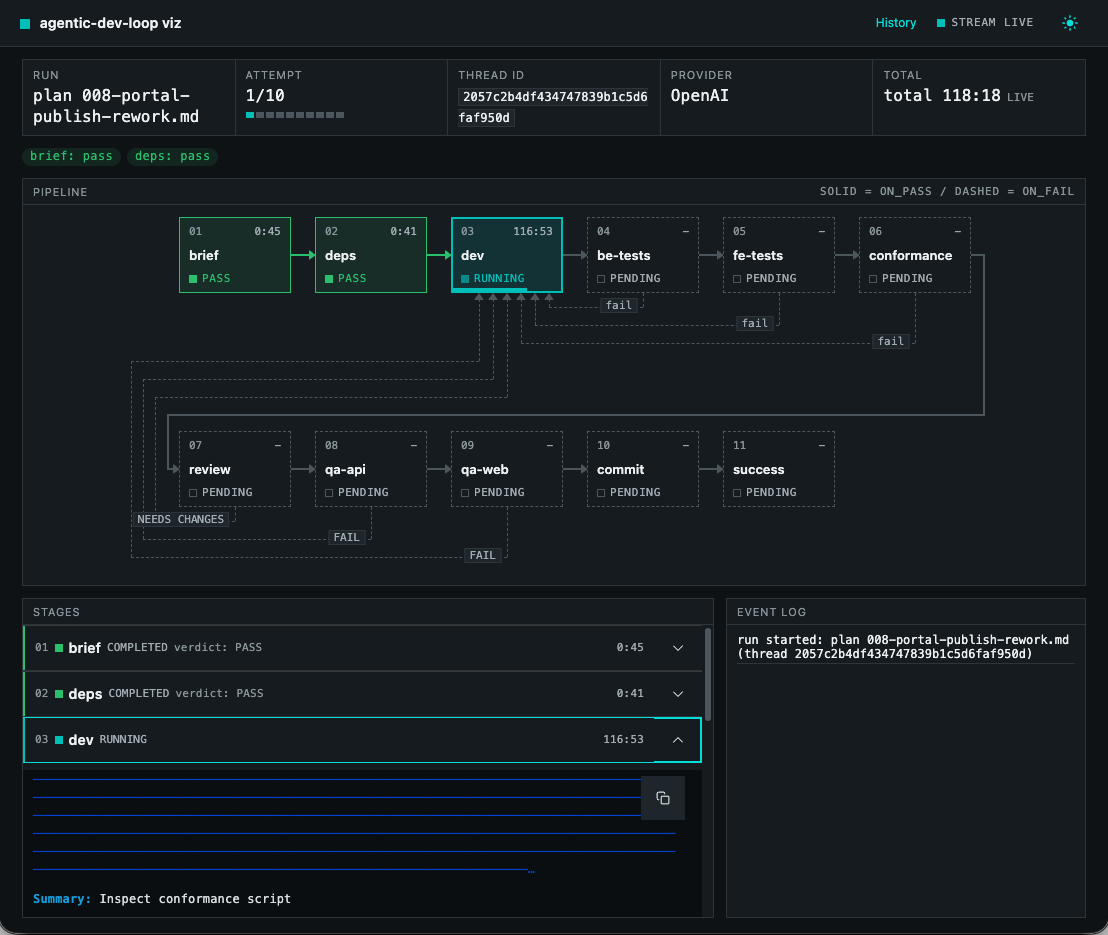
- Watchable. A live browser graph view with per-stage consoles and an
event log, a browsable run history, and markdown reports.
- Gated commits. A single commit point that fires only when every gate
passed and the worktree was clean at start.
- Supply-chain careful. A digest-pinned dev image, a locked-by-default
dependency policy, and a CVE-audited restore step.
- Secret-safe. Secrets are refs in config, values in the host environment,
opted in per step, and scrubbed from every engine-written output; the
workspace may not contain
.env* files.
- Onboarding that stays honest.
init scaffolds a working loop for your
repo, doctor probes the host before every run, upgrade converges the
install and the pinned version.
- Extensible. Plugins add your own actions, tools, and document loaders,
loaded from outside the workspace only.
Supported platforms
The engine is plain Linux under the hood and runs wherever a compliant
Docker engine does:
| Platform |
Support |
| Linux |
Native. Docker Engine, OrbStack, Colima, or podman with docker compat. |
| macOS |
Native. Docker Desktop, OrbStack, or Colima. |
| Windows |
Via WSL2 (Ubuntu distro). Enable Docker Desktop's WSL integration (or run Docker Engine inside the distro) and keep the repo on the WSL filesystem (~/dev/...), not /mnt/c - bind-mounting a 9p path into containers breaks permissions and is slow. |
Quickstart
Prerequisites
| Requirement |
Detail |
| Python |
>= 3.12 |
| Docker engine |
Engine API >= 1.43 (Engine 24). Any compliant engine works - Docker Desktop, OrbStack, Colima, Rancher Desktop, podman docker-compat. On Windows, run under WSL2: the repo must live on the WSL filesystem, not /mnt/c. |
| LLM API key |
The env var named by your pipeline's api_key_env (e.g. OPENAI_API_KEY) must be set - a missing key fails fast, naming it. Alternatively, agentic-dev-loop copilot-login authenticates a Copilot subscription, and a Claude Pro or Max subscription runs on Anthropic's own endpoint after agentic-dev-loop claude-login (see LLM providers). |
Installation
pipx install --pip-args="--pre" agentic-dev-loop   # latest release is currently a pre-release
agentic-dev-loop --version
Install with pipx: the engine's venv lives outside the workspace, so it
is unmounted from the sandbox and never agent-writable. On the first run the
engine pulls the digest-pinned dev image and verifies its digest. Setup
details and troubleshooting live in the setup guide.
Your first loop
cd <your-repo>
agentic-dev-loop init --profile python                     # writes the pipeline + agents
# or: --profile dotnet-node, rust
# or any toolchain image: --profile ./my-profile.yaml --recipe ./my-recipe.yaml
export OPENAI_API_KEY=...                                  # whatever api_key_env names
agentic-dev-loop agentic-dev-loop/pipeline.yaml --dry-run  # validate - no LLM, no Docker
agentic-dev-loop agentic-dev-loop/pipeline.yaml            # run it
init scaffolds agentic-dev-loop/pipeline.yaml plus the agent files it
names; --dry-run loads and validates with no LLM, no Docker, and no state
writes. Bundled profiles cover python, dotnet-node, and rust; for any
other toolchain, pass your own profile and recipe files and point the
profile's isolation.image at your image (see the
setup guide). A minimal pipeline looks like:
name: my-construction-loop

llm:
  model: openai/deepseek-v4-pro
  base_url: https://api.deepseek.com
  api_key_env: OPENAI_API_KEY

max_attempts: 10
agents_dir: sdk_agents

steps:
  - name: dev
    agent: dev
    produces: implementation-summary.md
    on_pass: test

  - name: test
    command: .venv-sandbox/bin/python -m pytest tests/ -q
    on_pass: review
    on_fail: { goto: dev, retry: true }

  - name: review
    agent: review
    artifact: review-findings.md
    verdicts: { pass: APPROVED, fail: NEEDS CHANGES }
    on_pass: commit
    on_fail: { goto: dev, retry: true }

  - name: commit
    action: commit
    params: { message: "feat: construct {subject}" }
Every field - per-step isolation, mounts and egress, secrets, dependency
policy, named LLM profiles - is in the
pipeline.yaml reference.
Documentation
| Page |
What it covers |
| Architecture |
The five layers, one full run end to end, and the host-boundary security model |
| CLI |
Run flags, resuming, the live view, reports, container management, and onboarding commands |
| pipeline.yaml |
The complete configuration reference: steps, isolation, secrets, networking, dependency policy |
| LLM providers |
OpenAI-compatible endpoints (OpenAI, DeepSeek, and others), the GitHub Copilot subscription, and the Claude subscription |
| Authoring a loop |
From init to a committed pipeline: agent files, stage lineup, adaptation checklist |
| Setup and troubleshooting |
Docker engines, the dev image, caching, error codes |
| Browser sandbox |
Running a browser inside the sandbox |
| Known issues |
Container lifecycle edge cases |
Contributing
Read AGENTS.md first -
it is the instruction set for both human and agent contributors - then see
CONTRIBUTING.md
for the development workflow and the OpenCode commands.
Built on OpenHands SDK and
LangGraph.









