





Scan your whole stack


From OX Research Newsroom






Are you using checkov?
Find out what’s in your code.
Scan your apps free in minutes (opens in a new tab)Latest version: v3.4.8
checkov was last scanned on 24 Nov 2026 at version 3.4.8. Risk score 0 of 100. High-severity rules fired.
| Version | Published | Status |
|---|---|---|
| 3.4.8 LATEST | 24 Nov 2026 | 1 rule fired |
| 3.4.7 | 23 Nov 2026 | 1 rule fired |
| 3.4.6 | 19 Nov 2026 | 1 rule fired |
| 3.4.5 | 12 Nov 2026 | Not shown |
| 3.4.4 | 11 Nov 2026 | Not shown |
Findings for v3.4.8. The score is a capped sum of the weights of the rules that fired — not CVSS, not exploitability, and not a probability. It is not comparable across packages with different scan coverage.
Several behaviors that are each common on their own, such as reading registry credentials, contacting a variable host or running shell commands, appear together in this package in a combination associated with attacks. The finding message lists the behaviors that were combined.
HIGHThe score describes 3.4.8; other versions have their own rules, not their own score.
The publisher’s own README, as collected from the registry.

Checkov is a static code analysis tool for infrastructure as code (IaC) and also a software composition analysis (SCA) tool for images and open source packages.
It scans cloud infrastructure provisioned using Terraform, Terraform plan, Cloudformation, AWS SAM, Kubernetes, Helm charts, Kustomize, Dockerfile, Serverless, Bicep, OpenAPI, ARM Templates, or OpenTofu and detects security and compliance misconfigurations using graph-based scanning.
It performs Software Composition Analysis (SCA) scanning which is a scan of open source packages and images for Common Vulnerabilities and Exposures (CVEs).
Checkov also powers Prisma Cloud Application Security, the developer-first platform that codifies and streamlines cloud security throughout the development lifecycle. Prisma Cloud identifies, fixes, and prevents misconfigurations in cloud resources and infrastructure-as-code files.
Scan results in CLI

Scheduled scan result in Jenkins
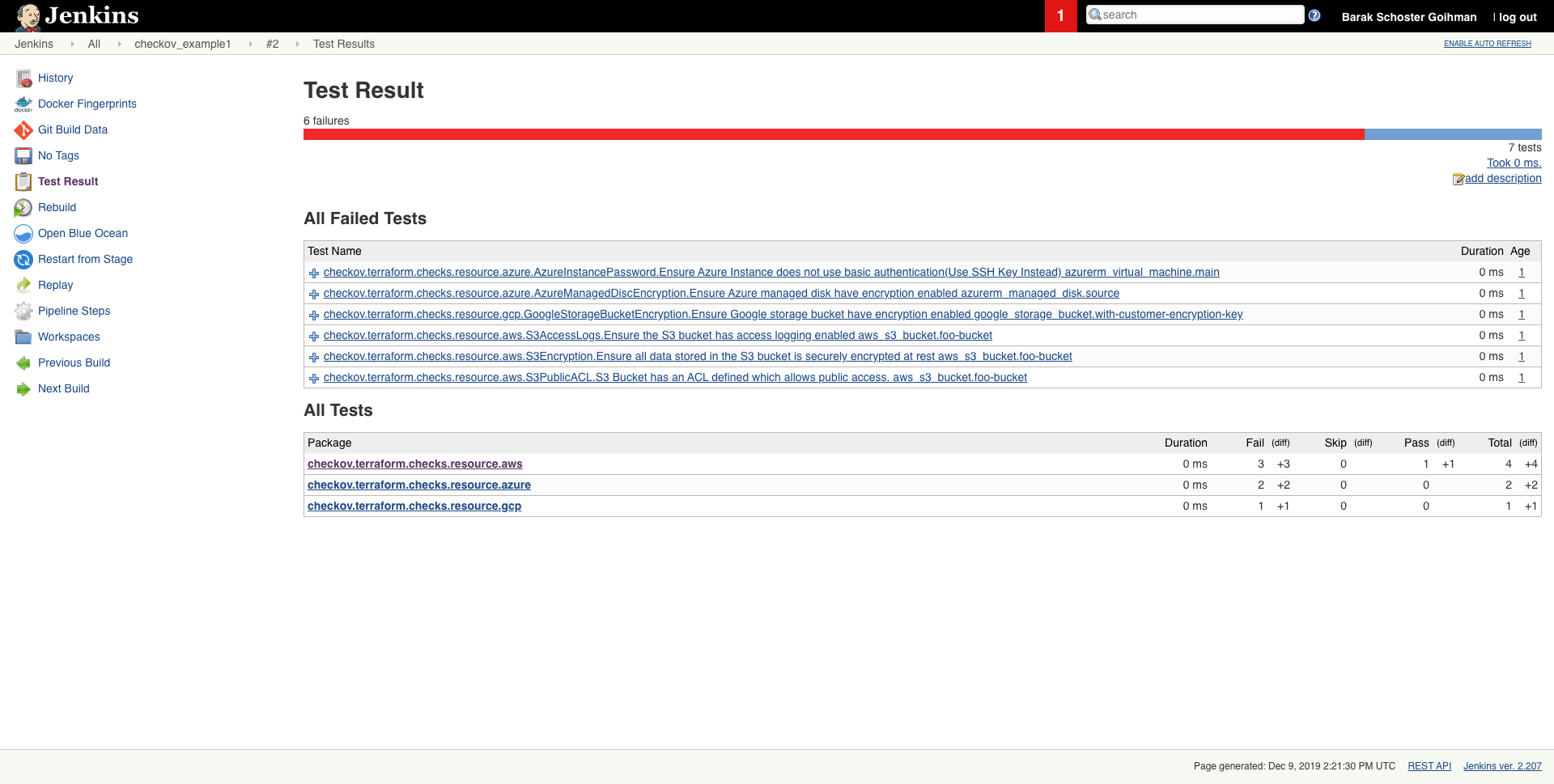
To install pip follow the official docs
pip3 install checkovCertain environments (e.g., Debian 12) may require you to install Checkov in a virtual environment
# Create and activate a virtual environment
python3 -m venv /path/to/venv/checkov
cd /path/to/venv/checkov
source ./bin/activate

# Install Checkov with pip
pip install checkov

# Optional: Create a symlink for easy access
sudo ln -s /path/to/venv/checkov/bin/checkov /usr/local/bin/checkov
or with Homebrew (macOS or Linux)
brew install checkovsource <(register-python-argcomplete checkov)if you installed checkov with pip3
pip3 install -U checkovor with Homebrew
brew upgrade checkovcheckov --directory /user/path/to/iac/codeOr a specific file or files
checkov --file /user/tf/example.tfOr
checkov -f /user/cloudformation/example1.yml -f /user/cloudformation/example2.ymlOr a terraform plan file in json format
terraform init
terraform plan -out tf.plan
terraform show -json tf.plan  > tf.json
checkov -f tf.json
Note: terraform show output file tf.json will be a single line.
For that reason all findings will be reported line number 0 by Checkov
check: CKV_AWS_21: "Ensure all data stored in the S3 bucket have versioning enabled"
    FAILED for resource: aws_s3_bucket.customer
    File: /tf/tf.json:0-0
    Guide: https://docs.prismacloud.io/en/enterprise-edition/policy-reference/aws-policies/s3-policies/s3-16-enable-versioning
If you have installed jq you can convert json file into multiple lines with the following command:
terraform show -json tf.plan | jq '.' > tf.jsonScan result would be much user friendly.
checkov -f tf.json
Check: CKV_AWS_21: "Ensure all data stored in the S3 bucket have versioning enabled"
    FAILED for resource: aws_s3_bucket.customer
    File: /tf/tf1.json:224-268
    Guide: https://docs.prismacloud.io/en/enterprise-edition/policy-reference/aws-policies/s3-policies/s3-16-enable-versioning

        225 |               "values": {
        226 |                 "acceleration_status": "",
        227 |                 "acl": "private",
        228 |                 "arn": "arn:aws:s3:::mybucket",
Alternatively, specify the repo root of the hcl files used to generate the plan file, using the --repo-root-for-plan-enrichment flag, to enrich the output with the appropriate file path, line numbers, and codeblock of the resource(s). An added benefit is that check suppressions will be handled accordingly.
checkov -f tf.json --repo-root-for-plan-enrichment /user/path/to/iac/codePassed Checks: 1, Failed Checks: 1, Suppressed Checks: 0
Check: "Ensure all data stored in the S3 bucket is securely encrypted at rest"
/main.tf:
Passed for resource: aws_s3_bucket.template_bucket
Check: "Ensure all data stored in the S3 bucket is securely encrypted at rest"
/../regionStack/main.tf:
Failed for resource: aws_s3_bucket.sls_deployment_bucket_nameStart using Checkov by reading the Getting Started page.
docker pull bridgecrew/checkov
docker run --tty --rm --volume /user/tf:/tf --workdir /tf bridgecrew/checkov --directory /tf
Note: if you are using Python 3.6(Default version in Ubuntu 18.04) checkov will not work, and it will fail with ModuleNotFoundError: No module named 'dataclasses' error message. In this case, you can use the docker version instead.
Note that there are certain cases where redirecting docker run --tty output to a file - for example, if you want to save the Checkov JUnit output to a file - will cause extra control characters to be printed. This can break file parsing. If you encounter this, remove the --tty flag.
The --workdir /tf flag is optional to change the working directory to the mounted volume. If you are using the SARIF output -o sarif this will output the results.sarif file to the mounted volume (/user/tf in the example above). If you do not include that flag, the working directory will be "/".
By using command line flags, you can specify to run only named checks (allow list) or run all checks except those listed (deny list). If you are using the platform integration via API key, you can also specify a severity threshold to skip and / or include. Moreover, as json files can't contain comments, one can pass regex pattern to skip json file secret scan.
See the docs for more detailed information about how these flags work together.
Allow only the two specified checks to run:
checkov --directory . --check CKV_AWS_20,CKV_AWS_57Run all checks except the one specified:
checkov -d . --skip-check CKV_AWS_20Run all checks except checks with specified patterns:
checkov -d . --skip-check CKV_AWS*Run all checks that are MEDIUM severity or higher (requires API key):
checkov -d . --check MEDIUM --bc-api-key ...Run all checks that are MEDIUM severity or higher, as well as check CKV_123 (assume this is a LOW severity check):
checkov -d . --check MEDIUM,CKV_123 --bc-api-key ...Skip all checks that are MEDIUM severity or lower:
checkov -d . --skip-check MEDIUM --bc-api-key ...Skip all checks that are MEDIUM severity or lower, as well as check CKV_789 (assume this is a high severity check):
checkov -d . --skip-check MEDIUM,CKV_789 --bc-api-key ...Run all checks that are MEDIUM severity or higher, but skip check CKV_123 (assume this is a medium or higher severity check):
checkov -d . --check MEDIUM --skip-check CKV_123 --bc-api-key ...Run check CKV_789, but skip it if it is a medium severity (the --check logic is always applied before --skip-check)
checkov -d . --skip-check MEDIUM --check CKV_789 --bc-api-key ...For Kubernetes workloads, you can also use allow/deny namespaces. For example, do not report any results for the kube-system namespace:
checkov -d . --skip-check kube-systemRun a scan of a container image. First pull or build the image then refer to it by the hash, ID, or name:tag:
checkov --framework sca_image --docker-image sha256:1234example --dockerfile-path /Users/path/to/Dockerfile --repo-id ... --bc-api-key ...

checkov --docker-image <image-name>:tag --dockerfile-path /User/path/to/Dockerfile --repo-id ... --bc-api-key ...
You can use --image flag also to scan container image instead of --docker-image for shortener:
checkov --image <image-name>:tag --dockerfile-path /User/path/to/Dockerfile --repo-id ... --bc-api-key ...Run an SCA scan of packages in a repo:
checkov -d . --framework sca_package --bc-api-key ... --repo-id <repo_id(arbitrary)>Run a scan of a directory with environment variables removing buffering, adding debug level logs:
PYTHONUNBUFFERED=1 LOG_LEVEL=DEBUG checkov -d .OR enable the environment variables for multiple runs
export PYTHONUNBUFFERED=1 LOG_LEVEL=DEBUG
checkov -d .
Run secrets scanning on all files in MyDirectory. Skip CKV_SECRET_6 check on json files that their suffix is DontScan
checkov -d /MyDirectory --framework secrets --repo-id ... --bc-api-key ... --skip-check CKV_SECRET_6:.*DontScan.json$Run secrets scanning on all files in MyDirectory. Skip CKV_SECRET_6 check on json files that contains "skip_test" in path
checkov -d /MyDirectory --framework secrets --repo-id ... --bc-api-key ... --skip-check CKV_SECRET_6:.*skip_test.*json$One can mask values from scanning results by supplying a configuration file (using --config-file flag) with mask entry. The masking can apply on resource & value (or multiple values, separated with a comma). Examples:
mask:
- aws_instance:user_data
- azurerm_key_vault_secret:admin_password,user_passwords
In the example above, the following values will be masked:
Like any static-analysis tool it is limited by its analysis scope. For example, if a resource is managed manually, or using subsequent configuration management tooling, suppression can be inserted as a simple code annotation.
To skip a check on a given Terraform definition block or CloudFormation resource, apply the following comment pattern inside it's scope:
checkov:skip=<check_id>:<suppression_comment>
<check_id> is one of the [available check scanners](docs/5.Policy Index/all.md)<suppression_comment> is an optional suppression reason to be included in the outputThe following comment skips the CKV_AWS_20 check on the resource identified by foo-bucket, where the scan checks if an AWS S3 bucket is private.
In the example, the bucket is configured with public read access; Adding the suppress comment would skip the appropriate check instead of the check to fail.
resource "aws_s3_bucket" "foo-bucket" {
  region        = var.region
    #checkov:skip=CKV_AWS_20:The bucket is a public static content host
  bucket        = local.bucket_name
  force_destroy = true
  acl           = "public-read"
}
The output would now contain a SKIPPED check result entry:
...
...
Check: "S3 Bucket has an ACL defined which allows public access."
    SKIPPED for resource: aws_s3_bucket.foo-bucket
    Suppress comment: The bucket is a public static content host
    File: /example_skip_acl.tf:1-25

...
To skip multiple checks, add each as a new line.
  #checkov:skip=CKV2_AWS_6
  #checkov:skip=CKV_AWS_20:The bucket is a public static content host
To suppress checks in Kubernetes manifests, annotations are used with the following format:
checkov.io/skip#: <check_id>=<suppression_comment>
For example:
Find threats in your stack.
OX Radar can check high-priority threats, like critical package CVEs, against your context.
Each incident is marked Detected or Not Detected with a remediation plan and proof all tracked in the Response Center.
The probe returned only these fields for this server — auth requirement, protocol and tool list weren’t observed, so they’re not shown (never guessed).
The publisher’s own links, as the registry reports them. These are not sources for the assessment on this page.