CTally
A floating status light for your Claude Code sessions on macOS and Ubuntu: whose turn is it?
Glance over instead of tabbing back to the terminal.
pipx install ctally
ctally setup --tmux
The name comes from the tally light, the lamp on a broadcast camera that shows it's live, and from tallying
up your sessions.
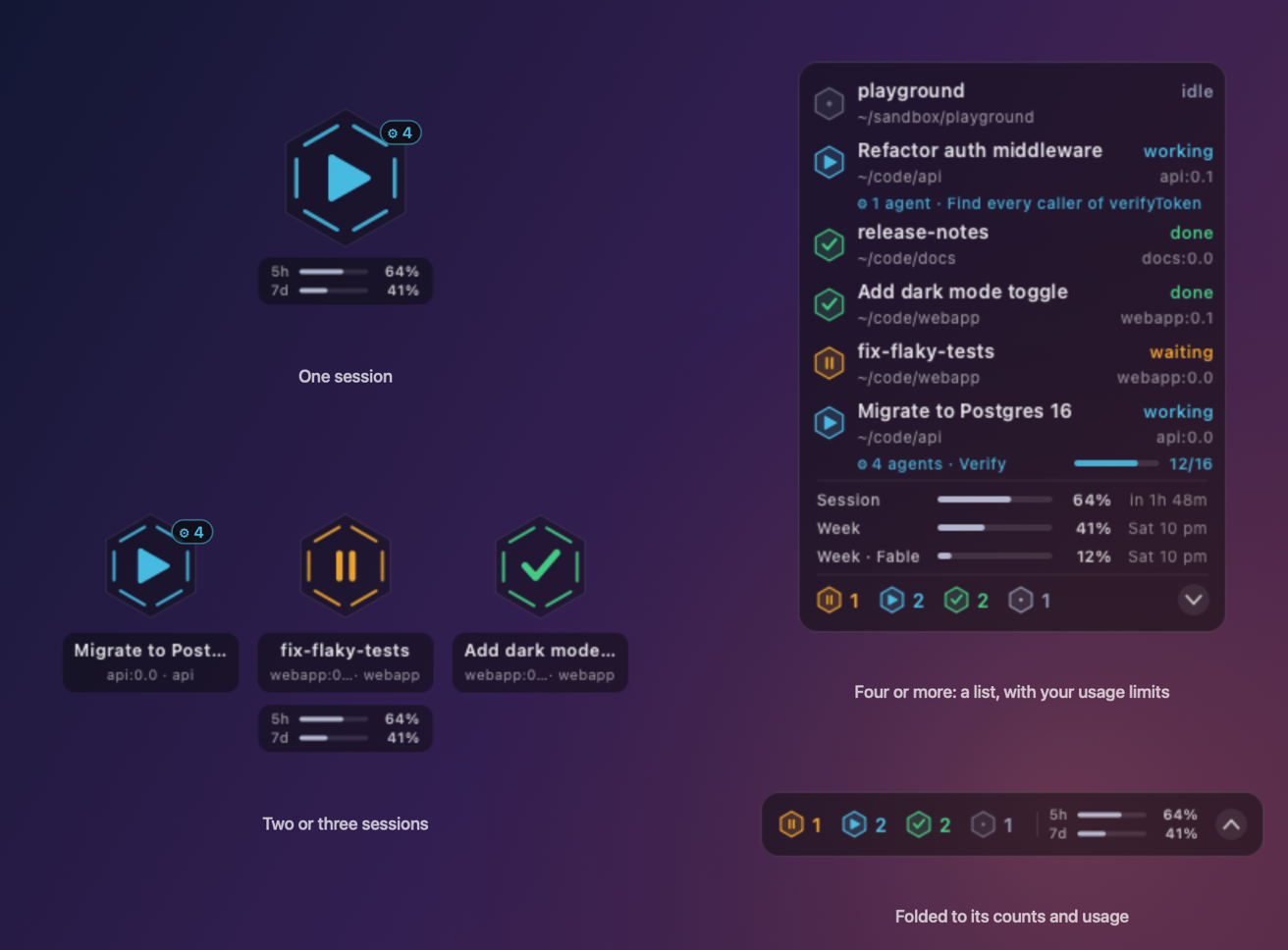
Every session gets a hexagon whose glyph and color say what it's doing:
|
State |
Meaning |
| ▶ cyan |
working |
Claude's turn: it's working, or its subagents or a workflow still are |
| ⏸ amber |
waiting |
your turn: a permission prompt, a question or a plan to approve, or it's waiting for input |
| ⏸ amber |
limit |
stopped by your plan's usage limit; it turns to done when the limit resets |
| ✓ green |
done |
your turn: the turn finished, and it stays here until your next prompt |
| • slate |
idle |
nothing running |
And a small gauge beside each one says how full its context window is: 62%, turning amber at 75% and
red at 90%, so you see a session nearing compaction before it gets there. More below.
Features
- Floats above everything without taking keyboard focus, except while you type in its search field; on
macOS on every Space and beside full-screen apps too.
- One to three sessions show as big badges; four or more become a compact list with each session's
name and directory. Past 16 rows (or the screen's height) it scrolls, with a scroll bar that marks the
sessions waiting on you. Session names come from
/rename, or else the title Claude gave the session.
- Search the list: as you type in the field beside the rows, it narrows them to the sessions with every
word in their name, folder or tmux pane (
api, ~/code/web, cb-d), while the count bar still counts them
all. Return opens the nearest match, or the one you pick with ↑ and ↓.
- Sees subagents and workflows: while a session's agents run, its row says how many and what they're up
to (
4 agents · Verify), with a progress bar for a workflow, and its badge carries the count.
More below.
- Answer without switching: a session waiting on you says what for, a tool to allow
(
Allow Bash(npm publish)?), a question or a plan, and in tmux you answer it from CTally with the
choices Claude Code shows. More below.
- Your plan's usage limits: the session, the week, and each model's week, as bars with when each
resets, kept fresh after every reply and asked of Anthropic every few minutes, as
/usage does.
More below.
- How full each session's context window is: a small gauge on every row and badge fills as the
conversation grows, turning amber at 75% and red at 90%, before Claude Code compacts it. These are Claude
Code's own numbers. More below.
- Your week with Claude:
ctally stats adds up, day by day, how long Claude worked and how long it
waited on you, your prompts, finished turns and limit hits. More below.
- Built for tmux: every row shows its pane, a click switches to it, prefix + J jumps to the session
that needs you, and the counts can sit in tmux's status line. More below.
- Click a row to bring that session's terminal forward: the exact tmux pane, and on macOS the exact
Terminal tab.
- Fold the list down to a bar of counts with the chevron.
- When a turn finishes, its row washes green and its mark bounces once; then everything holds still.
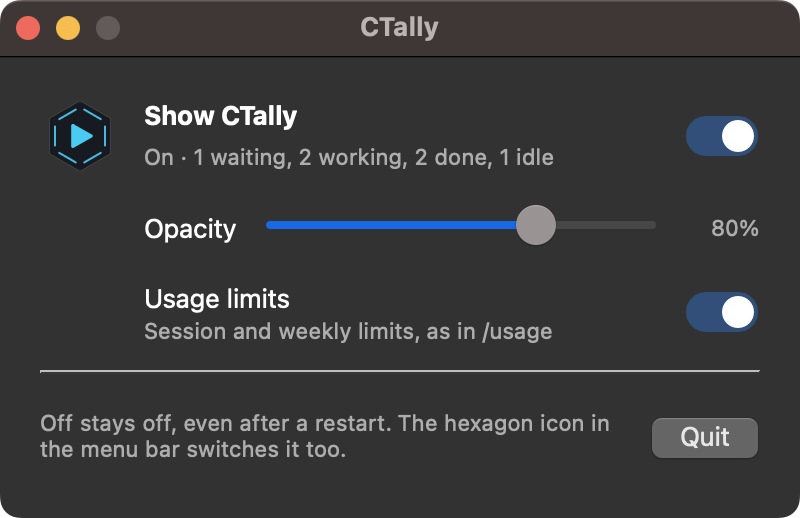
- Menu bar (or top bar) icon to show or hide CTally. Off stays off across restarts, and the app sits idle
with no timers but the snapshots', if they're on.
- Settings window with an on/off switch, an opacity slider (80% by default), switches for the usage
limits, asking Anthropic for them, and the snapshots, and how often snapshots are taken and how long they're
kept. Close Window puts it away; Quit CTally stops CTally, and says how to start it again.
- Snapshots for after a restart: every half hour (or as far apart as eight hours), your tmux sessions and the
Claude Code sessions in them, and a Restore Sessions item in the menus to bring them back.
More below.
- Silent: no sounds, no notifications, no Dock icon.
- One Python package, installed with pipx: the same Qt app on macOS and Linux, and a
ctally command for
the terminal and tmux.
Subagents and workflows
When a session hands work to subagents, or runs a whole workflow of them, CTally follows along:
- The row grows a line about its agents: how many are running, and what they're doing. For a workflow
that's the phase it has reached (
4 agents · Verify), with a progress bar of its agents finished out of
those started so far (12/16; the total grows as each phase sets off more). For a single agent it's the
task it was given (1 agent · Find callers of parseConfig).
- Click that line for a closer look: a workflow's phases, each with its own progress bar and the agents
still at work in it (
Verify verify:schema, verify:queries 0/4), or each agent and what it's doing
(Explore · Find callers of parseConfig). Click again to fold it away. Hover over a badge for the same.
- The badge carries the count (
⚙ 4) on its shoulder.
- The session stays working until its agents are back. A session that sends agents off in the background
finishes its own turn at once, and would otherwise look done for as long as they run, sometimes hours. CTally
keeps it cyan until they return and Claude has taken in their results, and prefix + J leaves it alone till
then.
- Stopping by hand counts. Press Esc, dismiss a question, or kill agents or a workflow, and Claude Code
runs no hook to say so. CTally reads it from the transcripts instead: the session shows done within a
couple of seconds (or working again, if you dismissed a question while its agents were still at it),
and the agents you stopped leave the agents line.
ctally list shows the count too. This needs the subagent hooks that ctally setup adds; if you set up
CTally before they existed, run ctally setup again and restart your sessions.
Answering from CTally
A session waiting on you says what for, on a line under its row (or on its caption, among the badges):
- a tool to allow, the way Claude Code shows it:
Allow Bash(npm publish)?, Allow Write(src/db.py)?
- a question Claude asks you:
Which colour do you prefer?
- a plan to approve:
Approve the plan: Add a dark mode toggle
Hover over the session for more: the whole command, every question and its options, the plan's first lines.
The session stays waiting for as long as that's on screen, even while its subagents or a workflow work on
behind it.
In tmux you can answer it from CTally. Click that line, or right-click the session, and pick from the
choices Claude Code is showing: 1. Yes, 2. Yes, and don't ask again…, 3. No. CTally reads them off the
session's tmux pane, just as you'd see them, and types your pick there, after checking the same choices are
still on screen, so a key never lands anywhere else. Choices that leave you something to type (Type something, Tell Claude what to change) bring the terminal forward for it. A form of several questions
takes one answer at a time, then its review.
Outside tmux, the menu shows what's asked and takes you to the terminal to answer it.
Context window
Every session shows how much of its context window it has used: a little pie that fills clockwise, and the
percentage beside it.
- In the list it ends the row's directory line (
webapp:0.0 ◔ 34%); on a badge it sits on the
lower-left shoulder.
- Colours: quiet grey while there's room, amber from 75%, red from 90%. Claude Code compacts a
conversation when it's nearly full, so an amber or red session is one to wrap up, or to
/compact yourself
at a good moment.
- Hover over the session for the tokens:
Context 62% full: 124k of 200k tokens. A 1M-token window
shows as of 1M, and fills that much more slowly.
ctally list has it as a column, between the agents and the project.
The numbers are Claude Code's own: after every reply it hands the status line each session's
context_window (its size, what's in it, the share used), and CTally's status line keeps the latest per
session in ~/.claude/ctally.d/.status/. A session shows its gauge from its next reply once that status
line is in place: after upgrading from 0.3.2 or earlier, run ctally setup again (sessions already running
pick it up without a restart). With --no-statusline there's no gauge.
Claude Code counts from the replies it has had, so a session you've just reopened on an earlier conversation
(claude --resume, --continue) reports nothing in its window until its next reply. CTally shows no gauge
for it till then, rather than a 0% that isn't so.
Usage limits
CTally shows your plan's usage limits the way Claude Code's /usage does: the current session (the
five-hour window, on a plan that has one), the week across all models, any per-model weekly limit (Fable,
say), and usage credits if you've switched them on.
- The list gives every limit a line between the sessions and the count bar: a bar, the share used, and
when it resets (
in 1h 48m, Sat 10 pm).
- The folded bar and the badges carry two small meters, the session (
5h) and the week (7d).
- A plan with no session limit shows the week alone. Once Claude Code's replies stop giving a five-hour
window, an empty one it still has on file isn't shown.
- Hover over any of them for the details, and how fresh they are. The menu bar (top bar) icon's menu
lists them too.
- Colours: a bar turns amber at 75% and red at 90%. Numbers more than an hour old are dimmed.
- A model's week is asked for. Replies bring only the session and the week, and Claude Code saves a
model's week (Fable's, say) only when you run
/usage. So CTally asks Anthropic for all of them, the way
/usage does, every five minutes while Claude Code is in use: see Privacy. Switch that off
(Exact usage in Settings), or while it can't get through, and a model's week stays as /usage last had
it. Once that's more than an hour behind the rest, its line is dimmed and says so (13 h ago, or
as of 9:33 am in the menu and ctally usage).
- Weeks reset early (by Anthropic, say) show at once. The week follows with the next reply, and that
reply, with less of the week used than CTally last heard, or the week ending later, before it was due to
end, has it ask Anthropic for each model's week at once rather than in five minutes. Until the answer, a
model's week from before the reset is dimmed and says
before reset.
- Hitting a limit shows it at 100% at once, and the sessions it stopped as limit. A prompt you send
before it resets doesn't make them look busy, because it can't get through. A limit reset early starts a new
window, and the meter follows it from the next reply.
- More than one account: the limits are the account's you're signed in to. Sign in to another, or swap
accounts under the sessions that are running (with a tool like
claude-swap), and within a couple of
seconds the meters are that account's, as CTally last saw them: nothing to wait for if you've used it
before, and its first reply if you haven't. Switch back and the first one's are there again.
- tmux's status line gets
5h 71% 7d 49% after the counts, coloured the same way, and ctally usage
prints the lot:
$ ctally usage
Current session            ███████░░░  71%  resets 7:30 pm (in 2h 25m)
Current week (all models)  █████░░░░░  49%  resets Sat Oct 10, 10 pm
Current week (Fable)       ░░░░░░░░░░   0%  resets Sat Oct 10, 10 pm
Updated just now
Where the numbers come from: Claude Code passes the session and week limits to its status line after every
reply, so ctally setup adds a status line that hands them to CTally and shows nothing itself (a status
line you already had keeps showing; CTally's runs it). Everything else comes from asking Anthropic, as
/usage does: the app asks every five minutes, while its limits are on screen and Claude Code has replied
since the last answer (or that answer is an hour old), and at once when a reply shows the weeks were reset;
ctally usage asks when what CTally has is five minutes old, or a reset has come since. The copy of the /usage numbers Claude Code keeps in ~/.claude.json counts too, when it's the
newer. Limits apply to Pro, Max and Team plans; with an API key there are none to show.
Claude Code doesn't say which account a session's numbers are for, and a session keeps handing over the
ones from its last reply, hours later and accounts later. So CTally takes a session's numbers only when
it has just had a reply, keeps the latest for each account apart, and tells the accounts by their week:
every account's week ends at its own time. Numbers from a session that hasn't replied since you changed
accounts, or since a limit was reset, change nothing.
Turn the limits off with the switch in Settings, or right-click → Hide Usage Limits. That hides them from tmux
too, and the app stops asking for them. Exact usage in Settings stops the asking alone: then a model's
week is as new as your last /usage. ctally setup --no-statusline leaves the status line out; the session
and the week then refresh only as often as CTally asks, or Claude Code refreshes its copy.
Your stats
ctally stats adds up the last week (or --days 30) from a small history CTally's hook keeps:
$ ctally stats
             working  waiting on you  prompts  turns  sessions  limit hits
Thu Oct 22    4h 10m             12m       41     38         6           -
…
Today         1h 43m              2m        3      3         2           -
Last 7 days  21h 36m          1h 05m      284    261        31           1

Claude worked 21h 36m in all, with up to 6 sessions at once (Tue 3:40 pm); something was working for 11h 20m.
You answered what it asked in 48s, and came back to finished turns in 3m (medians).
History since Oct 22.
- working adds up every session's time, so sessions running side by side count twice; the line under
the table says how long something was working.
- waiting on you is time a session sat on a permission, a question or a plan. Time after a finished
turn isn't counted there: that's your turn, not Claude being stuck. How soon you got back to it is the
median at the bottom (only within two hours; longer, and you'd moved on).
- With nothing heard from a session, a stretch counts for so long and no more: an hour working, half a
day waiting on you. Longer than that the computer was asleep, or the session's turn was stopped with
nothing to tell the hook. That goes for a session still running, too, so a day's numbers don't shrink
later.
--json gives the same, with times in seconds.
The history starts once the hook from 0.3.3 is set up (ctally setup, then restart your sessions), and keeps
90 days.
Built for tmux
Running a dozen Claude Code sessions across tmux sessions and split panes is exactly what CTally is for.
It knows where each one lives, because tmux leaves TMUX and TMUX_PANE in the environment of everything
started inside it.









