ctk-split-pane
A resizable two-pane widget for CustomTkinter.
It provides a draggable divider with three grip dots, double-click reset,
minimum pane sizes and Dark/Light appearance support.
Português | English
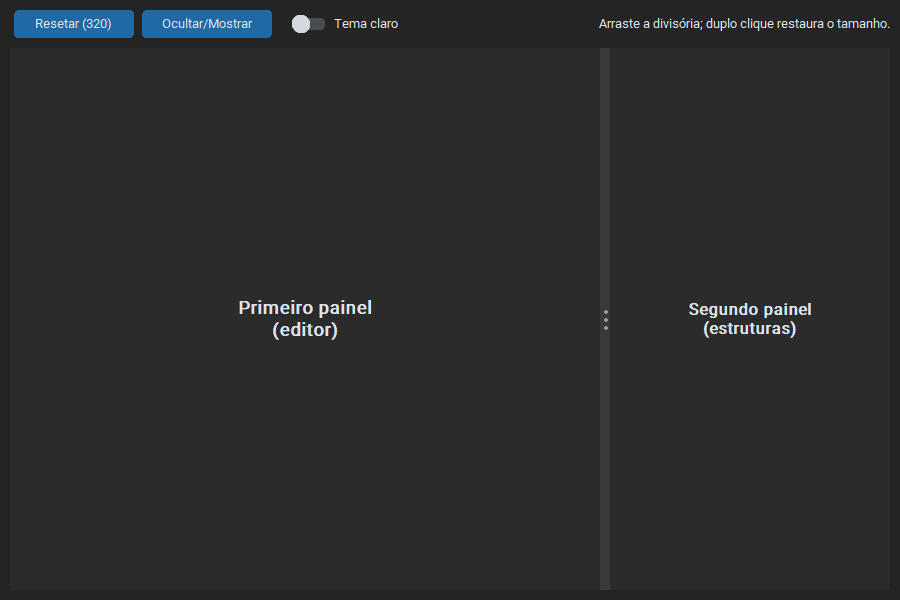
┌──────────────────────┬───────────────┐
│                      │               │
│      First pane      ║  Second pane  │
│                      │               │
└──────────────────────┴───────────────┘
                       ↑
                 drag to resize
Installation
pip install ctk-split-pane
Usage
import customtkinter as ctk
from ctk_split_pane import CTkSplitPane

ctk.set_appearance_mode("dark")

app = ctk.CTk()
app.geometry("900x600")

split = CTkSplitPane(
    app,
    orientation="horizontal",   # or "vertical"
    initial=280,                # initial size of the second pane
    default=280,                # size restored by double-click
    min_first=400,              # minimum size of the first pane
    min_second=220,             # minimum size of the second pane
)
split.pack(fill="both", expand=True, padx=10, pady=10)

left = ctk.CTkFrame(split.first)
left.pack(fill="both", expand=True)

right = ctk.CTkFrame(split.second)
right.pack(fill="both", expand=True)

app.mainloop()
The content of each pane must be created inside split.first / split.second
(or the aliases split.pane_a / split.pane_b).
Features
- Horizontal and vertical orientation.
- Draggable divider.
- Three vertical (or horizontal) grip dots as a visual indicator.
- Resize cursor.
- Double-click restores the default size.
- Minimum size for each pane.
- The second pane is never smaller than
min_second.
- The first pane keeps
min_first; the second is limited to the available space.
- Hide/show the second pane while preserving its current size.
- Colors and theme integrated with CustomTkinter; accepts fixed colors or
(light, dark) tuples.
on_resize and on_reset callbacks.- Keyboard navigation on the divider: arrow keys and
Home (when focused).
- No dependencies other than
customtkinter.
API
CTkSplitPane(master, **options)
| Option |
Default |
Description |
orientation |
"horizontal" |
"horizontal" or "vertical". |
initial |
default |
Initial size of the second pane. |
default |
250 |
Size restored by reset()/double-click. |
min_first |
120 |
Minimum size of the first pane. |
min_second |
120 |
Minimum size of the second pane. |
divider_width |
10 |
Divider thickness. |
grip |
"dots" |
"dots", "line" or "none". |
divider_color |
("#d9d9d9", "#3a3a3a") |
Divider color (str or (light, dark)). |
grip_color |
("#8a8a8a", "#9a9a9a") |
Grip color. |
hover_color |
("#c8c8c8", "#4a4a4a") |
Divider color on hover. |
cursor |
automatic |
Divider cursor. |
on_resize |
None |
Called with the new second-pane size. |
on_reset |
None |
Called after a reset. |
first_pane_kwargs |
None |
Extra options for the first pane CTkFrame. |
second_pane_kwargs |
None |
Extra options for the second pane CTkFrame. |
Methods
| Method |
Description |
set_second_size(size) |
Sets the second-pane size (within limits). |
get_second_size() |
Returns the current second-pane size. |
reset() |
Restores the default size. |
hide_second() |
Hides the second pane and divider. |
show_second() |
Shows the second pane at its previous position. |
toggle_second() |
Toggles hidden/visible. |
set_default_size(size) |
Changes the default size. |
set_min_second(size) |
Changes the second-pane minimum. |
set_min_first(size) |
Changes the first-pane minimum. |
is_second_visible |
Boolean property. |
first / second |
Internal frames where content should be created. |
pane_a / pane_b |
Aliases for first / second. |
Theming
Colors can be strings or (light, dark) tuples:
CTkSplitPane(
    app,
    divider_color=("#e5e5e5", "#2b2b2b"),
    grip_color=("#808080", "#a0a0a0"),
    hover_color=("#cccccc", "#444444"),
)
The widget follows ctk.set_appearance_mode("light"/"dark") automatically.
Default colors are neutral; consumers can pass their own palette.
Development
git clone https://github.com/MikaelGois/ctk-split-pane.git
cd ctk-split-pane
python -m venv .venv
.venv\Scripts\activate      # Windows
# source .venv/bin/activate # Linux/macOS
pip install customtkinter
python examples/demo.py
python -m unittest discover -s tests -v
On Linux, the graphical tests need a virtual display:
xvfb-run -a python -m unittest discover -s tests -v
Release process: see PUBLISHING.md (Portuguese).
License
MIT. See LICENSE.









