DjangoQL
.. image:: https://github.com/ivelum/djangoql/workflows/Tests/badge.svg
:target: https://github.com/ivelum/djangoql/actions?query=workflow%3ATests
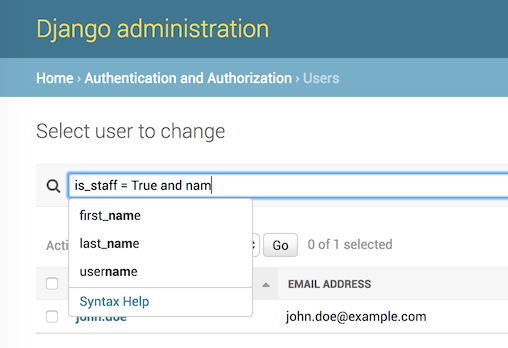
Advanced search language for Django, with auto-completion. Supports logical
operators, parenthesis, table joins, and works with any Django model. Tested on
Python 2.7, 3.6–3.14, Django 1.8–6.0. The auto-completion feature has been
tested in Chrome, Firefox, Safari, IE9+.
See a video: DjangoQL demo <https://youtu.be/oKVff4dHZB8>_
.. image:: https://raw.githubusercontent.com/ivelum/djangoql/master/djangoql/static/djangoql/img/completion_example_scaled.png
DjangoQL is used by:
|logo1| |logo2| |logo3| |logo4|
.. |logo1| image:: https://raw.githubusercontent.com/ivelum/djangoql/master/assets/redhat.svg
:width: 22%
:target: https://www.redhat.com
.. |logo2| image:: https://raw.githubusercontent.com/ivelum/djangoql/master/assets/teamplify.svg
:width: 22%
:target: https://teamplify.com
.. |logo3| image:: https://raw.githubusercontent.com/ivelum/djangoql/master/assets/police1.svg
:width: 22%
:target: https://www.police1.com
.. |logo4| image:: https://raw.githubusercontent.com/ivelum/djangoql/master/assets/15-five.svg
:width: 22%
:target: https://www.15five.com
Is your project using DjangoQL? Please submit a PR and let us know!
Contents
Installation_Add it to your Django admin_Using DjangoQL with the standard Django admin search_Language reference_DjangoQL Schema_Custom search fields_Can I use it outside of Django admin?_Using completion widget outside of Django admin_
Installation
.. code:: shell
$ pip install djangoql
Add 'djangoql' to INSTALLED_APPS in your settings.py:
.. code:: python
INSTALLED_APPS = [
    ...
    'djangoql',
    ...
]
Add it to your Django admin
Adding DjangoQLSearchMixin to your model admin will replace the standard
Django search functionality with DjangoQL search. Example:
.. code:: python
from django.contrib import admin

from djangoql.admin import DjangoQLSearchMixin

from .models import Book


@admin.register(Book)
class BookAdmin(DjangoQLSearchMixin, admin.ModelAdmin):
    pass
Using DjangoQL with the standard Django admin search
DjangoQL will recognize if you have defined search_fields in your ModelAdmin
class, and doing so will allow you to choose between an advanced search with
DjangoQL and a standard Django search (as specified by search fields). Example:
.. code:: python
@admin.register(Book)
class BookAdmin(DjangoQLSearchMixin, admin.ModelAdmin):
    search_fields = ('title', 'author__name')
For the example above, a checkbox that controls search mode will appear near
the search input. If the checkbox is on, then DjanqoQL search is used. There is
also an option that controls if that checkbox is enabled by default -
djangoql_completion_enabled_by_default (set to True by default):
.. code:: python
@admin.register(Book)
class BookAdmin(DjangoQLSearchMixin, admin.ModelAdmin):
    search_fields = ('title', 'author__name')
    djangoql_completion_enabled_by_default = False
If you don't want two search modes, simply remove search_fields from your
ModelAdmin class.
Language reference
DjangoQL is shipped with comprehensive Syntax Help, which can be found in Django
admin (see the Syntax Help link in auto-completion popup). Here's a quick
summary:
DjangoQL's syntax resembles Python's, with some minor
differences. Basically you just reference model fields as you would
in Python code, then apply comparison and logical operators and
parenthesis. DjangoQL is case-sensitive.
- model fields: exactly as they are defined in Python code. Access
nested properties via
., for example author.last_name;
- strings can be enclosed in either double quotes or single quotes.
To escape a quote, use
\" for double quotes or \' for single quotes.
You can also use single quotes to enclose strings containing double quotes,
and vice versa;
- boolean and null values:
True, False, None. Please note
that they can be combined only with equality operators, so you can
write published = False or date_published = None, but
published > False will cause an error;
- logical operators:
and, or;
- comparison operators:
=, !=, <, <=, >, >=
- string-specific comparison operators:
startswith, not startswith,
endswith, not endswith - work as you expect. Test whether or not a
string contains a substring: ~ and !~ (translated into
__icontains under the hood).
Example: name endswith "peace" or author.last_name ~ "tolstoy";
- date-specific comparison operators, compare by date part:
~ and !~.
Example: date_published ~ "2021-11" - find books published in Nov, 2021;
- test a value vs. list:
in, not in. Example:
pk in (2, 3).
DjangoQL Schema
Schema defines limitations - what you can do with a DjangoQL query.
If you don't specify any schema, DjangoQL will provide a default
schema for you. This will walk recursively through all model fields and
relations and include everything it finds in the schema, so
users would be able to search through everything. Sometimes
this is not what you want, either due to DB performance or security
concerns. If you'd like to limit search models or fields, you should
define a schema. Here's an example:
.. code:: python
class UserQLSchema(DjangoQLSchema):
    exclude = (Book,)
    suggest_options = {
        Group: ['name'],
    }

    def get_fields(self, model):
        if model == Group:
            return ['name']
        return super(UserQLSchema, self).get_fields(model)


@admin.register(User)
class CustomUserAdmin(DjangoQLSearchMixin, UserAdmin):
    djangoql_schema = UserQLSchema
In the example above we created a schema that does 3 things:
- excludes the Book model from search via
exclude option. Instead of
exclude you may also use include, which limits a search to
listed models only;
- limits available search fields for Group model to only the
name field
, in the .get_fields() method;
- enables completion options for Group names via
suggest_options.
An important note about suggest_options: it looks for the choices model
field parameter first, and if it's not specified - it will synchronously pull
all values for given model fields, so you should avoid large querysets there.
If you'd like to define custom suggestion options, see below.
Custom search fields
Deeper search customization can be achieved with custom search fields. Custom
search fields can be used to search by annotations, define custom suggestion
options, or define fully custom search logic. In djangoql.schema, DjangoQL
defines the following base field classes that you may
subclass to define your own behavior:
IntFieldFloatFieldStrFieldBoolFieldDateFieldDateTimeFieldRelationField
Here are examples for common use cases:
Search by queryset annotations:
.. code:: python
from djangoql.schema import DjangoQLSchema, IntField


class UserQLSchema(DjangoQLSchema):
    def get_fields(self, model):
        fields = super(UserQLSchema, self).get_fields(model)
        if model == User:
            fields += [IntField(name='groups_count')]
        return fields


@admin.register(User)
class CustomUserAdmin(DjangoQLSearchMixin, UserAdmin):
    djangoql_schema = UserQLSchema

    def get_queryset(self, request):
        qs = super(CustomUserAdmin, self).get_queryset(request)
        return qs.annotate(groups_count=Count('groups'))
Let's take a closer look at what's happening in the example above. First, we
add groups_count annotation to the queryset that is used by Django admin
in the CustomUserAdmin.get_queryset() method. It would contain the number
of groups a user belongs to. As our queryset now pulls this column, we can
filter by it. It just needs to be included in the schema. In
UserQLSchema.get_fields() we define a custom integer search field for the
User model. Its name should match the name of the column in our queryset.
Custom suggestion options
.. code:: python
from djangoql.schema import DjangoQLSchema, StrField


class GroupNameField(StrField):
    model = Group
    name = 'name'
    suggest_options = True

    def get_options(self, search):
        return super(GroupNameField, self)\
            .get_options(search)\
            .annotate(users_count=Count('user'))\
            .order_by('-users_count')


class UserQLSchema(DjangoQLSchema):
    def get_fields(self, model):
        if model == Group:
            return ['id', GroupNameField()]
        return super(UserQLSchema, self).get_fields(model)


@admin.register(User)
class CustomUserAdmin(DjangoQLSearchMixin, UserAdmin):
    djangoql_schema = UserQLSchema
In this example we've defined a custom GroupNameField that sorts suggestions
for group names by popularity (no. of users in a group) instead of default
alphabetical sorting.
Custom search lookup
DjangoQL base fields provide two basic methods that you can override to
substitute either search column, search value, or both -
.get_lookup_name() and .get_lookup_value(value):
.. code:: python
class UserDateJoinedYear(IntField):
    name = 'date_joined_year'

    def get_lookup_name(self):
        return 'date_joined__year'


class UserQLSchema(DjangoQLSchema):
    def get_fields(self, model):
        fields = super(UserQLSchema, self).get_fields(model)
        if model == User:
            fields += [UserDateJoinedYear()]
        return fields


@admin.register(User)
class CustomUserAdmin(DjangoQLSearchMixin, UserAdmin):
    djangoql_schema = UserQLSchema
In this example we've defined the custom date_joined_year search field for
users, and used the built-in Django __year filter option in
.get_lookup_name() to filter by date year only. Similarly you can use
.get_lookup_value(value) hook to modify a search value before it's used in
the filter.
Fully custom search lookup
.get_lookup_name() and .get_lookup_value(value) hooks cover many
simple use cases, but sometimes they're not enough and you want a fully custom
search logic. In such cases you can override main .get_lookup() method of
a field. Example below demonstrates User age search:
.. code:: python
from djangoql.schema import DjangoQLSchema, IntField


class UserAgeField(IntField):
    """
    Search by given number of full years
    """
    model = User
    name = 'age'

    def get_lookup_name(self):
        """
        We'll be doing comparisons vs. this model field
        """
        return 'date_joined'

    def get_lookup(self, path, operator, value):
        """
        The lookup should support with all operators compatible with IntField
        """
        if operator == 'in':
            result = None
            for year in value:
                condition = self.get_lookup(path, '=', year)
                result = condition if result is None else result | condition
            return result
        elif operator == 'not in':
            result = None
            for year in value:
                condition = self.get_lookup(path, '!=', year)
                result = condition if result is None else result & condition
            return result

        value = self.get_lookup_value(value)
        search_field = '__'.join(path + [self.get_lookup_name()])
        year_start = self.years_ago(value + 1)
        year_end = self.years_ago(value)
        if operator == '=':
            return (
                Q(**{'%s__gt' % search_field: year_start}) &
                Q(**{'%s__lte' % search_field: year_end})
            )
        elif operator == '!=':
            return (
                Q(**{'%s__lte' % search_field: year_start}) |
                Q(**{'%s__gt' % search_field: year_end})
            )
        elif operator == '>':
            return Q(**{'%s__lt' % search_field: year_start})
        elif operator == '>=':
            return Q(**{'%s__lte' % search_field: year_end})
        elif operator == '<':
            return Q(**{'%s__gt' % search_field: year_end})
        elif operator == '<=':
            return Q(**{'%s__gte' % search_field: year_start})

    def years_ago(self, n):
        timestamp = now()
        try:
            return timestamp.replace(year=timestamp.year - n)
        except ValueError:
            # February 29
            return timestamp.replace(month=2, day=28, year=timestamp.year - n)


class UserQLSchema(DjangoQLSchema):
    def get_fields(self, model):
        fields = super(UserQLSchema, self).get_fields(model)
        if model == User:
            fields += [UserAgeField()]
        return fields


@admin.register(User)
class CustomUserAdmin(DjangoQLSearchMixin, UserAdmin):
    djangoql_schema = UserQLSchema
Can I use it outside of Django admin?
Sure. You can add DjangoQL search functionality to any Django model using
DjangoQLQuerySet:
.. code:: python
from django.db import models

from djangoql.queryset import DjangoQLQuerySet


class Book(models.Model):
    name = models.CharField(max_length=255)
    author = models.ForeignKey('auth.User')

    objects = DjangoQLQuerySet.as_manager()
With the example above you can perform a search like this:
.. code:: python
qs = Book.objects.djangoql(
    'name ~ "war" and author.last_name = "Tolstoy"'
)
It returns a normal queryset, so you can extend it and reuse if
necessary. The following code works fine:
.. code:: python
print(qs.count())
Alternatively you can add DjangoQL search to any existing queryset,
even if it's not an instance of DjangoQLQuerySet:
.. code:: python
from django.contrib.auth.models import User

from djangoql.queryset import apply_search

qs = User.objects.all()
qs = apply_search(qs, 'groups = None')
print(qs.exists())
Schemas can be specified either as a queryset option, or passed
to .djangoql() queryset method directly:
.. code:: python
class BookQuerySet(DjangoQLQuerySet):
    djangoql_schema = BookSchema


class Book(models.Model):
    ...

    objects = BookQuerySet.as_manager()

# Now, Book.objects.djangoql() will use BookSchema by default:
Book.objects.djangoql('name ~ "Peace")  # uses BookSchema

# Overriding default queryset schema with AnotherSchema:
Book.objects.djangoql('name ~ "Peace", schema=AnotherSchema)
You can also provide schema as an option for apply_search()
.. code:: python
qs = User.objects.all()
qs = apply_search(qs, 'groups = None', schema=CustomSchema)
Using completion widget outside of Django admin
The completion widget is not tightly coupled to Django admin, so you can easily
use it outside of the admin if you want. The widget is
available on npm <https://www.npmjs.com/package/djangoql-completion>_ as a
standalone package.
See the source code and the docs in the
djangoql-completion <https://github.com/ivelum/djangoql-completion>_
repo on GitHub.
The completion widget is also bundled with the
djangoql <https://pypi.org/project/djangoql/>_ Python package on PyPI. If
you're not using Webpack or another JavaScript bundler, you can use the
pre-built version that ships with the Python package. Here is an example:
Template code, completion_demo.html:
.. code:: html