Scan your whole stack


From OX Research Newsroom






Are you using extractscore?
Find out what’s in your code.
Scan your apps free in minutes (opens in a new tab) Read the latest findings
Latest version: v0.1.4
extractscore was last scanned on 27 Nov 2026 at version 0.1.4. Risk score 0 of 100. No malicious behavior was detected.
| Version | Published | Status |
|---|---|---|
| 0.1.4 LATEST | 27 Nov 2026 | No rules fired |
| 0.1.0 | 14 Nov 2026 | No rules fired |
Findings for v0.1.4. The score is a capped sum of the weights of the rules that fired — not CVSS, not exploitability, and not a probability. It is not comparable across packages with different scan coverage.
The score describes 0.1.4; other versions have their own rules, not their own score.
The publisher’s own README, as collected from the registry.
English | 한국어
Field-level precision, recall and F1 for JSON that an LLM extracted from documents (invoices, receipts, contracts), plus a before/after comparison of two runs on the same gold set. It is a Python library with a matching CLI, has zero runtime dependencies, and needs Python 3.11 or newer.
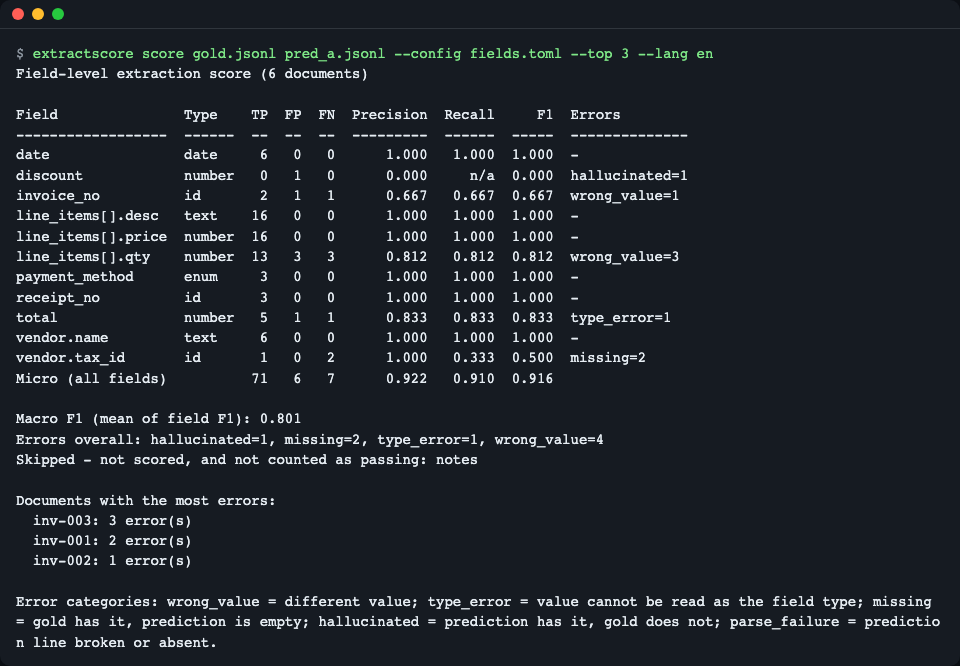
Per-field TP/FP/FN, precision, recall, F1 and error categories, scored against a gold JSONL.
uv add git+https://github.com/LeeGyeongPil/extractscore # or: pip install git+https://github.com/LeeGyeongPil/extractscoreTo try it from a clone instead: git clone https://github.com/LeeGyeongPil/extractscore && cd extractscore && uv run extractscore demo. If you do not have uv: curl -LsSf https://astral.sh/uv/install.sh | sh.
Python 3.11+ (it reads TOML with the standard library). No runtime dependencies.
The package ships a practice mock: six made-up invoices and receipts, the gold answers, and two sets of predictions that were written by hand to imitate typical LLM mistakes. No model is called, so it works offline. Your own data works the same way, with your gold file and your model's output.
uv run extractscore demo # inside a uv project or a clone; with pip: extractscore demoThat prints the score of run A, then the A to B comparison. To score one run yourself:
uv run extractscore demo --export my-eval     # copies gold, predictions, rules and source texts
uv run extractscore score my-eval/gold.jsonl my-eval/pred_a.jsonl --config my-eval/fields.toml
Field Type TP FP FN Precision Recall F1 Errors
------------------ ------ -- -- -- --------- ------ ----- --------------
date date 6 0 0 1.000 1.000 1.000 -
discount number 0 1 0 0.000 n/a 0.000 hallucinated=1
invoice_no id 2 1 1 0.667 0.667 0.667 wrong_value=1
line_items[].desc text 16 0 0 1.000 1.000 1.000 -
line_items[].price number 16 0 0 1.000 1.000 1.000 -
line_items[].qty number 13 3 3 0.812 0.812 0.812 wrong_value=3
payment_method enum 3 0 0 1.000 1.000 1.000 -
receipt_no id 3 0 0 1.000 1.000 1.000 -
total number 5 1 1 0.833 0.833 0.833 type_error=1
vendor.name text 6 0 0 1.000 1.000 1.000 -
vendor.tax_id id 1 0 2 1.000 0.333 0.500 missing=2
Micro (all fields) 71 6 7 0.922 0.910 0.916
Macro F1 (mean of field F1): 0.801
Errors overall: hallucinated=1, missing=2, type_error=1, wrong_value=4
Skipped - not scored, and not counted as passing: notes(The command also prints a header, the most-wrong documents and a short error-category legend; the table above is the core of it. For Korean output add --lang ko.)
Read it like this: total has 5 correct values (TP), 1 wrong value (one FP and one FN), so precision and recall are both 5/6. vendor.tax_id was never wrong when present, but the model left it out twice, so precision is 1.0 and recall 0.33.
Gold file, one JSON object per line, with an id and the correct fields:
{"id": "inv-001", "invoice_no": "INV-0042", "total": 1250.0, "line_items": [{"desc": "Widget A", "qty": 2, "price": 300.0}]}The prediction file has the same shape, one line per document, using the same id. A line that is not valid JSON (for example a truncated response) is scored as a parse failure for that document, it does not stop the run.
extractscore diff gold.jsonl pred_before.jsonl pred_after.jsonl --config fields.toml --fail-on-regression
extractscore score gold.jsonl pred.jsonl --config fields.toml --min-f1 0.95
Exit code 0 means pass, 1 means a gate failed, 2 means the input or config is invalid. A ready GitHub Actions workflow is in examples/ci.yml. It runs the PyPI package directly with uvx extractscore, so no install step is needed.
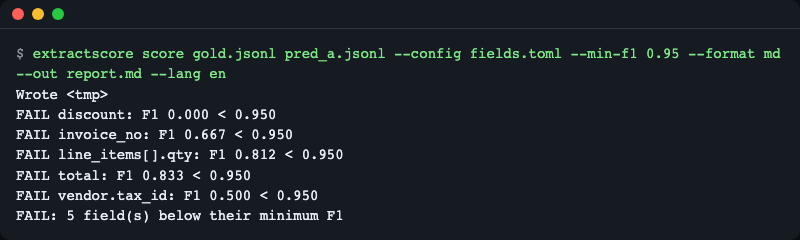
--min-f1 0.95 lists every field below the bar and exits with code 1.
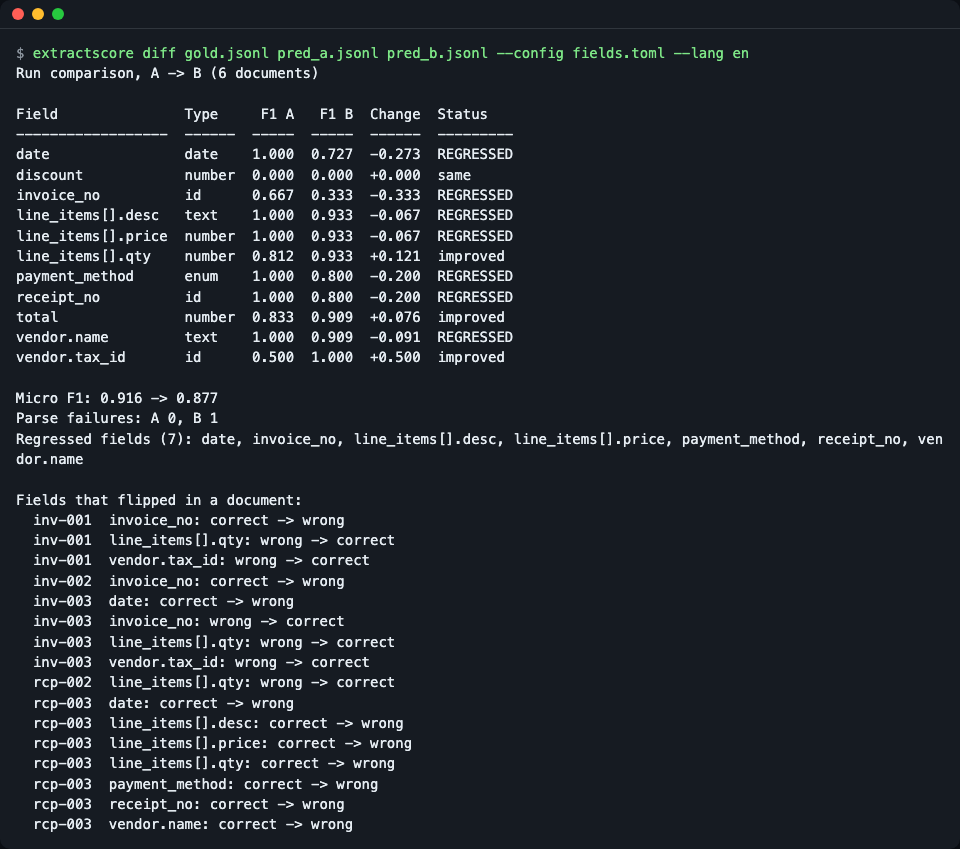
diff shows each field's F1 before and after, and which documents flipped between correct and wrong.
Run B in the mock fixes line_items[].qty and vendor.tax_id but makes date and invoice_no worse. Most of the 7 regressed fields come from one cut-off JSON line (rcp-003): one broken response lowers every field of that document. That is why the comparison lists the flipped documents, not only the totals.
flowchart LR
  G[gold.jsonl] --> W[walk fields]
  P[pred.jsonl] --> W
  C[fields.toml] --> W
  W --> S[TP / FP / FN per field]
  S --> R[precision, recall, F1]
  R --> D[diff A vs B]
R --> X[CI exit code]vendor.name; items in a list become line_items[].qty. Every path is scored on its own.n/a means 0/0.wrong_value, type_error, missing, hallucinated, parse_failure. They tell you what kind of mistake it was, not only how many.number, date, text, id, enum, bool. "1,250.00", "$1,250" and 1250 are the same number. Ids are always exact: INV-215 is not INV-0215. Fuzzy text matching is on only for the text fields you configure.Field rules (fields.toml, or JSON). Fields you do not list get a type inferred from the gold value:
date_formats = ["%Y-%m-%d", "%m/%d/%Y"]   # first match wins

[fields."total"]
type = "number"
tol = 0.01

[fields."line_items[].desc"]
type = "text"
fuzzy = 0.85          # minimum similarity that still counts as a match

[fields."notes"]
ignore = true # reported as skipped, never as passingfrom extractscore import evaluate_files, Config| Name | What it does | Main arguments | Returns |
|---|---|---|---|
evaluate(gold, pred, config=None, *, id_key="id") |
Score a whole dataset held in memory | rows or {id: dict} |
Report |
evaluate_files(gold_path, pred_path, config=None, *, id_key="id") |
Same, reading two JSONL files | paths | Report |
compare(gold, pred, config=None) |
Score one document | two dicts | DocResult |
diff(report_a, report_b, *, tolerance=0.0) |
Compare two reports from the same gold set | reports, allowed F1 drop | Diff (.regressions, .improvements, .flips) |
check_gates(report, *, min_f1=None, field_min=None) |
CI thresholds, overall and per field | min_f1, {path: min} |
list[GateFailure] (empty means pass) |
Config.from_file(path) / Config.from_dict(data) / Config(...) |
Field rules | fields, match_threshold, date_formats, empty_as_null |
Config |
FieldRule(type, tol, fuzzy, casefold, ignore) |
Rule for one field path | FieldRule |
|
load_jsonl(path, *, strict, id_key="id") |
Read a JSONL file (UTF-8, a leading BOM is accepted); with strict=False, broken lines become ParseFailure |
path | dict of id to row |
Report has .fields (per-path FieldStats with .precision, .recall, .f1, .counts), .micro, .macro_f1, .parse_failures, .skipped, .top_docs(n), .to_dict() and .to_markdown(lang). Counts expose .tp, .fp, .fn and .errors (category to number). A precision or recall of 0/0 is None.
Errors: InputError (the gold data or a file cannot be read), ConfigError (invalid field rules), both subclasses of ExtractScoreError. Problems in the predictions are never exceptions; they are scored.
Both files below are in examples/ and were run as written.
Score one run (examples/quickstart.py):
from pathlib import Path

import extractscore
from extractscore import Config, evaluate_files

sample = Path(extractscore.__file__).parent / "sample"
config = Config.from_file(sample / "fields.toml")
report = evaluate_files(sample / "gold.jsonl", sample / "pred_a.jsonl", config)

total = report.fields["total"]
print(f"total: P={total.precision:.3f} R={total.recall:.3f} F1={total.f1:.3f}")
print("type_error:", total.counts.errors["type_error"])
print("micro F1:", round(report.micro.f1, 3))
total: P=0.833 R=0.833 F1=0.833
type_error: 1
micro F1: 0.916Compare two runs and check gates (examples/compare_runs.py):
from pathlib import Path

import extractscore
from extractscore import Config, check_gates, diff, evaluate_files

sample = Path(extractscore.__file__).parent / "sample"
config = Config.from_file(sample / "fields.toml")
gold = sample / "gold.jsonl"
a = evaluate_files(gold, sample / "pred_a.jsonl", config)
b = evaluate_files(gold, sample / "pred_b.jsonl", config)

d = diff(a, b)
print("regressed:", ", ".join(d.regressions))
print("improved:", ", ".join(d.improvements))
for failure in check_gates(b, min_f1=0.9, field_min={"total": 0.99}):
    print(f"FAIL {failure.path}: F1 {failure.f1:.3f} < {failure.minimum:.2f}")
regressed: date, invoice_no, line_items[].desc, line_items[].price, payment_method, receipt_no, vendor.name
improved: line_items[].qty, total, vendor.tax_id
FAIL date: F1 0.727 < 0.90
FAIL discount: F1 0.000 < 0.90
FAIL invoice_no: F1 0.333 < 0.90
FAIL payment_method: F1 0.800 < 0.90
FAIL receipt_no: F1 0.800 < 0.90
FAIL total: F1 0.909 < 0.99Other output formats. --format json (English keys, stable for scripts) and --format md (a Markdown table for a CI job summary), both with --out FILE.
Language. Output is English or Korean: --lang en|ko, else EXTRACTSCORE_LANG, else LC_ALL/LC_MESSAGES/LANG; anything not starting with ko is English. JSON keys do not change.
Read these before you trust a number.
11/03/2026 is read as 2026-11-03. If your documents write day first, put that format first in fields.toml: date_formats = ["%d/%m/%Y", "%Y-%m-%d"]. The first format that parses wins, so an ambiguous date follows the order you give."1.250,00" is not read as 1250, so a correct value is counted as wrong_value. Normalise such values before scoring.id is dropped. If the line is cut off but the id can still be found, the document is scored as parse_failure. If it cannot, that document is scored as having no prediction at all.git clone https://github.com/LeeGyeongPil/extractscore && cd extractscore
uv run pytestMIT.
Find threats in your stack.
OX Radar can check high-priority threats, like critical package CVEs, against your context.
Each incident is marked Detected or Not Detected with a remediation plan and proof all tracked in the Response Center.
The probe returned only these fields for this server — auth requirement, protocol and tool list weren’t observed, so they’re not shown (never guessed).
The publisher’s own links, as the registry reports them. These are not sources for the assessment on this page.
Read the latest findings