inferencekit
Turn your coding agent into an inference engineer. Make your models faster across any hardware.
Benchmark, profile and optimize text, image, audio and video models with your coding agent.





Install · How it works · Showcase · Features · Engines · Roadmap · Contributing · Discord
inferencekit is a plugin for Claude Code, Codex and OpenCode, backed by reusable CLI and MCP tools. Give your agent a model, hardware and a goal. It finds, benchmarks and tunes compatible inference engines for your workload. You can stop with the best tested configuration or go further with custom optimizations, including GPU kernels. Model coverage depends on runtime and measurement adapter support; see supported workloads and hardware.
How it works
inferencekit gives your agent the playbook and the tools of a senior inference engineer. On every run it works the problem the same way.
- Understand the task. The agent first asks about your goal, deadline, budget and how much the results may change, reusing answers you already gave. It identifies the model, hardware and real inputs, then estimates memory, compute and launch costs per request. Text, image, audio and video use their own metrics and quality checks.
- Find and tune an engine. It searches the web for current engines and settings for your model and hardware, then tunes and benchmarks compatible options for your workload. Engines listed here, such as vLLM, SGLang, llama.cpp and TensorRT-LLM, are examples, not a fixed set. The fastest tested configuration that meets your quality requirements can be the result, or the tuned baseline for further work.
- Find the bottleneck. It selects the profiler for your hardware: Nsight on NVIDIA, ROCm tools on AMD, or Instruments and Metal on Apple. It measures the critical path and investigates memory, compute and launch costs, checking current vendor docs when support is uncertain.
- Investigate and implement, if requested. Search current code, papers, compiler docs and engineering talks; inspect dispatch, IR and assembly when useful. Choose graph execution, fusion, matrix kernels, packing, state reuse or other techniques from measured bottlenecks. Independent implementations can run in parallel; one coordinator integrates changes, and measurements stay serialized per device. Separate authorized devices may run concurrently.
- Prove every step. Every change gets a fast correctness check and a timed screen; milestones get the full proof: interleaved rounds against the tuned baseline, the anti-cheat gates and quality against a reference model. Changes that miss the agreed performance or quality requirements are reverted.
- Ship it. You get the fastest proven configuration and a
REPORT.md with the result, quality checks, commands to install and run it, saved outputs, and details to reproduce the measurements.
When it asks you
The agent works on its own and stops only when it needs you:
- Missing details. If you didn't say which model, hardware or workload, it asks before it starts.
- Your preferences. Choose exactly the same results, small differences with the same quality, or speed with an agreed quality tradeoff. Set your goal, spending, deadline and check-ins; it reuses answers you already gave.
- Model changes. Permission to simplify the model is separate from permission to use stronger compression. Plans are optional: ask to see one if you want it.
- The budget cap. When the run reaches the cap you set, it stops and asks.
- Things only you can give. For example, permission to read the GPU's profiler counters, or a Hugging Face token for a gated model.
Everything else runs without asking. For a hands-off run, approve a budget with a cap up front (non_interactive: true and budget.approved: true in the intake file); the agent then writes its questions and the choices it made to QUESTIONS.md instead of waiting for you.
Showcase
Examples of coding agents using inferencekit to optimize inference. The workflow applies beyond these models wherever compatible runtimes and measurement adapters are available. Each result applies to its stated hardware, baseline and quality settings.
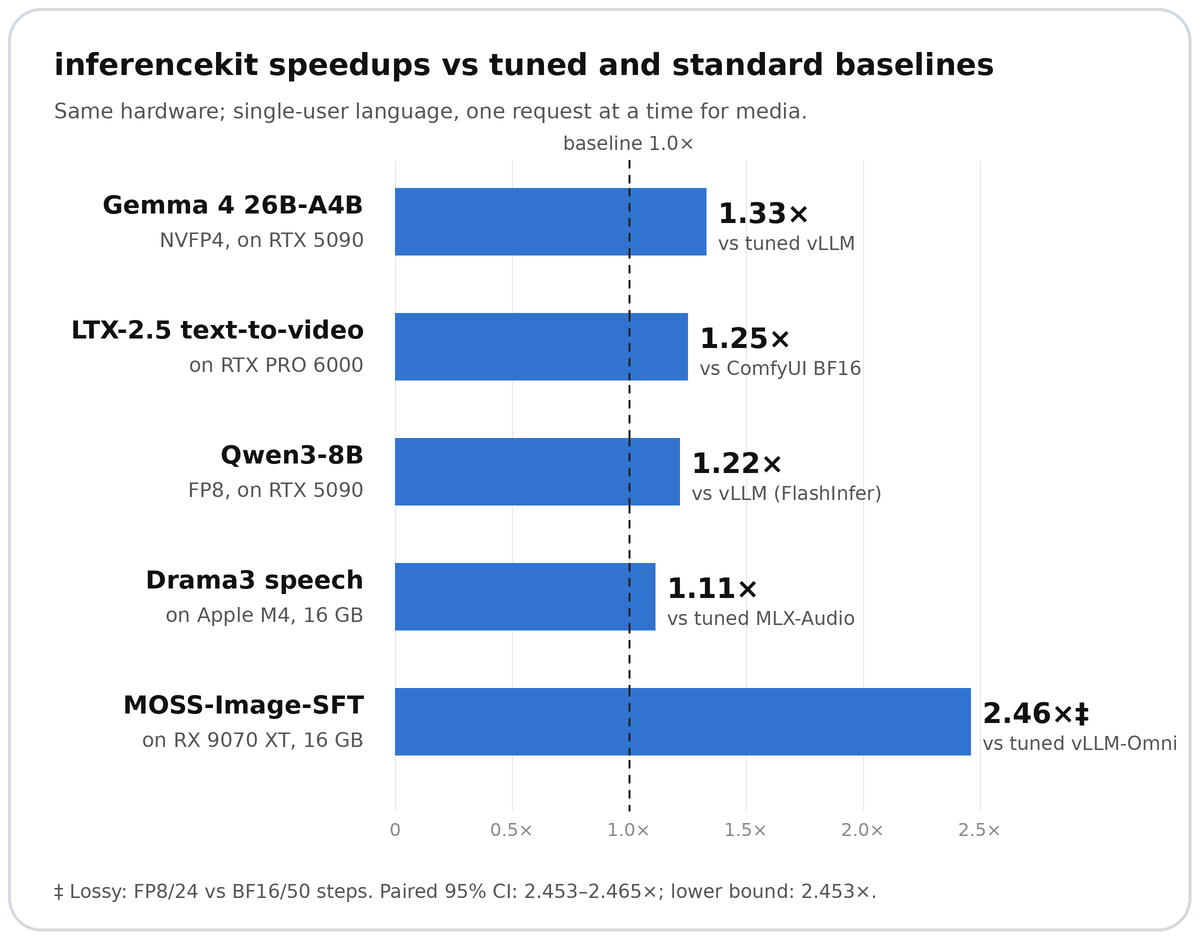
Baseline selection includes competing engines: Gemma's tuned vLLM baseline followed a vLLM/SGLang screen; LTX's ComfyUI baseline was fastest in the tested ComfyUI, Diffusers and official LTX pipeline screen.
Kitten TTS: faster speech across CPUs and GPUs
Kitten TTS 2 delivers about 5–7× faster complete-audio generation than vLLM and llama.cpp on RTX PRO 6000 in our tested configurations—and we’re pushing further with inferencekit.
We’re using inferencekit to continuously improve Kitten Inference, our native engines for Kitten TTS 0.8 and Kitten TTS 2. Our focus is faster speech generation, lower first-audio latency and efficient memory use across CPUs, NVIDIA and AMD GPUs, with speech-quality checks throughout.
Gemma 4: faster decode on RTX 5090
Claude Opus 5.5 used inferencekit to build an exact sampler, batch-1 NVFP4 MoE kernels, a pruned output layer and lossless weight packing. 1.33× faster single-user decode than tuned vLLM, with the same NVFP4 weights and activation scheme.
How it was built, results and usage
LTX-2.5: faster video generation on RTX PRO 6000
Claude Opus 5.5 used inferencekit to compile transformer blocks, fuse kernels and reuse work between guidance passes. 1.25× faster than ComfyUI for one 768 × 512, 121-frame clip at a time, with the same BF16 weights and 30 steps; quality checks passed, but outputs are not bit-identical.
How it was built, results and usage
Drama3: speech optimization on Apple M4 (16 GB)
GPT-6.1 Sol used inferencekit to remove a redundant sampler sort, compile single-token GDN blocks and release the codec encoder after reference preparation. 1.112× faster single-user speech generation than the MLX-Audio baseline selected from the tested configurations, on identical quantized weights. Output-preservation checks passed for all 144 paired outputs, matching audio, codes, chunks and completion. Neither engine met every-request realtime playback.
How it was built, results and usage
MOSS-Image-SFT: an accepted speed/quality trade-off on AMD
GPT-6.1 Terra used inferencekit to wire online FP8 into selected transformer projections and tune the quantization scale and step count. 2.46× faster than the tested tuned vLLM-Omni baseline on a 16 GB RX 9070 XT: FP8/24 steps versus BF16/50 steps, with quality secondary.
How it was built, results and usage
Qwen3-8B on RTX 5090: 1.22× faster single-user decode than vLLM with FlashInfer
Fastest decode in our tested vLLM, SGLang and llama.cpp panel. Claude Opus 5.5 used inferencekit to build Qwen3-8B on RTX 5090 with custom FP8 matrix-vector kernels, a CUDA graph for the decode step and fused attention. Single-user decode was measured with in-process timers and no speculative decoding; llama.cpp Q8_0 is a separate format comparison. Design, results and limits.
Start optimizing models without a $200k/year hire. Our published agent runs cost as little as $18
| Model / workload |
Hardware |
Speedup |
Agent |
Agent time |
Tokens |
Cost |
| Gemma 4 26B-A4B (NVFP4) |
RTX 5090 |
1.33× vs tuned vLLM |
Claude Opus 5.5 (high) |
19 h |
630M |
$199 |
| LTX-2.5 text-to-video |
RTX PRO 6000 |
1.25× vs ComfyUI |
Claude Opus 5.5 (high) |
3.6 h |
47M |
$18 |
| Qwen3-8B (FP8)* |
RTX 5090 |
1.22× vs vLLM with FlashInfer |
Claude Opus 5.5 (xhigh) |
about 10 h |
about 240M |
about $125 |
| Drama3 speech† |
Apple M4 (16 GB) |
1.112× vs tuned MLX-Audio |
GPT-6.1 Sol (high) |
~70 h elapsed |
~2.07B |
~$475 standard-rate equivalent |
| MOSS-Image-SFT (FP8)‡ |
RX 9070 XT (16 GB) |
2.46× vs tuned vLLM-Omni |
GPT-6.1 Terra (high) |
~19.6 h elapsed |
~1.80B |
~$206 standard-rate equivalent |
* Against vLLM 0.31.0 with FlashInfer attention; neither side uses speculative decoding. † Drama3 used identical quantized weights and matched PCM audio, codes, chunks and completion in 144 fresh output pairs. Four paired timing rounds gave a 95% CI of 1.059×–1.156×. Comparison details.
‡ Lossy speed-first experiment: FP8/24 steps vs BF16/50 steps; paired 95% CI 2.453–2.465×, conservative lower bound 2.453×. Outputs, timing and accounting.
Time and tokens include setup, benchmarking, optimization, validation and reporting. Costs are API list-price estimates; most tokens are cached conversation reads. How each engine was built and measured: inferencekit-engines.
Performance and quality validation
Performance gains need matched workloads and quality checks. inferencekit checks for cached responses, incomplete outputs and unintended quality changes before accepting a speedup.
Without these checks, one agent thought its video engine was 2% faster, but it was rendering a completely different video. Another was sure it had a 1.12× speedup; measured again on a clean machine, its engine was 5% slower than where it started.
A speedup counts only when both engines pass every check that applies.
| A way to game a benchmark |
What catches it |
| Answer repeated prompts from a cache |
caching: a replayed prompt may not be over 10% faster; a prompt changed by one character may not get the old answer |
| Report more tokens than were made |
token_count: the reported count must match the streamed tokens and the re-tokenized text |
| Stop early or cut answers short |
output_length: with end-of-text ignored, every answer must be exactly the requested length |
| Drop rare tokens from the vocabulary |
rare_tokens: random CJK text, emoji, long numbers and code names must come back exactly |
| Ignore sampling settings or fake probabilities |
hidden_probes: temperature must change answers; probabilities must be valid |
| Use another chat template so prompts get shorter |
Render check: every prompt must become the same number of tokens as on the baseline |
| Speculative decoding that changes answers |
spec_exact: greedy answers must match the same engine with speculation off |
| Lower quality for speed |
Quality vs a reference, GSM8K, per-step video check |
| Numbers that only hold on the agent's machine |
Every run writes manifest.json with each engine's install and launch commands, so anyone can re-run it on a clean machine, on prompts sealed with inferencekit prompts seal that the agent never saw |
Each check ends PASS, FAIL, UNPROVEN (not enough evidence) or NOT RUN. A missing check is never a pass.
Features








