Jayrun
An artifact-centric Python framework for resource-aware, concurrent and iterative computation.
Define each step with a synchronous or asynchronous Python method. Jayrun passes artifact values between steps and manages the lifetimes of intermediate results and shared resources.



Quick start · Documentation · Tutorials · API reference · 0.4.1 release notes
What Jayrun does
- Reuse expensive resources. Share models, calibration data and clients across compatible runs, with managed acquisition and teardown.
- Release intermediate data automatically. Let Jayrun release consumed artifact values when execution no longer needs them. Retention policies and application references determine what stays alive.
- Inspect and control execution. Visualize graphs before running them, follow live work in the dashboard, and inspect captured results, timings and records afterward.
Declare a graph once, then submit it with different inputs and configuration. Graphs can include branches, conditional routes and iteration. They can also act as observers or controllers for other work—the dashboard itself is built as a graph.
See the overview for applications and data and lifetimes for how artifacts, configuration and resources fit together.
Quick start
Install Jayrun with Python 3.11 or later.
python -m pip install jayrun
Save the following as first_graph.py. The Scale operator multiplies an input artifact by a configurable factor.
from jayrun import (
    Artifact, ArtifactContext,
    ArtifactField, ArtifactFlow,
    BaseOperator, ConfigContext,
    ConfigField, Engine, GraphDefinition,
)
from jayrun.context import ContextState


class Scale(BaseOperator):
    def __init__(self, *, source, outputs):
        super().__init__()
        self.source = ArtifactField()
        self.factor = ConfigField(value_type=int)
        self.outputs = (ArtifactField(),)

    def execute(self):
        value = self.source.value
        result = value * self.factor.value
        self.context.record("scaled", result)
        return result


source = Artifact(name="source")
result = Artifact(name="result")
scale = Scale(
    source=source, outputs=(result,)
)
flow = ArtifactFlow(
    scale, artifact=source
)
graph = GraphDefinition(
    flow, entry_flows=flow
)
graph.confirm()

with Engine() as engine:
    run = engine.submit(
        graph,
        ArtifactContext({source: 7}),
        ConfigContext({scale.factor: 3}),
    )
    run.wait(timeout=10)
    if run.state is not ContextState.FINISHED:
        failure = run.report.data.failure
        raise RuntimeError(str(failure))
    print(run.artifact(result).value)
Run the program. With input 7 and factor 3, it prints 21.
$ python first_graph.py
21
Each submission returns a ContextRun. Once it finalizes, check its outcome before reading the result. The first graph walkthrough explains field binding, reads the recorded value and visualizes the run.
To reuse the same inputs, create a Submission(graph, artifacts=inputs, configs=overrides) before opening the Engine. Call submission.inspect() to see which configuration values came from defaults, then pass **submission.arguments() to each engine.submit() call. Each call gets fresh builders and shares the underlying artifact payloads. Submission reference
The core runtime requires packaging. Install jayrun[yaml] for YAML configuration. Individual applications can add libraries such as PyTorch.
Inspect your graphs and runs
The quick start sends source through Scale to produce result. To save the completed run as interactive HTML, add run.plot.save("run.html") after the example’s print line. Open the file to inspect the executed step, timing and recorded values.
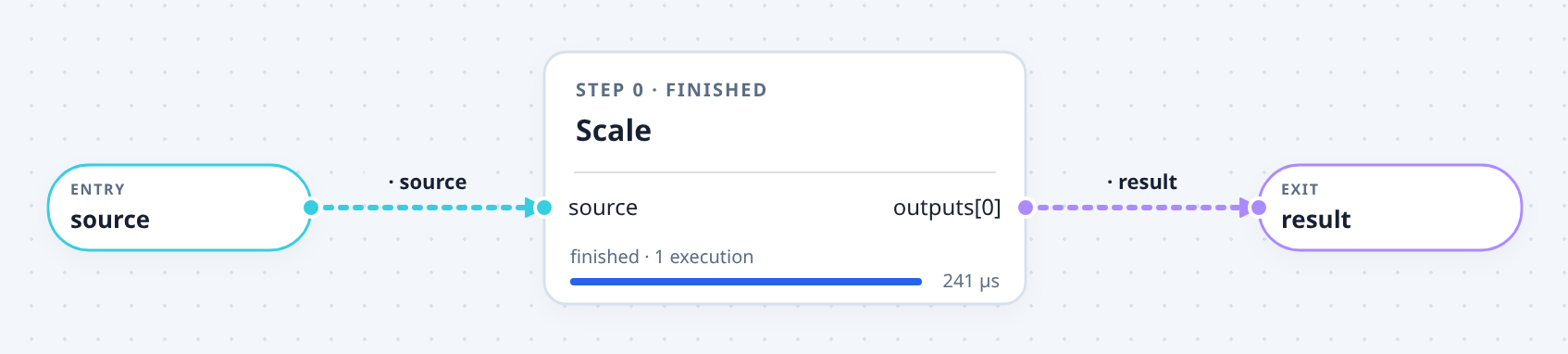
Explore the completed Scale run.
To inspect a declaration before running it, use graph.plot.save("graph.html"). Explore the interactive split-and-join example.
To follow running contexts and recent completions, submit the dashboard graph from jayrun.dashboard with Controller() authority.
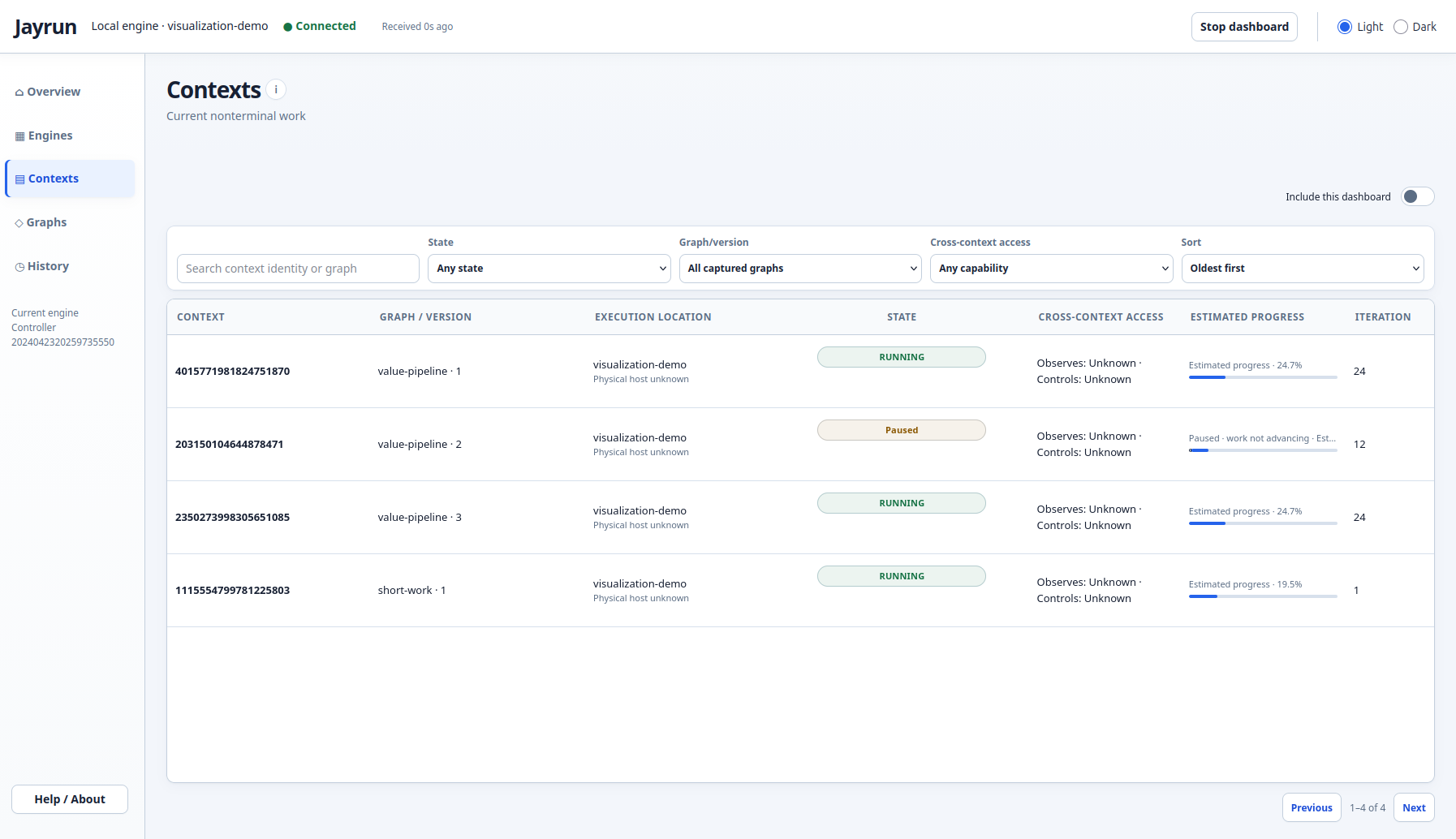
Explore the dashboard or build a monitoring graph with a Controller. The visualization and reporting guide also covers declarations, registries and completed runs.
For indefinite runs, ContextSettings(max_iterations=None, execution_history_limit=8) keeps detailed step reports for the latest eight reported iterations. Counts and timings cover the whole run. Use the context's optional RecordPolicy to tune values written through self.context.record(). Capacity and retention.
To keep diagnostic history beyond an Engine session, pass Database("execution.sqlite") from jayrun.persistence to Engine(database=...). The Engine owns the database lifecycle. After computation finishes, call engine.database.flush() to check that pending history was stored successfully. The Persistence and Database guide shows how to write history and read it after the Engine closes. Stored history is separate from application checkpoints and arbitrary artifact storage.
Framework comparison
“App” means application-managed. “via” identifies an integration. Hosted services are labeled explicitly. Reviewed versions, sources and qualifications
Computational architecture
| Framework |
Authoring model |
Execution model |
Composition |
Iteration / dynamic work |
Data lifetime |
Live resources |
Validation / preparation |
| Jayrun |
Artifact-centric graphs |
In-process threads and async tasks |
Flow attachment, splits and joins |
Step repeats, graph iteration, feedback, Controller submissions |
Consumed slots released, operators can republish values |
Reuse by type, effective config and parallel-safety mode |
Graph validation, declared artifact contracts, reusable Submission |
| Apache Airflow |
DAGs / operators |
Task processes or pods |
Task groups, TaskFlow calls |
Task mapping, bounded group loops |
XComs until retry or cleanup |
External resource setup and teardown |
DAG structure and cycle checks |
| Dagster |
Assets / ops |
Single or multiple processes |
Asset dependencies, op graphs |
Dynamic map and collect |
Retention by I/O manager |
Per-process setup and teardown |
Definitions and run-config checks |
| Dask Distributed |
Task graphs / futures |
Worker processes and thread pools |
Collections, task keys and futures |
Dynamic submission, task mapping |
While clients or dependents need keys |
Worker plugin lifecycle, actors |
Optional graph-layer dependency checks |
| Joblib |
Delayed calls |
Process or thread pools |
Caller chains parallel calls |
Caller generates calls |
Caller-held results |
Application-managed |
No workflow graph to validate |
| Kedro |
Nodes / named datasets |
Sequential, threads or processes |
Namespaced pipelines |
App loops inside nodes |
Release eligible values after last use |
Application-managed via hooks |
Cycle and duplicate-output checks |
| Luigi |
Tasks / targets |
Inline or child processes |
Required tasks, wrapper tasks |
Yield required tasks |
Target-defined retention |
Application-managed |
Dependency checks during traversal |
| Metaflow |
Step-based flows |
Step task processes |
Branches and joins |
Foreach, single-step recursion |
Task artifacts outlive runs |
Application-managed per task |
Pre-run flow graph linting |
| Parsl |
Python / shell apps |
Thread pool or worker processes |
App and file futures |
Dynamic submissions, join apps |
Future-held results, app-managed files |
Application-managed on workers |
Executor configuration checks |
| pipefunc |
Named function pipelines |
Direct calls or map executors |
Nested functions, joined pipelines |
Map or reduce array axes |
Caller-held or retained for resume |
Application-managed |
Map axes, defaults, optional type checks |
| Prefect |
Flows / tasks |
Thread or process task runners |
Nested flows, task futures |
Python control flow, task mapping |
Run-scoped or persisted results |
Application-managed |
Flow parameter validation |
| Ray Core |
Remote tasks / actors |
Task and actor processes |
Object references, actor handles |
Nested task submission |
Distributed reference counting |
Managed actor lifetimes |
Compiled actor graphs (beta) |
Operational capabilities









