

Scan your whole stack


From OX Research Newsroom






Are you using leakkill?
Find out what’s in your code.
Scan your apps free in minutes (opens in a new tab) Read the latest findings
Latest version: v0.8.2
leakkill was last scanned on 26 Nov 2026 at version 0.8.2. Risk score 0 of 100. High-severity rules fired.
| Version | Published | Status |
|---|---|---|
| 0.8.2 LATEST | 26 Nov 2026 | 1 rule fired |
| 0.8.1 | 25 Nov 2026 | 1 rule fired |
Findings for v0.8.2. The score is a capped sum of the weights of the rules that fired — not CVSS, not exploitability, and not a probability. It is not comparable across packages with different scan coverage.
Several behaviors that are each common on their own, such as reading registry credentials, contacting a variable host or running shell commands, appear together in this package in a combination associated with attacks. The finding message lists the behaviors that were combined.
HIGHThe score describes 0.8.2; other versions have their own rules, not their own score.
The publisher’s own README, as collected from the registry.
Your AI coding agent has probably saved your API keys in plain text. Find them with one command, then check which are still live and revoke them. Free, local, zero dependencies.
uvx leakkill scan --agents     # nothing to install: what Claude Code, Cursor, Copilot, Codex and Gemini CLI kept on this machine
uvx leakkill scan              # ...and the secrets in this folder (git-ignored files such as .env are skipped: add --include-ignored)
A key you paste into a chat, or a .env the agent reads, stays on disk in its session history. leakkill finds
those, and the ones in your code and git history. leakkill verify and leakkill revoke then answer what comes next: is this key still working, whose
account is it, how do I revoke it right now, and how do I clean it out of git history? It can also
stop agents reading or writing secrets in the first place. Everything runs on your
machine; nothing is uploaded.
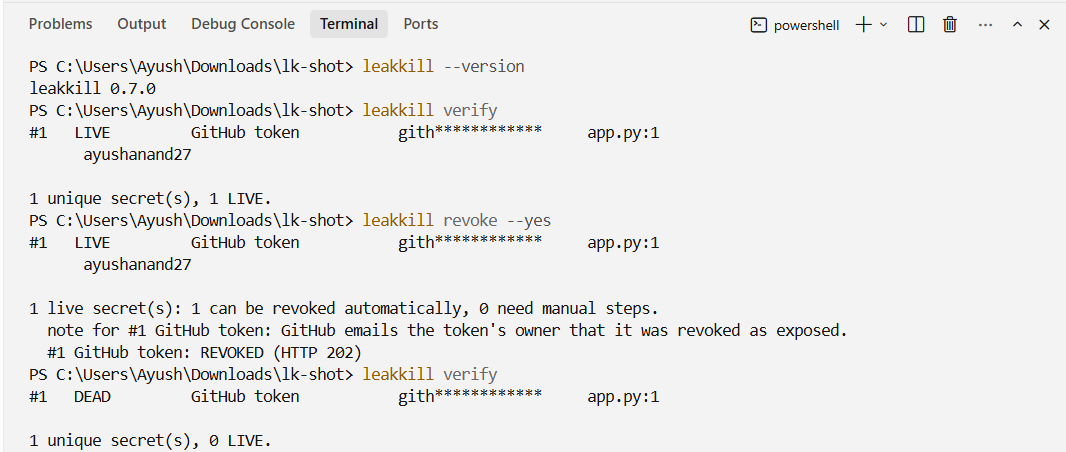
A real run on a throwaway GitHub token: found LIVE, REVOKED, then DEAD.
$ leakkill verify
#1   LIVE         GitHub token           ghp_************     config.py:3
      octocat  scopes: repo, workflow
#2   DEAD         AWS access key         AKIA************     deploy/old.sh:12
      key id is unknown or deactivated
#3   UNVERIFIABLE Credentials in URL     postgres://app:****@db.prod.internal  .env.backup:1

3 unique secret(s), 1 LIVE.

$ leakkill revoke --only 1 --yes
#1 GitHub token: REVOKED (HTTP 202)pip install leakkillTry it without installing: uvx leakkill scan or pipx run leakkill scan (scans the current folder).
Python 3.9+, no dependencies. Latest development version:
pip install git+https://github.com/ayushanand27/leakkill
Or with Docker, no Python needed:
docker run --rm -v "$PWD:/scan" ghcr.io/ayushanand27/leakkill            # scan this folder
docker run --rm -v "$PWD:/scan" ghcr.io/ayushanand27/leakkill --history # every commit| Command | What it does | Network? |
|---|---|---|
leakkill init |
Set a project up in one step: the git hook, the guards for the AI agents you use, and a CI workflow. Adds only, never overwrites. | Never |
leakkill [scan] [PATH ...] |
Find secrets. Exit code 1 if any. | Never |
leakkill scan <github-url> |
Check a repository before you trust it: clones read-only to a temp folder, scans, deletes it (--history for every commit). Only scans; verify/revoke are refused, because they would test keys that belong to someone else. |
Only the clone |
leakkill verify |
Also check each secret against the provider that issued it: live or dead, which account, which scopes | Read-only "who am I" calls |
leakkill revoke |
Show what can be revoked. With --yes, revoke the live ones (--only 1,3 to pick) |
Only with --yes |
leakkill report |
Write leakkill-report.md: every leak, its status and owner, and the cleanup steps in order |
Same as verify (--no-verify to skip) |
leakkill install-hook |
Git pre-commit hook that blocks commits containing secrets | Never |
leakkill install-agent-hooks |
Stop AI coding agents (Claude Code, Cursor, GitHub Copilot, OpenAI Codex) reading .env and keys, sending secrets in prompts, or writing secrets into code |
Never |
Every scan command also accepts --include-ignored (also scan .gitignored files, which are left out by default), --staged (pre-commit), --history (every commit on every branch,
including secrets you already "deleted"), --agents (secrets your AI coding agents stored on this machine, see
below), --exclude-tests and --json.
| Provider | Verify (live? whose?) | Revoke from the CLI |
|---|---|---|
GitHub (ghp_, github_pat_, gho_, ghu_, ghr_) |
✅ user and scopes | ✅ via GitHub's credential revocation API (the owner is notified) |
GitLab (glpat-) |
✅ token name, scopes, expiry | ✅ self-revoke |
Slack tokens (xox…) |
✅ user and workspace | ✅ auth.revoke |
| Discord webhooks | ✅ server and channel | ✅ deletes the webhook |
| AWS access key and secret | ✅ IAM ARN and account (STS, needs no permissions) | ⚠️ deactivates the key if it has iam:UpdateAccessKey, otherwise console steps |
SendGrid (SG.) |
✅ scopes | ✅ the key deletes itself if it has API-key permissions |
| Stripe (live and test keys), OpenAI, Anthropic, OpenRouter, Groq, Hugging Face, Replicate, DigitalOcean, npm, Telegram, Slack webhooks | ✅ (account or username where the API returns it) | ❌ the provider has no API for it, so you get the exact page or command |
| Postman, Linear, Notion, Sentry, Netlify, Doppler, Pulumi, Heroku, Brevo, Square, Airtable, Dropbox, LaunchDarkly, Cloudflare, Mailchimp | ✅ (account where the API returns it); live only on HTTP 200, dead only on 401 | ❌ you get the exact page to revoke it |
| Google API keys, Shopify, PyPI, Docker Hub, Twilio, Perplexity, Azure Storage, private keys, JWTs, credentials in URLs and Basic auth headers, generic high-entropy secrets | detected, not verified | step-by-step rotation guidance |
| leakkill | Kingfisher | Betterleaks | Gitleaks | TruffleHog OSS | GitGuardian | |
|---|---|---|---|---|---|---|
| License / price | MIT, free | Apache 2.0, free | MIT, free | MIT, free | AGPL, free | free for individuals, paid for teams |
| Runs fully local | ✅ | ✅ | ✅ | ✅ | ✅ | ❌ SaaS |
| Install | pip (zero dependencies) or Docker |
Rust binary | Go binary | Go binary | Go binary | CLI + account |
| Detection rules | 246 | ~485 | 463 | 150+ | 800+ | 550+ |
| Checks if a key is live | ✅ 33 services | ✅ hundreds | ✅ | ❌ | ✅ 700+ | ✅ |
| Revokes from the CLI | ✅ 6 providers | ✅ some providers | ❌ | ❌ | ❌ (Enterprise) | partial |
| Remediation report with ordered steps + history purge | ✅ | HTML report, blast-radius map | ❌ | ❌ | ❌ | ✅ |
| Guards AI coding agents | ✅ Claude Code, Cursor, Copilot, Codex | ❌ | ❌ | ❌ | ❌ | ✅ (hooks, paid platform) |
| Scans Slack / Jira / S3 / Docker | ❌ | ✅ | ❌ | ❌ | ✅ | ✅ |
| SARIF / baselines | ✅ / ✅ hashes only | ✅ / ✅ | ✅ / ✅ | ✅ / ✅ (stores secrets) | ✅ / ❌ | ✅ / ✅ |
Where each is strongest (accuracy below): Betterleaks finds the most real credentials; Kingfisher has the
fewest false alarms and the broadest platform coverage with validation and revocation; TruffleHog verifies the
most providers. leakkill's niche is a dependency-free pip install that goes from finding to revoked key to
cleanup plan, guards AI coding agents, and is the best of these at passwords embedded in URLs and Basic auth headers.
Figures from each project's documentation, October 2026. Use what fits: running two scanners is common.
leakkill's own 32 rules cover the providers it can verify and revoke. On top of those, it includes
214 provider rules from Gitleaks (MIT), translated to Python by
tools/import_gitleaks.py from a pinned, checksum-verified release, together with
Gitleaks' entropy thresholds and allowlists. Thank you to the Gitleaks maintainers. See
THIRD_PARTY_NOTICES.md.
Measured on 4 cores (October 2026), wall-clock time for a full scan:
| Repository | leakkill | Gitleaks 8.28 |
|---|---|---|
| psf/requests (130 files) | 0.36 s | 0.63 s |
| pallets/flask (236 files) | 0.31 s | 0.64 s |
| expressjs/express (214 files) | 0.23 s | 0.48 s |
| pallets/flask full history (5,557 commits) | 2.0 s | 1.5 s |
| django/django (7,000 files, 43 MB) | 2.8 s | 1.4 s |
On typical repositories leakkill is faster; on very large ones Gitleaks (Go) is about 2x faster.
End to end on Windows with real, throwaway credentials:
| Credential | verify |
revoke --yes |
verify again |
|---|---|---|---|
| GitHub token | LIVE, correct user | REVOKED (HTTP 202) | DEAD |
| Discord webhook | LIVE, correct server and channel | REVOKED (HTTP 204) | DEAD |
| Slack bot token | LIVE, correct bot and workspace | REVOKED | DEAD (the app was uninstalled, as Slack documents) |
| Slack webhook | LIVE | (died with the app) | DEAD |
| Stripe test key | LIVE, correct account, "test mode" | manual roll in dashboard | |
| Hugging Face token | LIVE, correct user and token role | manual delete | |
| Postman API key | LIVE, correct username | manual delete (page linked) | DEAD |
| Netlify access token | LIVE, correct account email | manual delete (page linked) | DEAD |
Find threats in your stack.
OX Radar can check high-priority threats, like critical package CVEs, against your context.
Each incident is marked Detected or Not Detected with a remediation plan and proof all tracked in the Response Center.
The probe returned only these fields for this server — auth requirement, protocol and tool list weren’t observed, so they’re not shown (never guessed).
The publisher’s own links, as the registry reports them. These are not sources for the assessment on this page.
Read the latest findings