lightrag-dedupe
English | 한국어
Find the same entity written in different ways in a LightRAG knowledge graph (OpenAI, openai, OpenAI Inc., 오픈AI의), get a merge plan you can review, and apply only the groups you approve through LightRAG's own merge API. No LLM calls, no network, no API key: the same graph always gives the same plan. This is an unofficial tool, not part of LightRAG.
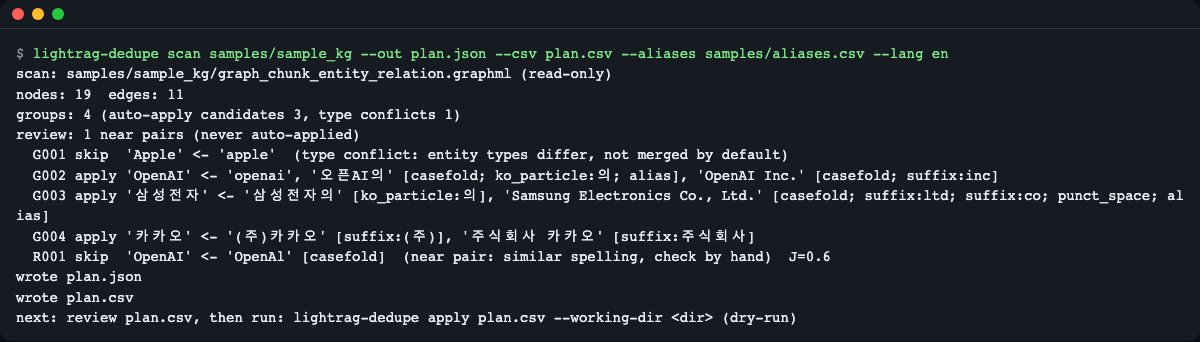
scan reads a LightRAG working folder and lists groups of nodes that are probably one entity, each with the rules that matched.
Who it is for
- You indexed hundreds of documents with LightRAG and the graph viewer shows one company as five nodes.
- Your documents mix Korean and English, so names carry particles (
삼성전자의), company markers ((주)카카오, Co., Ltd.) or two scripts (오픈AI).
- You want a cleanup step you can re-run in a script and review in a spreadsheet before anything changes.
Install
Requires Python 3.11+. uv is the easiest way to run it (curl -LsSf https://astral.sh/uv/install.sh | sh).
uv tool install git+https://github.com/LeeGyeongPil/lightrag-dedupe
scan, explain, restore and apply --server use only the Python standard library. apply --rag and demo need LightRAG itself (lightrag-hku, version 1.5.x), which you already have if you run LightRAG from Python.
To try it from a clone (this also installs LightRAG for the demo):
git clone https://github.com/LeeGyeongPil/lightrag-dedupe
cd lightrag-dedupe
uv sync
On a minimal Linux image you need git and curl before the commands above.
Quick start (30 seconds, practice mock)
uv run lightrag-dedupe demo --lang en
This is a practice mock: real LightRAG 1.5.8 runs offline with a one-token-per-character tokenizer and hash embeddings (no meaning), and an LLM that would raise if called. It works in a temporary folder only.
1) building a small knowledge graph from the bundled sample (no LLM) ...
2) scan:
nodes: 19  edges: 11
groups: 4 (auto-apply candidates 3, type conflicts 1)
review: 1 near pairs (never auto-applied)
  G001 skip  'Apple' <- 'apple'  (type conflict: entity types differ, not merged by default)
  G002 apply 'OpenAI' <- 'openai', '오픈AI의' [casefold; ko_particle:의; alias], 'OpenAI Inc.' [casefold; suffix:inc]
  G003 apply '삼성전자' <- '삼성전자의' [ko_particle:의], 'Samsung Electronics Co., Ltd.' [casefold; suffix:ltd; suffix:co; punct_space; alias]
  G004 apply '카카오' <- '(주)카카오' [suffix:(주)], '주식회사 카카오' [suffix:주식회사]
  R001 skip  'OpenAI' <- 'OpenAl' [casefold]  (near pair: similar spelling, check by hand)  J=0.6
3) applying 3 approved groups through LightRAG's amerge_entities ...
4) result:
nodes: 19 -> 12
entity vector store: 19 -> 12 entries (0 merged-away names left)
OpenAI -> Sam Altman: 3 relations became 1, weight 2.0 (max rule, not the sum)
삼성전자 -> HBM: 3 relations became 1, weight 1.0 (max rule, not the sum)
카카오 -> 카카오톡: 3 relations became 1, weight 1.0 (max rule, not the sum)
5) scan again: 1 groups left, 0 auto-apply candidates, 1 review pairs
Never open your real working directory with mock embeddings: LightRAG refuses a different embedding model. Use --rag with your own factory or --server.
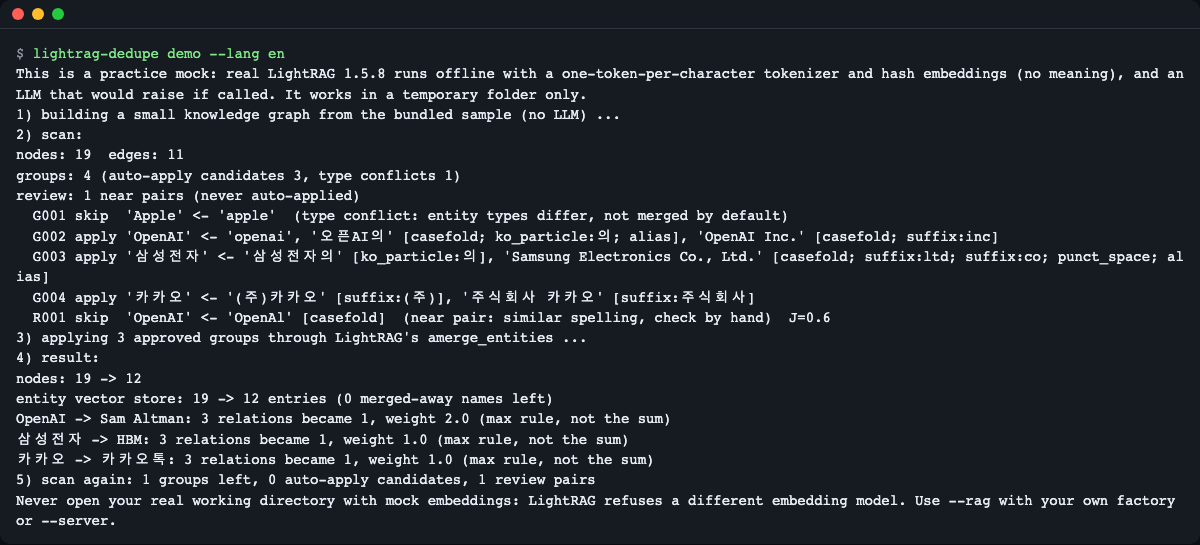 The whole flow on a bundled sample graph: scan, merge through LightRAG, check the result, scan again.
This is a practice mock (it is labeled as one in the output): it builds a small graph in a temporary folder with fake hash embeddings and an LLM that is never called. The merge itself is real LightRAG 1.5.8 code. Use it only to see the flow; never open your own working folder with mock embeddings (LightRAG refuses a different embedding model).
Usage
The normal flow is scan, review plan.csv, apply (preview), apply --yes.
| Command |
What it does |
scan PATH [--out plan.json] [--csv plan.csv] [--aliases aliases.csv] [--near 0.6] |
Reads the graph file in a working folder (read-only) and writes the plan. |
explain NAME --in PATH [--aliases aliases.csv] |
Shows the rule chain that gave one node its key, and the other nodes with the same key. |
apply PLAN [--working-dir DIR] [--rag FILE.py:FUNC \| --server URL] [--yes] |
Applies groups marked apply=true. Without --yes it only prints the calls it would make. |
restore BACKUP --working-dir DIR [--yes] |
Puts back a backup that apply made. |
demo |
The practice mock above. |
--lang en\|ko |
Screen language (see Settings). |
Exit codes: 0 success, 2 input or usage error, 3 the plan no longer matches the graph, 4 a merge failed.
1. Scan
uv run lightrag-dedupe scan samples/sample_kg --out plan.json --csv plan.csv --aliases samples/aliases.csv --lang en
scan: samples/sample_kg/graph_chunk_entity_relation.graphml (read-only)
nodes: 19  edges: 11
groups: 4 (auto-apply candidates 3, type conflicts 1)
review: 1 near pairs (never auto-applied)
  G001 skip  'Apple' <- 'apple'  (type conflict: entity types differ, not merged by default)
  G002 apply 'OpenAI' <- 'openai', '오픈AI의' [casefold; ko_particle:의; alias], 'OpenAI Inc.' [casefold; suffix:inc]
  G003 apply '삼성전자' <- '삼성전자의' [ko_particle:의], 'Samsung Electronics Co., Ltd.' [casefold; suffix:ltd; suffix:co; punct_space; alias]
  G004 apply '카카오' <- '(주)카카오' [suffix:(주)], '주식회사 카카오' [suffix:주식회사]
  R001 skip  'OpenAI' <- 'OpenAl' [casefold]  (near pair: similar spelling, check by hand)  J=0.6
wrote plan.json
wrote plan.csv
next: review plan.csv, then run: lightrag-dedupe apply plan.csv --working-dir <dir> (dry-run)
How to read it: G… lines are groups of nodes that normalize to the same key. 'OpenAI' <- 'openai', … means "merge the sources into the target". The part in [...] is the evidence: the rules that changed that name. skip groups are not applied by default (apply=false in the plan). The R001 line is a near pair (OpenAI vs OpenAl with a lowercase L). It is only listed for you to check by hand; the tool never merges near pairs on its own.
For your own data, point scan at the LightRAG working folder (the one that contains graph_chunk_entity_relation.graphml).
2. Review the plan
cat plan.csv
group_id,apply,target,member,role,entity_type,degree,chunks,rules
G001,false,Apple,Apple,target,ORGANIZATION,0,1,casefold
G001,false,Apple,apple,source,FOOD,0,1,
G002,true,OpenAI,OpenAI,target,ORGANIZATION,1,2,casefold
G002,true,OpenAI,openai,source,ORGANIZATION,1,1,
G002,true,OpenAI,오픈AI의,source,ORGANIZATION,1,1,casefold;ko_particle:의;alias
G002,true,OpenAI,OpenAI Inc.,source,ORGANIZATION,1,1,casefold;suffix:inc
G003,true,삼성전자,삼성전자,target,ORGANIZATION,1,1,
G003,true,삼성전자,삼성전자의,source,ORGANIZATION,1,1,ko_particle:의
G003,true,삼성전자,"Samsung Electronics Co., Ltd.",source,ORGANIZATION,1,1,casefold;suffix:ltd;suffix:co;punct_space;alias
G004,true,카카오,카카오,target,ORGANIZATION,1,1,
G004,true,카카오,(주)카카오,source,ORGANIZATION,1,1,suffix:(주)
G004,true,카카오,주식회사 카카오,source,ORGANIZATION,1,1,suffix:주식회사
R001,false,OpenAI,OpenAI,target,ORGANIZATION,1,2,casefold
R001,false,OpenAI,OpenAl,source,ORGANIZATION,1,1,casefold
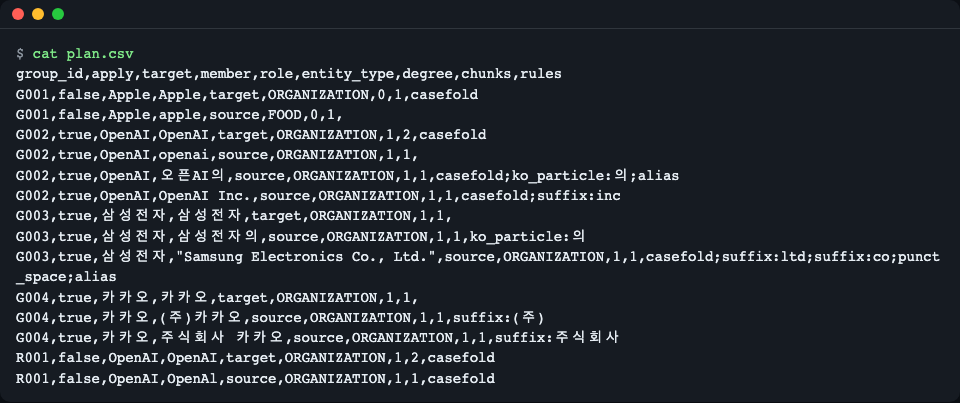 One row per node. Open it in a spreadsheet and change
apply to true or false, or edit target, before you apply. CSV column names are always English.
Rows with the same group_id form one merge. Edit the CSV (or plan.json) freely; apply checks the result again and rejects empty sources, a target that is also a source, and overlapping groups (exit code 2).
3. Explain one name
uv run lightrag-dedupe explain "오픈AI의" --in samples/sample_kg --aliases samples/aliases.csv --lang en
name: 오픈AI의   entity_type: ORGANIZATION
1. casefold -> '오픈ai의'   (upper/lower case ignored)
2. ko_particle:의 -> '오픈ai'   (Korean particle removed) - the remaining stem is in the alias table
3. alias -> 'openai'   (replaced by the alias table's canonical spelling)
key: openai
other nodes with the same key:
  - OpenAI
  - OpenAI Inc.
  - openai
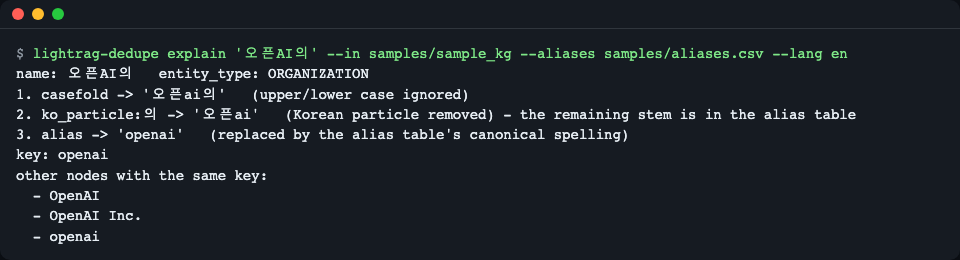 Each numbered line is one rule and the name it produced. Nodes that end with the same
key are one group.
4. Preview the apply
uv run lightrag-dedupe apply plan.csv --working-dir samples/sample_kg --lang en
plan: 3 groups to apply (2 marked apply=false, 0 already done)
dry-run: nothing was changed.
[1/3] G002: amerge_entities(['openai', '오픈AI의', 'OpenAI Inc.'] -> 'OpenAI')
[2/3] G003: amerge_entities(['삼성전자의', 'Samsung Electronics Co., Ltd.'] -> '삼성전자')
[3/3] G004: amerge_entities(['(주)카카오', '주식회사 카카오'] -> '카카오')
pre-check passed: every source exists in the graph exactly as written.
to apply for real, run the same command with --yes.
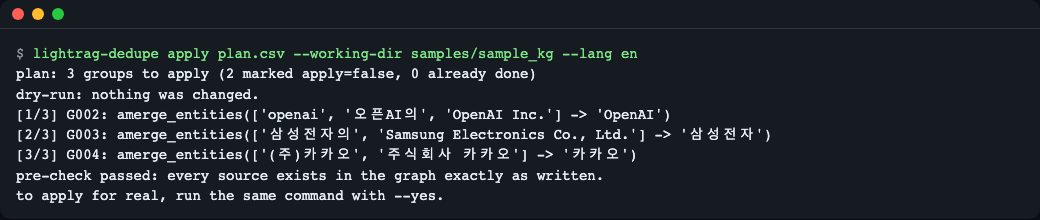 Nothing changed. The pre-check confirms every source name still exists in the graph exactly as written; if not, nothing is touched and the exit code is 3.
5. Apply for real, and undo
The Python path needs a small factory function that builds your LightRAG instance (not yet initialized) exactly as in your indexing script, with your embedding function. samples/demo_factory.py is a template. To try it safely, first create a throwaway LightRAG working folder from the bundled sample (offline, from a clone):
uv run python -c "from lightrag_dedupe.demo import create_sample_working_dir; create_sample_working_dir('rag_storage')" 2>/dev/null
Then apply with the bundled mock factory:
RAG_WORKING_DIR=rag_storage uv run lightrag-dedupe apply plan.csv --rag samples/demo_factory.py:build_rag --yes --lang en
plan: 3 groups to apply (2 marked apply=false, 0 already done)
backup: /…/rag_storage.lightrag-dedupe-backups/20261127T005706Z
[1/3] G002: merging 3 nodes into 'OpenAI'
[2/3] G003: merging 2 nodes into '삼성전자'
[3/3] G004: merging 2 nodes into '카카오'
done: 3 groups merged.
LightRAG prints many INFO log lines to stderr while merging; add 2>/dev/null to hide them.
Before merging, the whole working folder is copied to <working-dir>.lightrag-dedupe-backups/<timestamp> with a sha256 manifest. To undo (stop any LightRAG process using that folder first):
uv run lightrag-dedupe restore rag_storage.lightrag-dedupe-backups/20261127T005706Z --working-dir rag_storage --yes --lang en
restored 12 files into /…/rag_storage.
The timestamp folder name is the one printed on the backup: line of your own apply run (use that, not the one shown here). Without --yes, restore only verifies the backup and says how many files would be restored. Running apply again is safe: groups already done are skipped (recorded in apply-log.jsonl), and when you pass --working-dir, groups whose sources reappear (for example after a restore) are applied again.
For a running LightRAG server use --server http://localhost:9621 (calls POST /graph/entities/merge). Pass --working-dir for the pre-check and backup, or --no-backup to say you accept no backup. If the server has an API key, set LIGHTRAG_API_KEY.
Use your own LightRAG
Run the tool from the same Python environment as your LightRAG app, because your factory imports your own embedding and LLM packages (openai, ollama, ...). Install it into that environment instead of an isolated tool environment:
uv pip install "lightrag-dedupe @ git+https://github.com/LeeGyeongPil/lightrag-dedupe"
Then write a factory like your indexing script, and point --rag at it (my_factory.py):
from lightrag import LightRAG

def build_rag():
    # same working_dir, embedding_func and llm_model_func as when you indexed
    return LightRAG(working_dir="./rag_storage", embedding_func=my_embedding, llm_model_func=my_llm)
lightrag-dedupe apply plan.csv --rag my_factory.py:build_rag --working-dir ./rag_storage
Gotchas:
- Stop any LightRAG server or process that uses the working folder before
apply --rag; its in-memory state could overwrite the merge. (With --server the server stays up.)
- Do not apply while documents are being indexed; LightRAG answers with a conflict (409) and the group fails. Wait for indexing to finish and run
apply again.
- LightRAG downloads the tiktoken encoding file when it is created. Offline, prepare it first (
lightrag-download-cache) and set TIKTOKEN_CACHE_DIR, or pass your own tokenizer in the factory.
- Names in the plan must be written exactly as stored (case, spaces, punctuation); the pre-check rejects anything else.
Settings
| Setting |
Meaning |
--lang en\|ko |
Screen language. Order: --lang, then LIGHTRAG_DEDUPE_LANG, then LC_ALL / LC_MESSAGES / LANG; anything not starting with ko gives English. Rule codes, JSON keys and CSV columns are never translated. |
LIGHTRAG_API_KEY |
Sent as X-API-Key for apply --server, only if your server has a key. See .env.example. The tool does not load .env itself. |
--aliases FILE |
CSV with columns variant,canonical for spellings no rule can derive (오픈AI → OpenAI). See samples/aliases.csv. |
--near 0.6 |
Trigram similarity needed to list a near pair for review (0 to 1). |
--workspace NAME |
LightRAG workspace sub-folder inside the working folder. |
scan supports the default NetworkX storage (a .graphml file). Neo4j or PostgreSQL graphs are not scanned yet, though apply --server works with any storage the server uses.
Language









