litetune
litetune.dev · Measurements · Models
Full or LoRA fine-tuning of small models such as Gemma and Qwen, conversion
to .litertlm for LiteRT-LM on native devices, and a comparison of the result
with the model it came from.
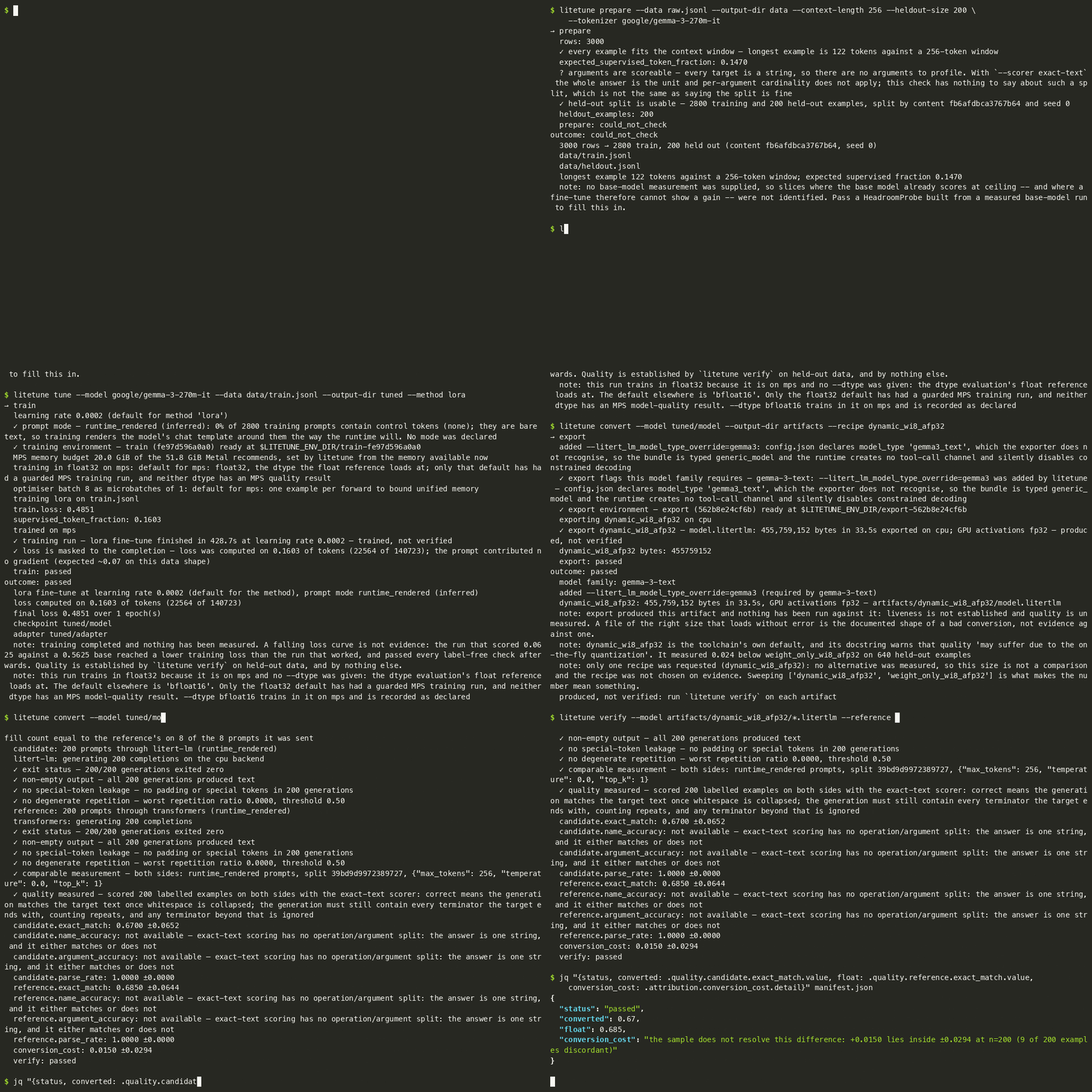
A real run of litetune 0.9.1 on an Apple M5 Pro: google/gemma-3-270m-it, LoRA, 2,800 banking77 rows to train on and 200 held out. The commands ran for nine and a half minutes; the recording cuts every pause to 1.5 s.
Getting from a Hugging Face checkpoint to a model that works inside your app is
a long road — LoRA, merge, export to .litertlm, bundle metadata — and a
mistake at any step produces a file of the right size that loads without error
and is broken while every check stays green. litetune walks that road and knows
the traps on it.
The output is a .litertlm bundle: what LiteRT-LM loads — natively on
Android, iOS, macOS, Linux and Windows, with GPU acceleration on each. The
flutter_gemma plugin runs it through the LiteRT-LM C API on all five;
Google's AI Edge Gallery loads
the file directly if you only want to try it on a device. Web exists as a
text-only preview that supports neither function calling nor LoRA, so a
tuned tool-calling model is native-only for now. convert --npu also compiles a
generation bundle for a Qualcomm NPU, for the families that have run on one
(below); an Intel Lunar
Lake NPU ran single-chunk prompts of a hand-compiled one. The conditions are under
Limitations.
Any task shaped as prompt → completion works. What "correct" means is the one
thing you choose: --scorer tool-call for function calling, where the operation
name and every argument value must match, or --scorer exact-text where there
is one right string. Everything after scoring — the paired comparison, the
intervals, whether a difference resolves, the exit code — reads only whether
each example was right, so it does not know or care which task you brought.
- prepare — validate the data and make a reproducible train/held-out split
- tune — LoRA or full fine-tuning, with the wiring the export needs
- convert — checkpoint to
.litertlm, across quantization recipes
- verify — compare the converted model with its float reference before you ship
- bundle — package the artifact with what was measured about it
litetune env shows the environments the stages cached, and --clean removes
them.
Bring your own checkpoint and skip the first two steps, or bring a .litertlm
and its float checkpoint and run only verify.
Alpha. Measured end to end on twelve models: google/functiongemma-270m-it
with the tool-call scorer, and google/gemma-3-270m-it,
google/gemma-3-1b-it, Qwen/Qwen3-0.6B, Qwen/Qwen3-1.7B,
Qwen/Qwen2.5-0.5B-Instruct, Qwen/Qwen2.5-1.5B-Instruct,
Qwen/Qwen3.5-0.8B, Qwen/Qwen3.5-2B, openbmb/MiniCPM5-1B,
ibm-granite/granite-4.1-3b and
google/gemma-4-E2B-it with exact-text on the same 77-way intent task —
every headline candidate evaluated on LiteRT-LM's CPU backend, and two Qwen3
artifacts also evaluated on a phone's CPU and GPU,
all in MEASUREMENTS.md.
Qwen3.5's rule hands the exporter LiteRT-LM's Qwen 3.5 chat template, edited
so that it renders a single turn as the checkpoint's own does, needs a
transformers floor, and gives every prompt verify scores an Engine of its
own (google-ai-edge/LiteRT-LM#3165). Gemma 4 exports once you name the variant
— E2B or E4B — because the chat template override is per-variant; a bare
gemma-4 is refused rather than guessed at, and the refusal names the flag
to pass if you want to choose the template yourself. It carries two numbers
the others do not: an earlier conversion cost measured on its untouched base
weights, which used prompts listing all 77 labels and so does not sit beside
the eleven above it, and a comparison of two LoRA runs that differ only in
which projections they adapt — the seven litetune names against the two peft
would have chosen, which is 24 points apart. On a multimodal checkpoint
litetune keeps a LoRA run inside the text tower; tune says so in its own
output. Try it on yours and open an issue.
Install
pip install litetune
Or through Homebrew, which brings its own Python 3.12:
brew install DenisovAV/tap/litetune
Linux, macOS on Apple Silicon or Windows on x64, Python 3.10–3.12 — with
convert needing Linux x86_64 or an Apple Silicon Mac, for the reason below.
The pinned wheels set the minimums. On Linux: glibc 2.27 for convert,
verify and towers (litert-lm-api and litert-converter are
manylinux_2_27); for tune, glibc 2.17 on Python 3.10–3.12, where it pins
sentencepiece==0.2.0 (manylinux2014), and 2.27 on 3.13, where it pins
sentencepiece==0.2.1, the first with cp313 wheels and manylinux_2_27. On
macOS: 12 for convert, verify and towers (litert-lm-api is
macosx_12_0_arm64) and 11 for tune. musl Linux, Alpine's, has none of them. Each stage checks, before pip runs, that
every pin it installs publishes a wheel on PyPI that this interpreter accepts —
the whole tag, matched as pip matches it — and refuses by naming the one that
does not: the runtime's native library litert-lm-api and torch==2.5.1
publish none for Intel Macs, 32-bit Python or an ARM64 Python on Windows, so no
stage that builds an environment runs there. The tag is the interpreter's, not
the machine's: an x64 Python on Windows 11 on Arm, which runs x64 programs under
emulation, is checked as x64 and pip installs win_amd64 wheels into it, as for
any x64 install; litetune has not been run there. Installing from another index
or a wheelhouse that has a wheel PyPI lacks, set
LITETUNE_ALLOW_MISSING_WHEELS=1: the refusal becomes a note, and pip is asked.
On Linux you also need
libvulkan1 —
litert-lm dlopen()s a Vulkan-linked library even for the CPU backend, and
without it every invocation, --help included, dies in under a second:
sudo apt-get install -y libvulkan1 # Debian/Ubuntu
macOS needs nothing extra; Colab works out of the box.
Windows runs everything but convert. prepare, tune, verify and
bundle install and run on Windows x64: every pin in those environments has a
wheel that installs there — win_amd64 for the ones with native code,
litert-lm-api included, and py3-none-any for the rest. convert cannot,
because litert-converter — the
MLIR converter litert-torch depends on — has never published a Windows wheel
or a source distribution, so convert refuses there before installing anything
and says where it does run.
Upstream tracks it as
litert-torch#968,
where a collaborator says Windows is planned and gives no date. Google's
verified platforms
page says the same: "Windows: litert compile and litert convert not
supported yet." The same gap covers ARM Linux and Intel macOS. There are wheels
for macOS on Apple Silicon, though upstream's README still names Linux as its
operating system, and this project has only ever converted on Linux.
Two ways round it. Run everything under WSL2 with Ubuntu — install
pythonX.Y-dev, or the build stops on a missing libpython3.x.so
(litert-torch#74),
and keep the checkout and ~/.cache/litetune on the Linux filesystem rather
than under /mnt/c. Or
convert on any Linux machine and bring the .litertlm back: verify takes it
with the float checkpoint it came from and asks nothing of the export
environment.
tune on Windows trains on the CPU unless you say otherwise, and that is
PyTorch's packaging rather than litetune's: every CUDA dependency of
torch==2.5.1 is marked platform_system == "Linux", so the wheel PyPI serves
Windows is the CPU build. PIP_EXTRA_INDEX_URL=https://download.pytorch.org/whl/cu124
reaches the stage install and gets you the CUDA one — after litetune env --clean, because an environment's identity is a hash of the interpreter and
the pins, which an index does not change, so a cached CPU environment would be
reused in silence. Either way the run records what it got: device and
cuda_build are in the training metrics.
Python 3.13 runs bundle, and prepare without --tokenizer, everywhere;
tune, and prepare --tokenizer, on Linux x86_64 only; and convert and
verify nowhere. Each stage builds its environment from the interpreter you
launched: torch==2.5.1 publishes its one cp313 wheel for manylinux x86_64,
and numpy==2.0.2, pinned for convert and verify, publishes none past
3.12. Past a ceiling the command refuses and names the pin that set it.
Each of tune, convert and verify builds its environment on first use and
caches it. Measured on macOS:
| stage |
pulls |
size |
verify |
both of the below |
~740 MB |
tune |
torch, transformers, peft |
588 MB |
convert |
the litert-torch export toolchain |
1.6 GB |
bundle, prepare |
nothing |
— |
On Linux the training environment is larger: the torch wheel pulls its CUDA
dependencies, several hundred megabytes each.
litetune env shows what is on disk and litetune env --clean removes it; the
next stage that needs one rebuilds it. Worth knowing because a provision that
died halfway leaves a directory that looks like a working one from the outside,
and because the cache key includes the Python version — running litetune under
two Python versions builds two sets, while two interpreters of the same version
share one.
Which runtime each version measures on
A number from verify belongs to the runtime and the CPU that produced it --
its model name and its instruction-set features together. On one CPU model litert-lm 0.17.1 and 0.16.1 gave the same per-token scores on
1 of 36 prompt-bundle scorings, and one runtime on an Intel and an AMD server CPU
on none, while
each runtime on one CPU model reproduced every score to the bit -- 0.17.1 on the
Intel model with 1, 4, 8, 16 or 32 threads alike (MEASUREMENTS.md).
So each litetune release pins one runtime, and from 0.2.0 every
verify manifest records the litert-lm version and the CPU its candidate ran on
where the driver could read them, and says so when it could not read the version; 0.1.x recorded the version on the
tool path only and the CPU nowhere.
On a Mac whose CPU has SME2 (sysctl hw.optional.arm.FEAT_SME2 prints 1),
Google's litert-lm 0.18.0 wheel gave results that depend on the thread count
(XNNPACK #11789): on an M5 Pro, an int8 decision bundle scored at four threads
differed from one thread by up to 0.481 nats a token on 12 of 50 rows, and one
thread gave the scores of a run with SME hidden, bit for bit. So on such a CPU,
or a Mac whose answer litetune cannot read, every LiteRT-LM CPU run verify
drives uses one thread, whatever --threads asks: option scoring and its float
twin, EmbeddingGemma 2's engines, text and tool generation, and the rendering
check. The manifest records the threads used, the threads asked for and why,
and says so in its limitations; what one thread changes in generated text was
not measured. Off such a CPU nothing changes.









