PowerContext
Context that stays with the work — across sessions, agents, and people.




English · 中文 · 日本語
Website · Quickstart · Manual startup · Integrations · Benchmarks · Interfaces
New in 1.6.0
Knowledge bases debut, and the Gateway reaches its stable release. Bring existing documents into searchable knowledge bases and spend less uncached input on turning Agent conversations into long-term memory.
- Knowledge bases: import Markdown and PNG/JPEG/WebP images, search with keyword and vector retrieval, and inspect, edit or reprocess revisioned document chunks in the Dashboard. Install the optional plugin and dependencies using the knowledge-base guide. PDF/Office import and answer generation are not included.
- Gateway token savings: optional prefix extraction appends memory instructions to the Agent's exact conversation prefix so the provider can reuse its prompt cache. Core selects it only when estimated to cost less than normal extraction. The Gateway enables prefix extraction by default; capture remains opt-in and the Server callback URL must be configured. Cache hits, conversation length and fallback requests determine actual savings. Codex subscriptions support it with a non-enforcing Core. See Gateway setup.
- A more complete workflow: plugin hot reload, Server/device Source runners, Deep Agents integration and clearer processing diagnostics.
See the 1.6.0 release notes for setup, compatibility and database maintenance requirements.
What is PowerContext?
PowerContext is an open-source context service for AI agents. It keeps the durable part of your work — decisions, constraints, evidence, progress — outside any single conversation, so the next session, the next agent, or the next person can pick up from the current state instead of rereading the transcript.
You can use it as a ready-to-run Server or embed the same contracts in another application:
| Layer |
What it owns |
Use it when |
| Core protocol |
Source, Artifact, and Trigger contracts |
Embedding PowerContext or adding a component |
| Builtin runtime |
Memory, Handoff, Experience, and Skill services, scheduling, inference, and supported storage backends |
Running the standard local Server |
| Server and integrations |
HTTP/MCP, Python Client, CLI, Dashboard, and Agent plugins |
Connecting an Agent or application |
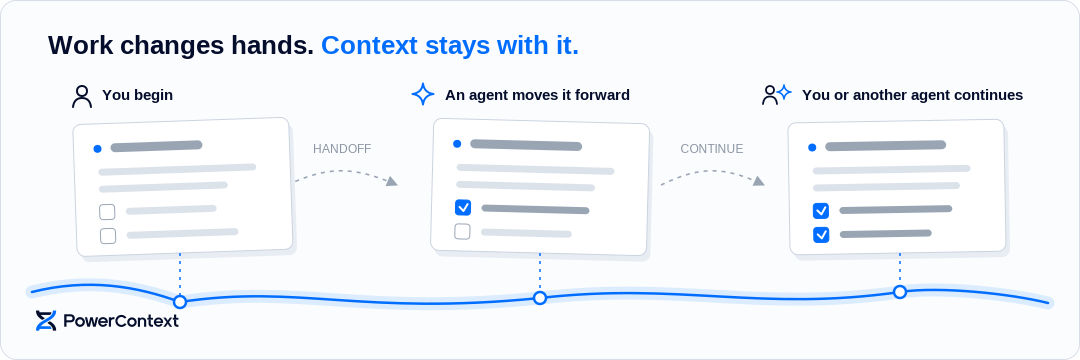
Work rarely ends with whoever starts it. You hand a task to an agent, the agent gets part of the way, and later you or someone else takes over. The reasoning and current state often stay behind in that conversation. PowerContext moves them out of the conversation and into revisioned artifacts you can inspect:
Everything belongs to a Scope — one isolated Source journal, Memory lifecycle, review inbox, and Handoff history. A Scope ID selects data; it does not prove user identity, grant tool access, or authorize execution.
Scope
├── Source journal    # evidence: prompts, documents, work contracts, task outcomes
├── Memory            # atomic-memory/ARTIFACT_ID@REVISION — decisions, constraints, next steps
├── Review Inbox      # pending Experience and Skill candidates awaiting a decision
├── Handoff history   # handoff/ARTIFACT_ID@REVISION — work continuity across sessions
└── Topic Memory      # extracted in the background from eligible Sources
For Kubernetes deployments with external OceanBase, see the Helm chart and deployment guide.
Recordings show the running Dashboard and native Desktop preview in their light themes, using synthetic demonstration records.
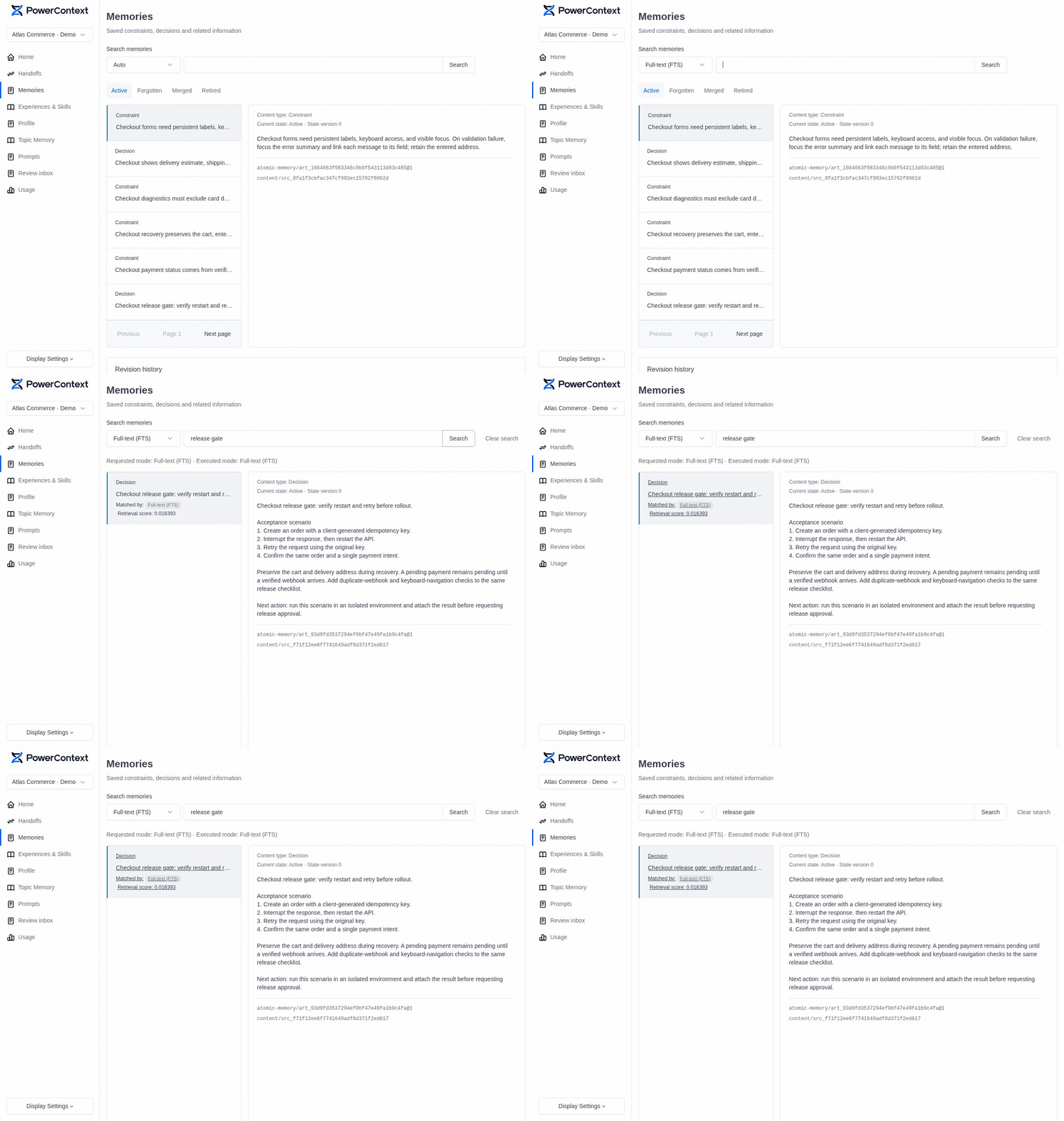
Memory — decisions and constraints that outlive a session
Memory is a revisioned Artifact family for reusable decisions, constraints, facts, state, and next steps. An entry is active, forgotten, merged, or retired. Forgetting one through POST /v1/atomic-memory/lifecycle takes it out of active recall while its content and history stay available and restorable, without advancing the content revision. Explicit Memory writes need no model at all; extraction from captured Sources needs a configured generation pipeline.
"Don't refactor the old auth module — mobile is still using it."
Context this expensive shouldn't depend on someone repeating it in every session.
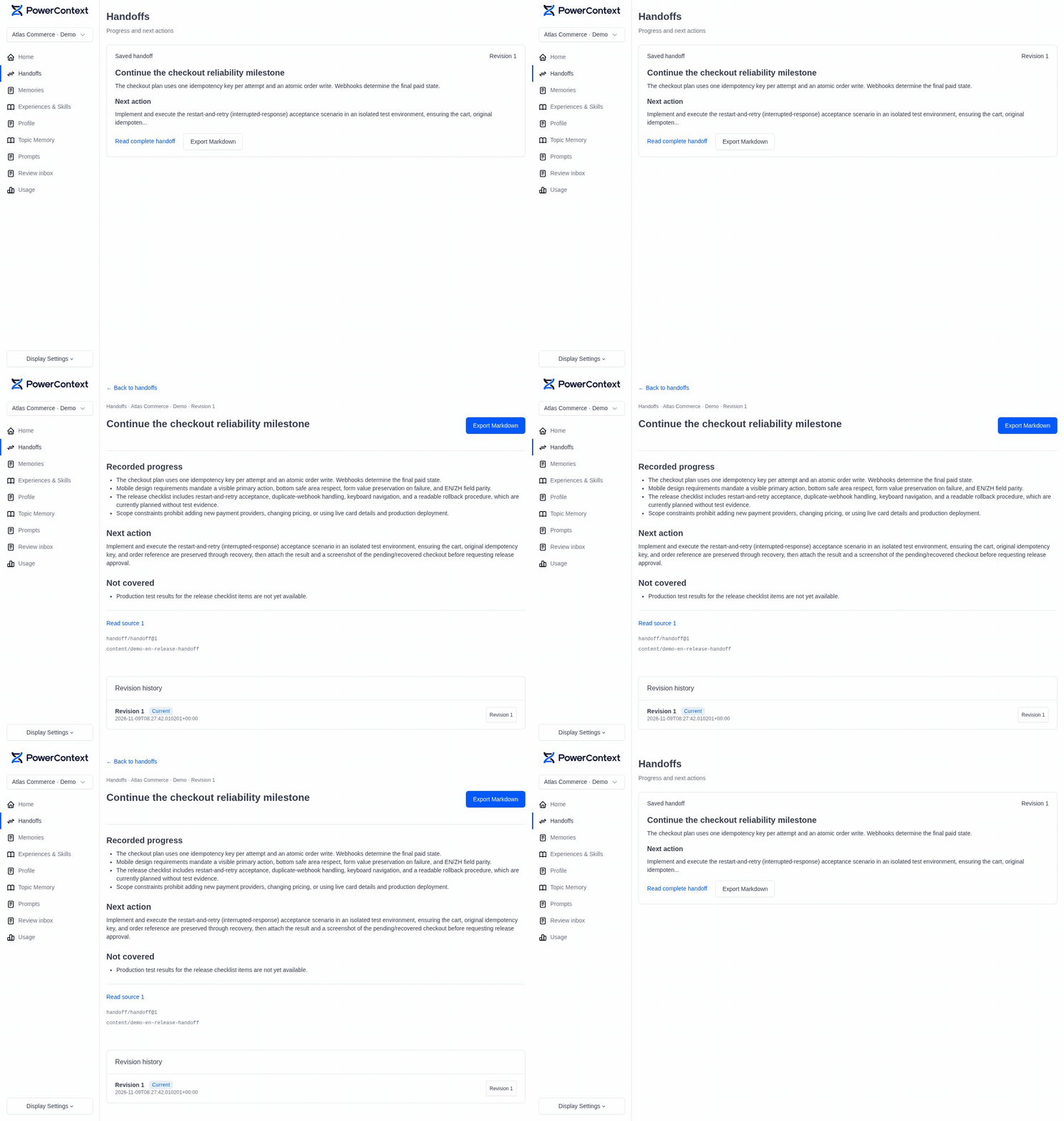
Handoff — the current state, not the whole transcript
Handoff records work continuity as a four-step loop:
Work Contract → Prepared Handoff → Acknowledgement → Task Outcome
handoff_current_work captures an inspected boundary and returns a temporary Prepared Handoff. Committing it creates a durable Revision only when the user wants a milestone. The receiver resolves the Handoff and records an Acknowledgement; a Task Outcome preserves the final status and checks as Source evidence. The Handoff Report projects the latest Revision in each selected Scope — read-only, and it never rewrites Memory.
Experience — what worked, reviewed before it is reused
An Experience records a situation, an action, an observed outcome, and a reusable lesson. It enters a scope-local Review Inbox as a pending Candidate. Review writes use expected_version, so a decision cannot silently apply after another writer changes the proposal. Approval writes an immutable Revision; rejection records a reason. Both are terminal, and only the approved current head takes part in recall — pending, rejected, and historical Revisions are excluded.
Skill — a reviewed procedure, exported on purpose
A managed Skill holds a name, a discovery description, instructions, validation checks, and lineage. Approval does not install or execute it: an exact approved Revision must be exported explicitly before an Agent host can discover the host-local projection.
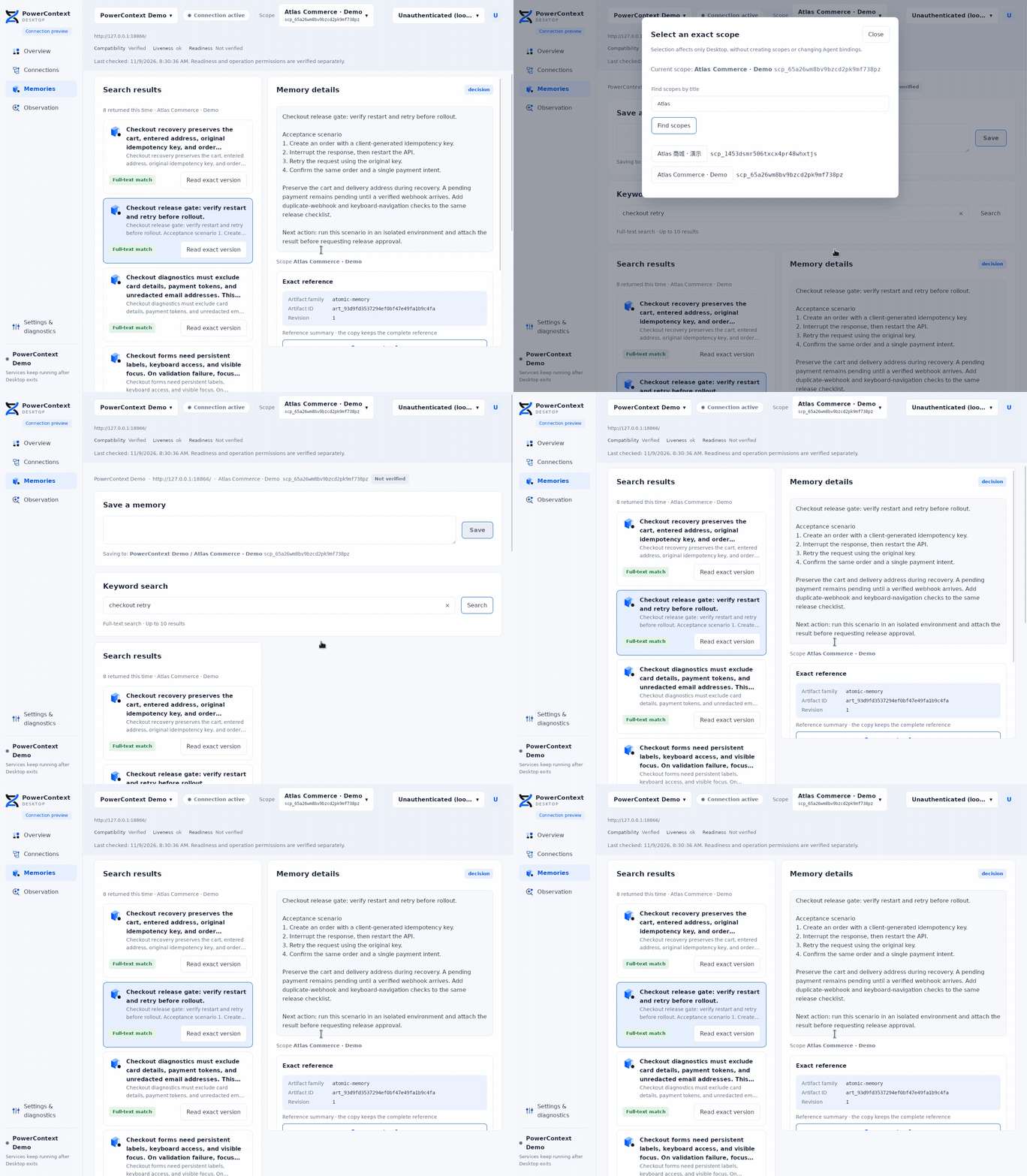
Desktop — inspect project memory from a connected workspace
Connect to a Server, select an exact Scope, and search its memories. Open a result to read its saved revision, or save a note for the next session. The Desktop preview is intended for internal validation; signed distribution and platform release qualification remain separate work.
Operational metrics expose dependency observations, processing freshness, and attempt latency, including a protected metrics-only endpoint for standalone background deployments.
Why PowerContext?
- Context lives outside the conversation. Memory, Handoff, Experience, and Skill are server-side artifacts, not files inside one agent's home directory. Switch from Codex to Claude Code — or hand the work to a teammate — and the work travels with you.
- Everything is revisioned and traceable. Each Artifact is addressed as
FAMILY/ARTIFACT_ID@REVISION. The Artifact ID stays stable while approved replacements create later Revisions, and reading an exact reference returns that historical snapshot even after the family head advances.
- Generation, review, and execution are separate steps. A model proposes content, review approves a Revision, and export creates a host-local copy. None of those steps grants an Agent permission to execute instructions. See Interfaces for what each surface exposes today.
- Recall is bounded, not dumped.
PreparedContext selects configured sections from active Memory and approved Experience, with optional Profile snapshots and Topic Memory, then applies a shared byte budget and returns ready content or empty. Recalled content is history, not an instruction authority: the receiving Agent still follows current instructions and checks live workspace state.
- Review before reuse. Experience and Skill pass through a review decision that is terminal either way, and approval writes an immutable Revision. With access control enforced, approval requires
scope.review. An authorized Agent can approve its own Candidate; separate submission and review with distinct identities and permissions when a person must decide.
- One Server, several views of the same contract. HTTP is the complete remote application contract. The Python Client gives typed access, MCP is a curated Agent-facing projection, and Core protocols let an application assemble its own Source, Artifact, and Trigger implementations.
How it compares
The comparison assumes typical single-agent or host-local setups; exact behavior depends on how each system is deployed.
|
Re-reading chat history |
RAG over transcripts |
Host-local memory files |
PowerContext |
| Survives a new session |
manual |
yes |
yes |
yes |
| Survives switching agents |
no |
no |
no |
yes |
| Handing work to a person |
manual |
manual |
manual |
Handoff, first-class |
| Reusable procedure |
no |
no |
prose only |
Experience / Skill |
| Earlier revisions kept |
no |
depends on the index |
only via git |
immutable Revisions |
| Review before reuse |
n/a |
no |
no |
Review Inbox |
| Bounded recall for one turn |
no |
partial |
no |
PreparedContext byte budget |
| Inspectable outside the Agent |
no |
no |
yes |
yes |
Proof it works
-
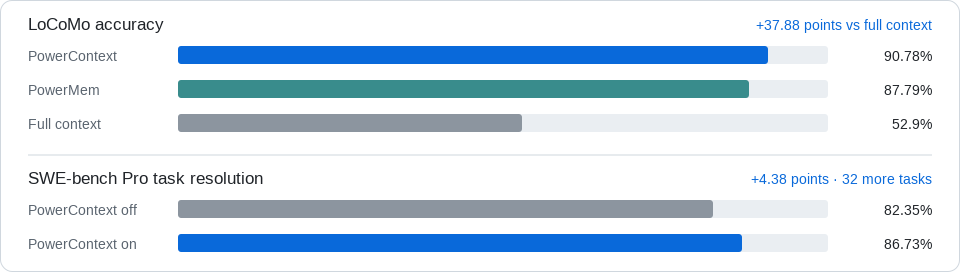
Long-conversation memory (LoCoMo; 1,540 scored questions across categories 1–4): 90.78% accuracy, against 52.9% for full-context replay — +37.88 points over full context.
-
Coding tasks (SWE-bench Pro paired comparison): approximately 225.32 million input tokens per 100 tasks with PowerContext on, versus 302.18 million with it off — approximately 25.4% fewer input tokens, or 76.86 million fewer per 100 tasks.
-
Retrieval quality (LoCoMo Plus), native PowerContext against PowerContext with Jev candidate filtering after retrieval. Each model is used for both Memory extraction and answering; embeddings use qwen3.7-text-embedding (1024 dimensions):
| Model |
PowerContext |
PowerContext + Jev |
Difference |
| GPT-4o-mini |
40.855% |
49.78% |
+8.925 points |
| Qwen3.7-plus |
60.37% |
68.947% |
+8.577 points |
| GPT-4o |
65.082% |
69.28% |
+4.198 points |
Full methods, results, and limitations: benchmarks. Two caveats we would rather state than bury: the six LoCoMo Plus scores above were supplied by the project owner, and their run artifacts are not publicly available for verification — the published instructions reproduce the harness, not those scores. Windows support is experimental.
Quick start
If you want to manually configure and start PowerContext, see the manual startup guide.
PowerContext keeps durable project context outside any single chat. A first run follows this path:
Agent input → Source evidence → Memory / Topic Memory → PreparedContext → next session or Agent
PowerContext 1.6.0 includes an interactive setup wizard. You need Python 3.11+, Git, and uv; uv can provision Python when needed. To connect an Agent, also install its CLI. In the wizard, choose Basic memory for explicit saves and recall without model APIs; Full memory requires separate Generation and Embedding API credentials. For a local Server without model APIs, see Install and run. macOS and Linux are supported; Windows support is experimental. To provision Python and uv automatically, use the installation script.
To use an existing subscription for background generation, configure it manually in the saved .env; the wizard does not offer subscriptions yet. Embedding still needs its own connection, Topic Memory and Dream are unsupported on this path, and inference protection must remain disabled. See subscription setup.
Choose the path that matches your goal:








