rag-kit




Ask questions about your own PDFs and notes, and get answers that show which
page they came from.
rag-kit is a small RAG toolkit for Python. You give it documents (PDF, .txt
or .md). It splits them into chunks and stores them in a vector database
(Qdrant). When you ask a question, it finds the chunks that match best, and
Gemini writes an answer from those chunks only. Each claim in the answer is
tagged [S1], [S2]… so you can check it against the source.
New to RAG? RAG (retrieval-augmented generation) means the AI first
looks up the relevant parts of your documents, then writes the answer
from them. It answers from your files instead of from memory, and it tells
you when your files don't contain the answer.
Contents: Example · How it works ·
Quick start · Commands ·
Browser UI, Python and API ·
Install with pip · Settings ·
Troubleshooting
Example
A 296-page programming book, indexed and then asked a question (output
shortened):
$ rag-kit ingest data/book.pdf
[2] Extracted  : 296 pages, 410,128 characters
[4] Chunked    : 620 chunks (size=1000, overlap=150)
[6] Qdrant     : collection 'pdf_rag' now holds 620 vectors

$ rag-kit ask "What is dynamic programming and when should it be used?"
Dynamic programming is a technique that combines the correctness of complete
search and the efficiency of greedy algorithms [S1]. It can be applied if a
problem can be divided into overlapping subproblems that can be solved
independently [S1].

Sources:
  [S1] book.pdf, page 75   (score 0.731)
  [S2] book.pdf, page 144  (score 0.668)
How it works
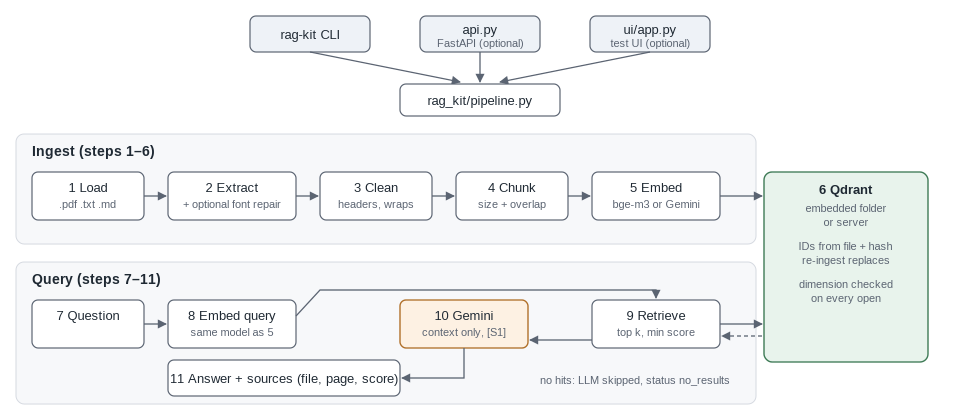
There are two phases:
- Ingest, once per document: load the file → extract the text page by
page → clean it → split it into overlapping chunks → turn each chunk into a
vector (embedding) → store the vectors in Qdrant.
- Ask, for every question: turn the question into a vector → find the
closest chunks → Gemini answers from those chunks only → you get the
answer plus its sources.
Each step is its own short module in
src/rag_kit/,
so you can read, test or replace any one of them.
pipeline.py
connects them, and the command line, the browser UI and the API all use it.
| Step |
Module |
What it does |
| 1 Load |
step01_load_pdf.py |
accepts .pdf, .txt, .md; checks the file before any work |
| 2 Extract |
step02_extract_text.py |
one document per PDF page; optional font repair |
| 3 Clean |
step03_clean_text.py |
rejoins broken lines and hyphenated words, fixes ligatures like fi, drops repeating headers, footers and table-of-contents pages |
| 4 Chunk |
step04_chunking.py |
recursive splitter with overlap; a chunk_id per document |
| 5 Embed |
step05_embedding.py |
local Hugging Face model (default BAAI/bge-m3) or Gemini |
| 6 Store |
step06_vector_store.py |
Qdrant, either a folder on disk or a server |
| 7 Question |
CLI, API or UI |
where the question comes from |
| 8–9 Retrieve |
step08_query_embedding.py, step09_retrieve.py |
cosine search, optional minimum score |
| 10 Generate |
step10_generate.py |
Gemini answers from the context only and tags claims [S1], [S2]… |
| 11 Answer |
step11_answer.py |
the answer plus the source behind each tag |
More detail per step: docs/pipeline.md.
Quick start
You need: Node.js 20 or newer, Python 3.11 or 3.12, and a free
Gemini API key.
1. Create a project. The rag-kit-dev generator makes a folder with a
settings template, a data/ folder and a Python environment with rag-kit
installed.
npx rag-kit-dev@latest my-rag
It asks how to create embeddings:
| Choice |
Install size |
Indexing cost |
| local (default) |
large: PyTorch plus a 2.2 GB model, downloaded on first use |
free, works offline |
| gemini |
small, no PyTorch |
uses your Gemini quota |
To skip the question, add --embeddings gemini (or --embeddings local).
Other options (--no-install, --python, --gpu, …) are in the
generator README.
2. Add your API key.
cd my-rag
Copy-Item .env.example .env          # macOS/Linux: cp .env.example .env
Open .env and set GOOGLE_API_KEY=your-key. Never commit .env.
3. Activate the environment and check the setup.
.venv\Scripts\Activate.ps1           # macOS/Linux: source .venv/bin/activate
rag-kit check
4. Add a document and ask. Copy a PDF into data/, then:
rag-kit ingest data/your-document.pdf
rag-kit ask "your question"
With local embeddings, the first ingest downloads the model once. Indexing a
300-page book took about 10 minutes on a laptop CPU.
Commands
| Command |
What it does |
rag-kit check |
checks settings, installed packages and the vector store (--deep also loads the model) |
rag-kit ingest FILE … |
adds documents; adding a file again replaces its old chunks |
rag-kit ask "question" |
answers with sources; without a question it starts an interactive session |
rag-kit search "question" |
shows the matching chunks only, with no AI call |
rag-kit documents |
lists the indexed files and their chunk counts |
rag-kit delete FILE |
removes one file's chunks (asks first; -y skips the question) |
rag-kit ui |
opens the browser UI at http://localhost:8501 |
rag-kit serve |
starts the HTTP API at http://localhost:8000 |
Every command accepts --project DIR and --collection NAME.
rag-kit ingest data/book.pdf notes.md        # several files at once
rag-kit ingest                               # the file named in PDF_PATH
rag-kit ingest report.pdf --collection test  # a separate collection
rag-kit ingest book.pdf --recreate           # empty the collection first
rag-kit ask "..." --show-chunks              # also print each chunk in full
rag-kit ask "..." -k 8 --min-score 0.5       # more chunks, drop weak matches
rag-kit ask "..." --json                     # machine-readable output
rag-kit search "..." --full                  # full chunk text, no AI call
rag-kit documents --json
Tip: ask specific questions. Each answer is built from only the top few
chunks (TOP_K, 4 by default). "What is a segment tree?" works well. "Summarize
chapter 1" doesn't, because a whole chapter is spread over dozens of chunks.
- Adding a file again replaces it. Chunk IDs come from the file name,
content and position, so ingesting a file again overwrites its chunks and
removes older ones with the same name. Nothing is duplicated. Two different
files with the same name in one collection count as one document.
- Changed the embedding model? Use
--recreate or another collection.
A collection only works with the model that built it, and rag-kit stops with
an error instead of mixing them.
- File names that start with
- look like options. Write ./-name.pdf,
or put -- before the files: rag-kit ingest --font-repair on -- -name.pdf.
rag-kit documents --json prints
{"collection": str, "total_chunks": int, "documents": [{"file": str, "chunks": int}]},
with files sorted by name.rag-kit search --json and rag-kit ask --json write progress to stderr,
so stdout holds only the JSON.
Browser UI, Python and API
Browser UI
pip install "ragkit-dev[ui]"
rag-kit ui                           # http://localhost:8501
The UI listens on localhost only. To open it from another device on your
network, run rag-kit ui --host 0.0.0.0; anyone on that network can then use
it, including your API key's quota.
A chat with your documents. The question box stays at the bottom of the page,
so you can keep asking; each answer shows its sources as cards with the file,
page, relevance and full text. Switch to Sources only to see the matching
chunks without an AI call. The sidebar library adds documents (drag and drop)
and deletes them, and New chat starts over. Uploads are saved in the
project's uploads/ folder. It is a tool for testing, not a production front
end.
Python
from rag_kit import Pipeline, Settings

settings = Settings.load("path/to/project")    # reads path/to/project/.env
pipeline = Pipeline(settings=settings)
pipeline.ingest("data/book.pdf")
result = pipeline.ask("What is a noun?")
print(result.status, result.answer_without_markers)
for source in result.sources:
    print(source["marker"], source["file"], source["page"], source["score"])
pipeline.close()
Settings.load() with no folder finds the project the same way the CLI does.
Change values with settings.replace(top_k=8).- Loading settings never changes
os.environ, and API keys are hidden from
its repr.
- The pipeline prints nothing by itself. Call
rag_kit.log.show_progress(), or
configure logging for the rag_kit logger, to see step progress.
HTTP API
pip install "ragkit-dev[api]"
rag-kit serve --port 8000            # or: uvicorn rag_kit.api:app --port 8000
GET /health → {"status": "ok", "ready": true}POST /query with {"question": "...", "top_k": 4} →
{"answer": "...", "status": "answered" | "no_results", "sources": [{"page", "source", "score", "marker", "chunk_id", "text"}]}
The [S1] tags are removed from answer; each source's marker maps back to
them. Errors in the pipeline (including a missing project) return 503 with the
reason, and questions over 4000 characters return 422.
The API has no authentication and listens on 127.0.0.1 only. Don't expose
it to the internet. To build it into another app, use
rag_kit.api.create_app(settings=..., pipeline=...).
Install with pip
Use this instead of the generator if you want rag-kit in an existing project.
py -3.11 -m venv .venv               # macOS/Linux: python3.11 -m venv .venv
.venv\Scripts\activate               # macOS/Linux: source .venv/bin/activate
python -m pip install -U pip
pip install "ragkit-dev[local,gemini]"
The package name is ragkit-dev. pip install ragkit installs a different
project. In code you import rag_kit, and the command is rag-kit. Upgrade
with pip install -U "ragkit-dev[local,gemini]"; pip show ragkit-dev shows
the installed version.
Choose the extras you need:
| Extra |
Adds |
Needed for |
| (none) |
LangChain core, Qdrant, PyMuPDF |
the basics and rag-kit check |
local |
sentence-transformers (with PyTorch) |
local embeddings (the default) |
gemini |
langchain-google-genai |
answers, and Gemini embeddings |
ui |
Streamlit |
rag-kit ui |
api |
FastAPI, uvicorn |
rag-kit serve |
dev |
pytest, httpx, ruff (+ api) |
running the tests |
all |
local, gemini, api, ui |
everything |
Make a project folder. rag-kit keeps your .env, documents and vector
store in a project folder, marked by a file called rag-kit.toml. Nothing is
written inside the installed package.
mkdir my-rag && cd my-rag
echo "# rag-kit project" > rag-kit.toml     # the marker; its contents don't matter yet
# copy .env.example from this repository to .env, then set GOOGLE_API_KEY
rag-kit check
--project DIR, on any command (no marker needed);- otherwise the
RAG_PROJECT_DIR environment variable;
- otherwise the nearest folder at or above the current one that contains
rag-kit.toml.
If none of these applies, the command stops with an error instead of creating
a store in an unexpected place. Relative paths in .env (QDRANT_PATH,
PDF_PATH) are read from the project folder, so commands behave the same in
any subfolder.
On Linux, PyTorch from PyPI pulls in several GB of CUDA libraries. For
CPU-only local embeddings, install the CPU build from PyTorch's own index
first, in the same environment:
pip install torch --index-url https://download.pytorch.org/whl/cpu
pip install "ragkit-dev[local,gemini]"     # keeps the CPU torch

# with uv:
uv pip install torch --index-url https://download.pytorch.org/whl/cpu
uv pip install "ragkit-dev[local,gemini]"
This works on x86_64 and aarch64 with Python 3.11 and 3.12. Later,
pip install -U "ragkit-dev[local]" keeps the CPU build, but
pip install -U torch without the --index-url switches to the CUDA build.
If a CUDA build is already installed, start from a fresh environment, because
reinstalling torch over it leaves the nvidia-* packages behind. Skip the
first command if you want to use an NVIDIA GPU.
Windows and macOS need no extra step.
git clone https://github.com/shamiulriyad/rag-learning.git
cd rag-learning
pip install -e ".[local,gemini]"
Wherever this README says pip install "ragkit-dev[...]", use
pip install -e ".[...]" instead. This repository is itself a project.









