
Scan your whole stack


From OX Research Newsroom






Are you using speakerjoin?
Find out what’s in your code.
Scan your apps free in minutes (opens in a new tab) Read the latest findings
Latest version: v0.1.1
speakerjoin was last scanned on 27 Nov 2026 at version 0.1.1. Risk score 0 of 100. No malicious behavior was detected.
| Version | Published | Status |
|---|---|---|
| 0.1.1 LATEST | 27 Nov 2026 | No rules fired |
| 0.1.0 | 17 Nov 2026 | No rules fired |
Findings for v0.1.1. The score is a capped sum of the weights of the rules that fired — not CVSS, not exploitability, and not a probability. It is not comparable across packages with different scan coverage.
The score describes 0.1.1; other versions have their own rules, not their own score.
The publisher’s own README, as collected from the registry.
English | 한국어


Join a speech-to-text result and a separate speaker diarization result into speaker-labelled transcripts and subtitles (SRT, WebVTT, JSON, Markdown, text), and measure how trustworthy the alignment is. Pure Python standard library, no runtime dependencies, and it works on files, so you need no audio, model or API key.
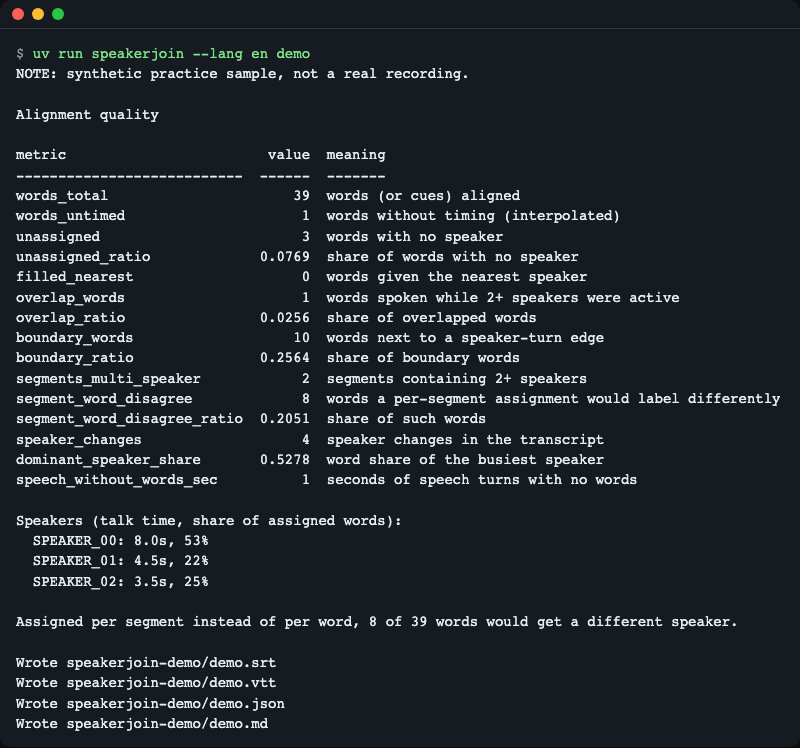
The built-in demo merges a synthetic meeting and prints the quality numbers: 3 of 39 words got no speaker, and 8 words would have a different speaker if you assigned speakers per segment instead of per word.
uv add git+https://github.com/LeeGyeongPil/speakerjoinOr use it from a clone without installing it into a project:
git clone https://github.com/LeeGyeongPil/speakerjoin
cd speakerjoin
uv run speakerjoin demo
Needs Python 3.10 or newer. Runtime dependencies: none. To install uv: curl -LsSf https://astral.sh/uv/install.sh | sh.
Merge the bundled synthetic sample (a faster-whisper style transcript and an RTTM speaker file) and print who said what:
from importlib.resources import files

import speakerjoin as sj

samples = files("speakerjoin").joinpath("samples")
transcript = sj.load_transcript(
    samples.joinpath("meeting.whisper.json").read_text(encoding="utf-8")
)
diarization = sj.load_diarization(samples.joinpath("meeting.rttm").read_text(encoding="utf-8"))

result = sj.merge(transcript, diarization)
print(result.report.words_total, result.report.unassigned, result.report.segment_word_disagree)
print(sj.to_text(result), end="")
39 3 8
SPEAKER_00: Welcome everyone to the weekly sync Next is Bob
SPEAKER_01: Thanks Alice I have two updates Budget is
SPEAKER_02: fine wait
UNKNOWN: no
SPEAKER_00: okay go Let us start with the roadmap review now
SPEAKER_02: Quick question about the 2027 deadline please
UNKNOWN: Thanks allThe first line reads: 39 words, 3 without a speaker, 8 whose speaker would change under per-segment assignment. UNKNOWN marks words that fall outside every speaker turn.
The same thing from the command line, writing a subtitle file with renamed speakers:
uv run speakerjoin merge src/speakerjoin/samples/meeting.whisper.json \
  --diar src/speakerjoin/samples/meeting.rttm -o out.vtt \
  --speaker-map SPEAKER_00=Alice --speaker-map SPEAKER_01=Bob
39 words, 7 utterances, unassigned 3.The summary line goes to stderr; out.vtt starts like this:
WEBVTT

00:00:00.000 --> 00:00:02.900
<v Alice>Welcome everyone to the weekly sync Next

00:00:02.900 --> 00:00:03.600
<v Alice>is Bob

00:00:03.800 --> 00:00:07.250
<v Bob>Thanks Alice I have two updates Budget is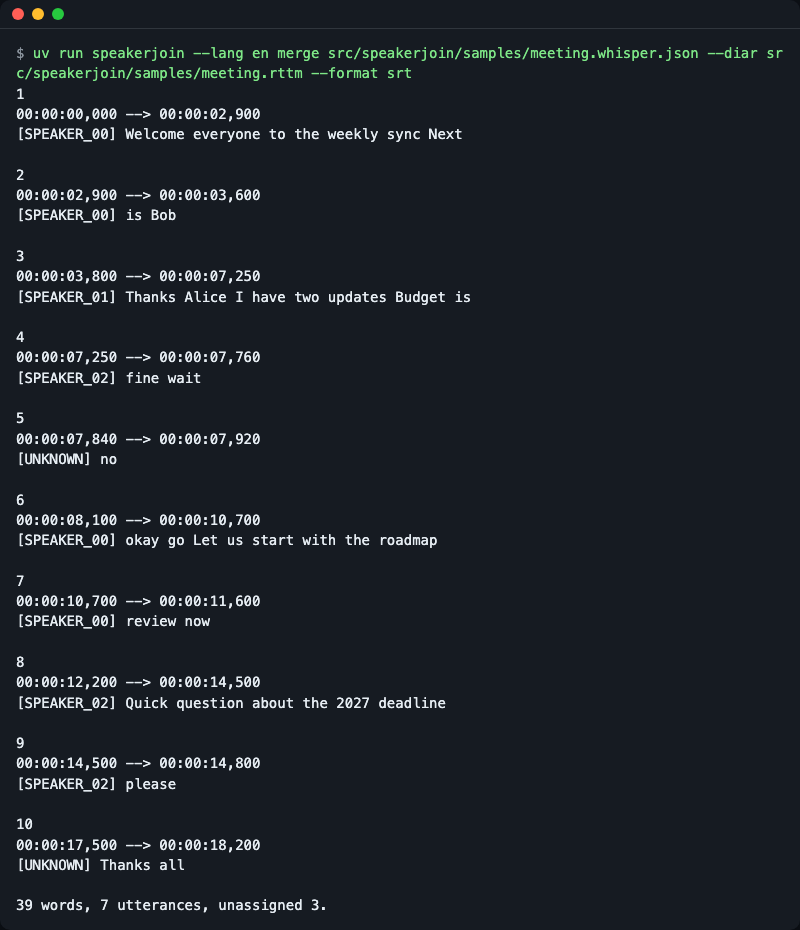
Speaker-labelled SRT. A new cue starts at every speaker change, even in the middle of one transcript segment ("Next" / "is Bob" stay with Alice, "Thanks Alice" starts Bob).
For meeting notes, --format md groups the words by speaker with a start time (uv run speakerjoin merge ... --format md):
# Transcript

**SPEAKER_00** [0:00:00]

Welcome everyone to the weekly sync Next is Bob

**SPEAKER_01** [0:00:03]

Thanks Alice I have two updates Budget is

**SPEAKER_02** [0:00:07]

fine wait
(The first lines of the output; the full text continues with the remaining speaker turns.)
Times are converted to seconds everywhere. Use --stt-format / --diar-format (or format= in Python) to force a format; otherwise it is detected from the shape of the data. speakerjoin formats lists the names.
Speech-to-text input (load_transcript)
| Format | Produced by | Required shape | Word times |
|---|---|---|---|
faster_whisper |
your own JSON dump of faster-whisper segments (it has no native JSON output) | {"segments": [{"start", "end", "text", "words": [{"word", "start", "end", "probability"}]}]} |
yes, if run with word_timestamps=True |
whisperx |
WhisperX result after alignment | same segments[].words[], with score instead of probability; unaligned words (e.g. numbers) may lack start and are interpolated |
yes |
openai_verbose |
OpenAI transcription with response_format="verbose_json" |
{"segments": [...], "words": [{"word", "start", "end"}]}; the words are a top-level list |
only if you request word timestamps |
openai_diarized |
OpenAI diarized transcription | {"segments": [{"start", "end", "text", "speaker"}]} |
no, segment level |
deepgram |
Deepgram response | results.channels[0].alternatives[0].words[] |
yes |
assemblyai |
AssemblyAI transcript JSON | utterances[] or top-level words[]; times in milliseconds |
yes |
srt, vtt |
any subtitle file | cues; WebVTT <v Name> voice tags are read as speakers |
no, one cue is one unit |
Diarization input (load_diarization)
| Format | Produced by | Required shape | Notes |
|---|---|---|---|
rttm |
pyannote (write_rttm), most diarization tools |
lines SPEAKER file 1 START DURATION <NA> <NA> speaker <NA> <NA> |
column 5 is the duration, not the end; pass --file-id when one file holds several recordings |
pyannoteai |
pyannoteAI job result | output.diarization[] and optionally output.exclusiveDiarization[], items {start, end, speaker} |
the exclusive list (no overlapping speakers) is preferred; --no-prefer-exclusive uses the plain one |
json |
anything you write yourself | a list, or {"turns": [...]}, of {"start": 0.0, "end": 2.2, "speaker": "alice"} |
seconds |
| Python objects | in code only | (start, end, speaker) tuples, or a pyannote Annotation |
Pitfall: if the speech-to-text file has no word times (an OpenAI verbose_json request without word timestamps, subtitles), unit="auto" silently assigns one speaker per segment. Mixed or fallback runs are recorded as effective_unit (word, segment or mixed) in the report JSON, and the CLI prints one line on stderr:
Note: no word timing found, so speakers were assigned per segment. Request word timestamps from your speech-to-text tool for word-level results.(Output of speakerjoin merge on a verbose_json file without a words list and a plain json turn file.)
Sketches for making the input files. They are not run by this repository's tests, need their own packages (and, for pyannote, a model download that can take minutes on a CPU), and may need adjusting to the versions you install.
faster-whisper, written to the JSON shape above (docs, checked 2026-11-14):
import json

from faster_whisper import WhisperModel

model = WhisperModel("small")
segments, _info = model.transcribe("meeting.wav", word_timestamps=True)
data = {
    "segments": [
        {
            "start": s.start,
            "end": s.end,
            "text": s.text,
            "words": [
                {"word": w.word, "start": w.start, "end": w.end, "probability": w.probability}
                for w in s.words
            ],
        }
        for s in segments
    ]
}
with open("meeting.whisper.json", "w", encoding="utf-8") as f:
    json.dump(data, f, ensure_ascii=False)
pyannote.audio, written as RTTM (docs, checked 2026-11-14). Version 4 returns an object whose exclusive_speaker_diarization has no overlaps and is the recommended input for joining; older versions return the Annotation directly, and load_diarization also accepts an Annotation:
from pyannote.audio import Pipeline

pipeline = Pipeline.from_pretrained("pyannote/speaker-diarization-community-1")
output = pipeline("meeting.wav")
with open("meeting.rttm", "w", encoding="utf-8") as f:
    output.exclusive_speaker_diarization.write_rttm(f)
OpenAI, with word timestamps requested so the result stays word level (API reference, checked 2026-11-14):
import json

from openai import OpenAI

client = OpenAI()
with open("meeting.wav", "rb") as audio:
    result = client.audio.transcriptions.create(
        model="whisper-1",
        file=audio,
        response_format="verbose_json",
        timestamp_granularities=["word", "segment"],
    )
with open("meeting.openai.json", "w", encoding="utf-8") as f:
    json.dump(result.model_dump(), f, ensure_ascii=False)
Then: uv run speakerjoin merge meeting.openai.json --diar meeting.rttm -o meeting.srt.
flowchart LR
    A[STT result<br/>words + times] --> C{merge}
    B[Diarization<br/>speaker turns] --> C
    C --> D[Speaker per word]
    D --> E[SRT / VTT / JSON / MD / TXT]
    D --> F[Quality report]
F --> G[--fail-on thresholds]strategy="overlap"), or the speaker active at its midpoint ("midpoint"). Without word times it falls back to the whole segment (unit="auto").| Metric | Meaning |
|---|---|
unassigned_ratio |
share of words that no speaker turn covers |
overlap_ratio |
share of words spoken while two or more speakers were active |
boundary_ratio |
share of words whose start or end lies within tolerance (0.2 s) of a turn edge, where the label is most likely wrong |
segment_word_disagree |
words that would get a different speaker if the whole segment were assigned to one speaker |
speech_without_words_sec |
seconds of speaker turns where the STT produced no words |
Other fields are in the output of speakerjoin report (see the screenshot in the next section).
start == end) is widened to min_word_dur (0.02 s) around its centre (flag zero_length), so it can still overlap a turn.interpolated) instead of being dropped.UNKNOWN (null in JSON), or the nearest speaker with fill_nearest=True.WhisperX has a similar function, assign_word_speakers (largest overlap per word, optional nearest fill; source checked 2026-11-14). speakerjoin is not a drop-in replacement; the differences are on the input and reporting side: it reads RTTM, pyannoteAI JSON, subtitles and other vendors' JSON directly instead of a pandas DataFrame and WhisperX's own result; it keeps words without a start time (interpolated) rather than leaving them without a speaker; it widens zero-length words; and it returns the numbers above. Where both apply the same "largest overlap" idea, results are expected to agree, but this repository does not test against WhisperX.
All names are importable from speakerjoin.
Find threats in your stack.
OX Radar can check high-priority threats, like critical package CVEs, against your context.
Each incident is marked Detected or Not Detected with a remediation plan and proof all tracked in the Response Center.
The probe returned only these fields for this server — auth requirement, protocol and tool list weren’t observed, so they’re not shown (never guessed).
The publisher’s own links, as the registry reports them. These are not sources for the assessment on this page.
Read the latest findings