dsh-session-status-marker
给 DeepSeek Harness 的会话打状态标记。侧栏每个会话标题后面显示一个状态图标,一眼就能看出这个会话是待办、已完成,还是被中断或者卡住了。状态可以你自己点选,也可以让 AI 在任务结束时自动标。
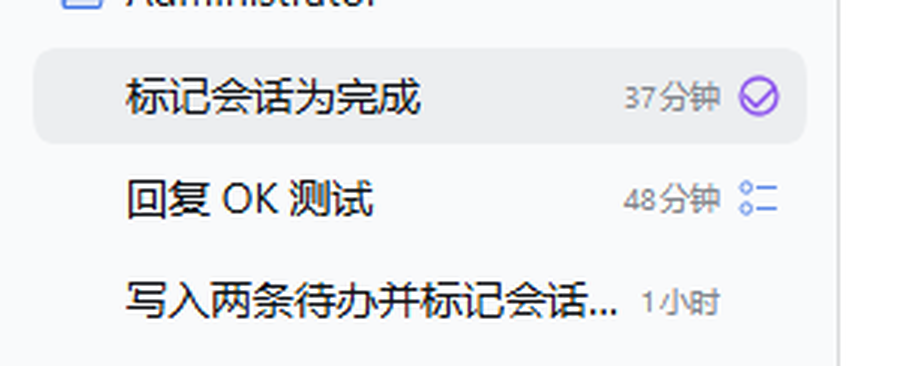
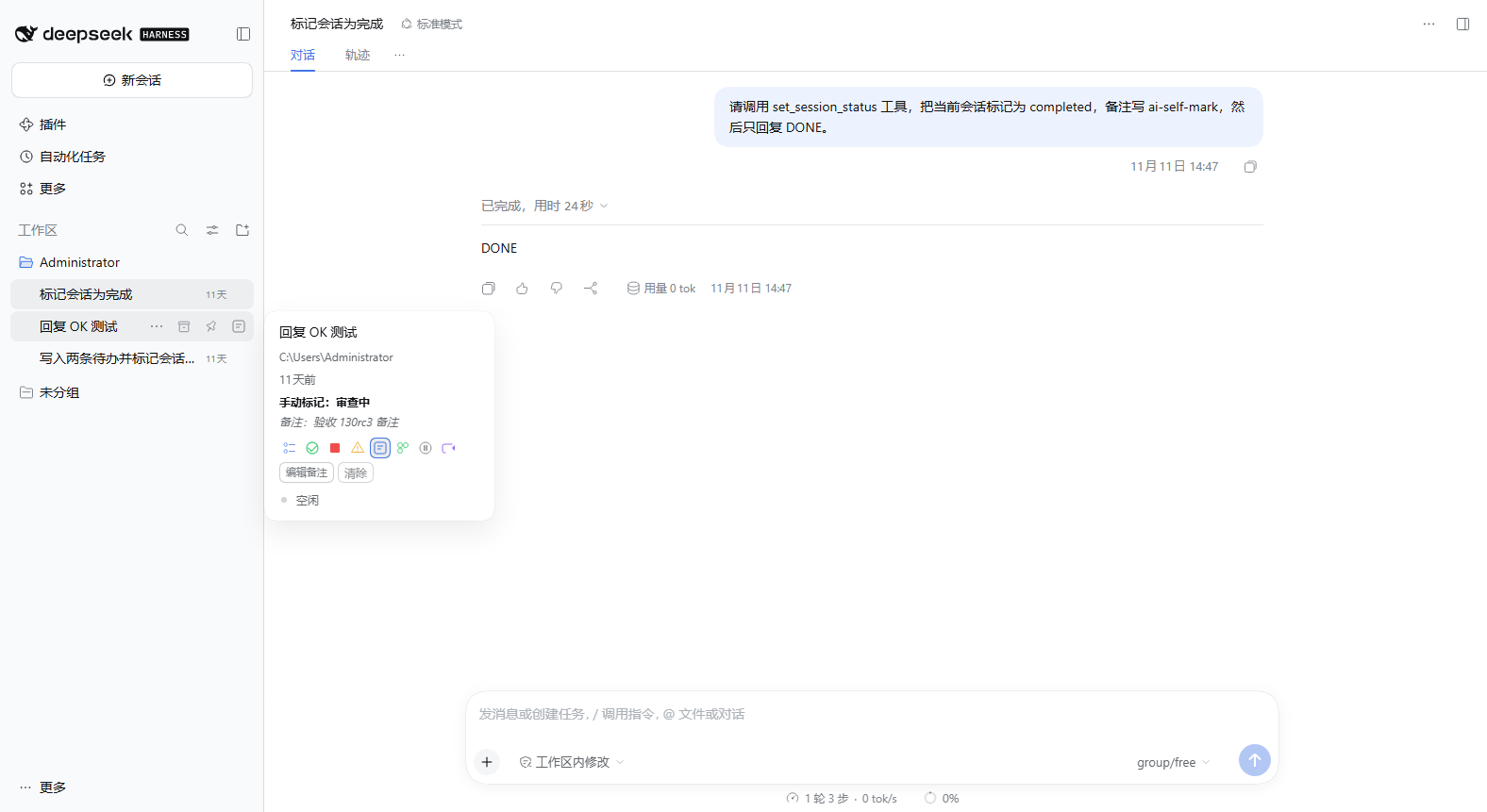
鼠标移到会话行上会展开状态卡片,里面是八个状态格子,已标记的会话旁边还有备注和编辑入口:
怎么用
手动标记:把鼠标移到侧栏的会话行上,状态卡片会展开。卡片里有八个状态格子,点其中一个就能给这个会话设置状态。需要的话,还可以在备注框里写一句话说明;写好后按 Enter 保存,按 Escape 取消。
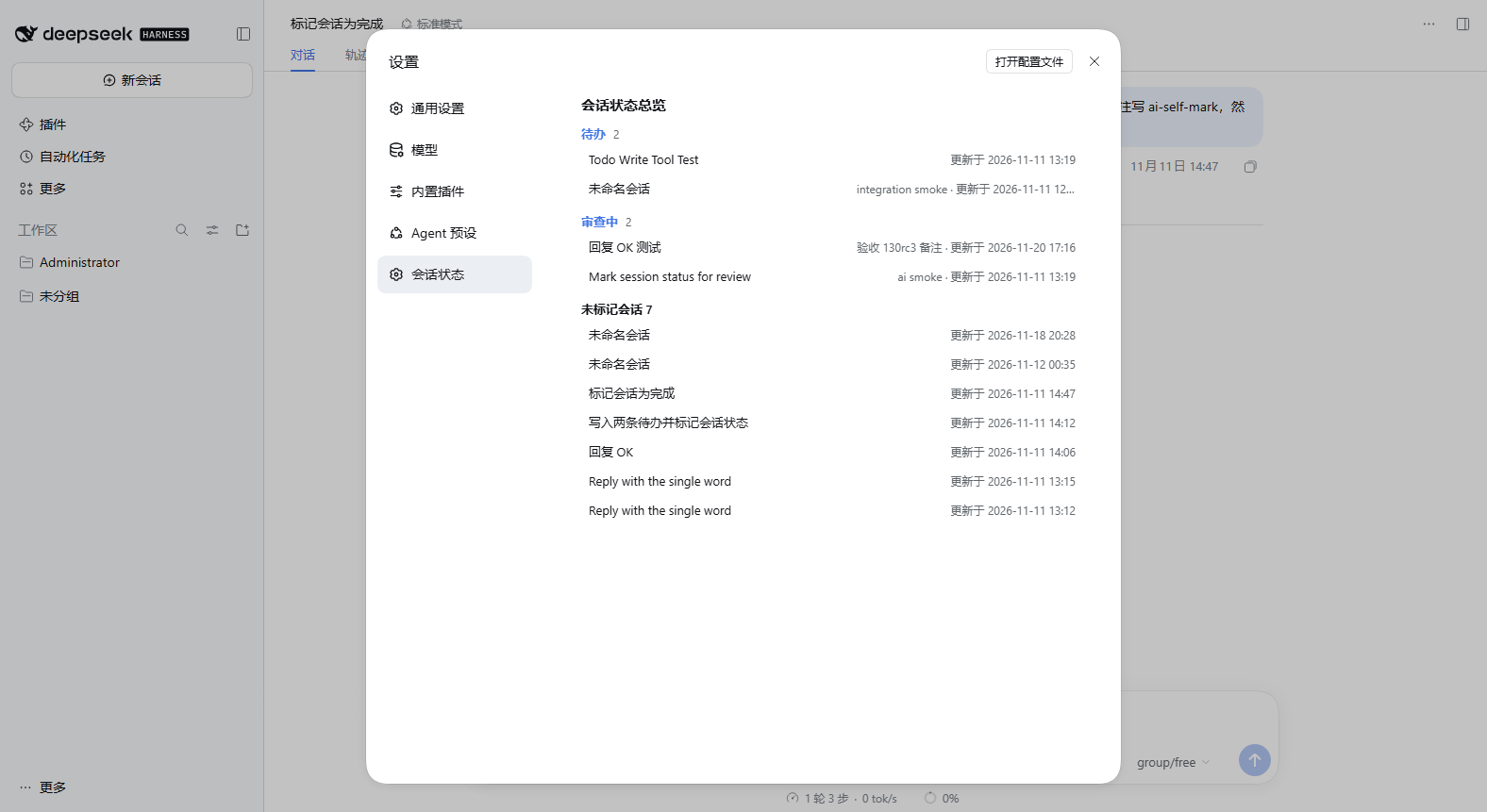
跨会话总览:打开设置面板(快捷键 Ctrl+Alt+,),左侧出现「会话状态」一节。它按状态分组列出所有打过标记的会话,每组带数量,组内按更新时间排序,页面每两秒自动刷新。打过标记但还没有标记的会话也会列在「未标记会话」区块里,方便你找到之前没处理的对话。
让 AI 自己标:插件给模型提供 set_session_status 和 clear_session_status 两个工具。任务被中断、子代理还没跑完,或者需要你回答的时候,模型可以自己标上。手动标记的优先级高于自动推断,自动推断不会覆盖你标过的状态。
八种状态
| 状态 |
图标 |
用在哪 |
todo |
清单 |
会话停止输出了,但还有事情没做完 |
done |
对勾(绿色) |
任务已经完成 |
stopped |
停止 |
会话被中断,任务没有做完 |
blocked |
警告三角 |
卡住了,需要人来处理才能继续 |
review |
浏览 |
产出已经完成,等你审查 |
pending-subagent |
子代理 |
子代理还在运行,父会话在等它 |
awaiting-answer |
暂停 |
在等你回答问题或做选择 |
feedback |
点赞(紫色) |
你还没给反馈,等你的评价 |
颜色沿用 DSH 自身的状态色语义:完成态统一用绿色(和官方 data-state="done" 一致),反馈态用紫色,警告用琥珀色,错误用红色,进行中与待办用主题蓝。状态格与徽标都跟着 DSH 的浅色/深色主题切换。
安装
从 npm 安装(当前稳定版 1.2.3):
dsh plugin --profile desktop add dsh-session-status-marker
从 GitHub Release 安装:到 https://github.com/sterraMind/dsh-session-status-marker/releases 下载 dsh-session-status-marker-1.2.3.tgz,然后:
dsh plugin --profile desktop add ./dsh-session-status-marker-1.2.3.tgz
桌面端(DSH 0.2.2-rc.3)从旧版本升级时请先 dsh plugin --profile desktop remove dsh-session-status-marker 再安装,走全新安装路径才能把插件写入 profile 的启用列表;装完在插件页点「立即启用」。
装完核对一下是否生效:
dsh --profile desktop --dump-config # 输出里应出现 session-status-marker
要求 DeepSeek Harness 版本在 0.2.2-rc.1 到 0.3.0 之间,Node 版本 24.9.0 或更高。低于 0.2.2-rc.1 的版本没有侧栏标题旁的插槽,状态图标不会显示。
配置
在 profile 的 cordis.patch.yml 里写配置。前三项必填,其余有默认值可以省略:
- id: session-status-marker
  name: dsh-session-status-marker
  config:
    autoInfer: true            # 是否允许 AI 自动推断状态
    maxNoteLength: 200         # 备注最长字符数
    autoExpireMs: 0            # 自动标记多久后过期,0 表示不过期
    refreshIntervalMs: 2000    # 浏览器多久读一次状态,最小 250
    rowActionOrder: 300        # 会话行状态按钮的顺序,别的插件占用 300 时改大
    menuItemOrder: 300         # 右键菜单里状态条目的顺序
悬停卡片里八个状态一直显示,点图标就能设置,已标记的会话会高亮当前状态。会话行末尾和右键菜单里也各有一个入口,不用打开悬停卡片也能改。行末尾入口排在官方的归档、置顶按钮之后;如果别的插件也用了这个顺序,改上面两个配置项错开即可。
主题与语言
界面跟随 DeepSeek Harness 的浅色、深色和跟随系统三种主题。侧栏徽标、状态总览和悬停卡片用的是同一套主题颜色。浅色主题下卡片是白底深色字,深色主题下是深灰底浅色字。
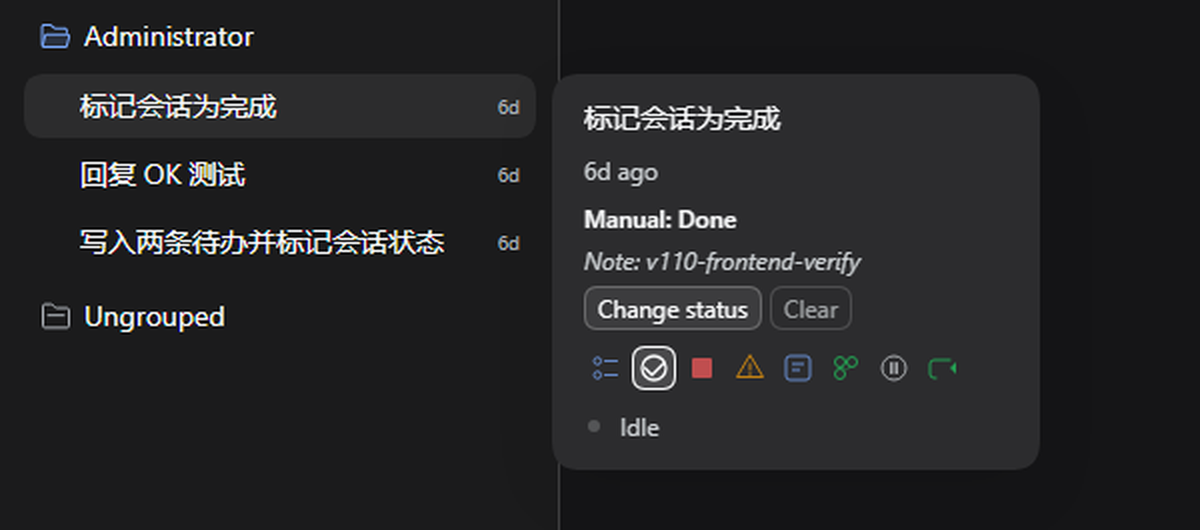
界面文字支持八种语言,包括简体中文、英文、日文、西班牙文、法文、德文、俄文和葡萄牙文,跟随 Harness 当前的语言设置。
已知限制
- 浏览器端靠定时读取来发现其它窗口或 AI 写入的状态,不是服务端实时推送。读取时带一个版本号,状态没变就只用极小响应、不重绘界面,所以延迟最多是一个轮询周期(默认 2 秒)。
- 除简体中文和英文之外的六种语言,界面文字只经过字典完整性测试,没有在真实页面里逐种语言看过。
路线图
下面几项还没做,计划后续版本实现。
- 终端界面接入:终端界面目前没有显示状态徽标的位置,标记只能由 AI 写入并以文字形式呈现。后续要做的话,需要另外设计终端侧的展示方式。
- 侧栏按状态筛选、批量修改多个会话状态:目前侧栏没有状态筛选入口,也没有批量修改的操作入口。这两项计划在后续版本实现。
开发
源码和完整文档在 GitHub:https://github.com/sterraMind/dsh-session-status-marker
pnpm run typecheck     # 类型检查
pnpm run build         # 编译 Host 与浏览器端产物
pnpm run test          # 139 项测试
pnpm pack              # 打包成 .tgz 压缩包
这个插件是独立安装包,不会改动 DeepSeek Harness 本身的代码。状态记录保存在 DeepSeek Harness 自己的数据目录里,不写进会话记录,所以既不占用对话上下文,也不会影响模型收到的内容。
需要了解实现细节、设计决策和测试证据时,请看仓库里的文档:
许可
MIT,与 DeepSeek Harness 一致。








