Quota Boss
A multi-model orchestrator for your coding agent: a boss that hands each sub-task to the cheapest model that can
do it,across the subscriptions you already pay for and the free AI offers you choose.


Install · Quick start · Commands · How it works · Documentation · Website
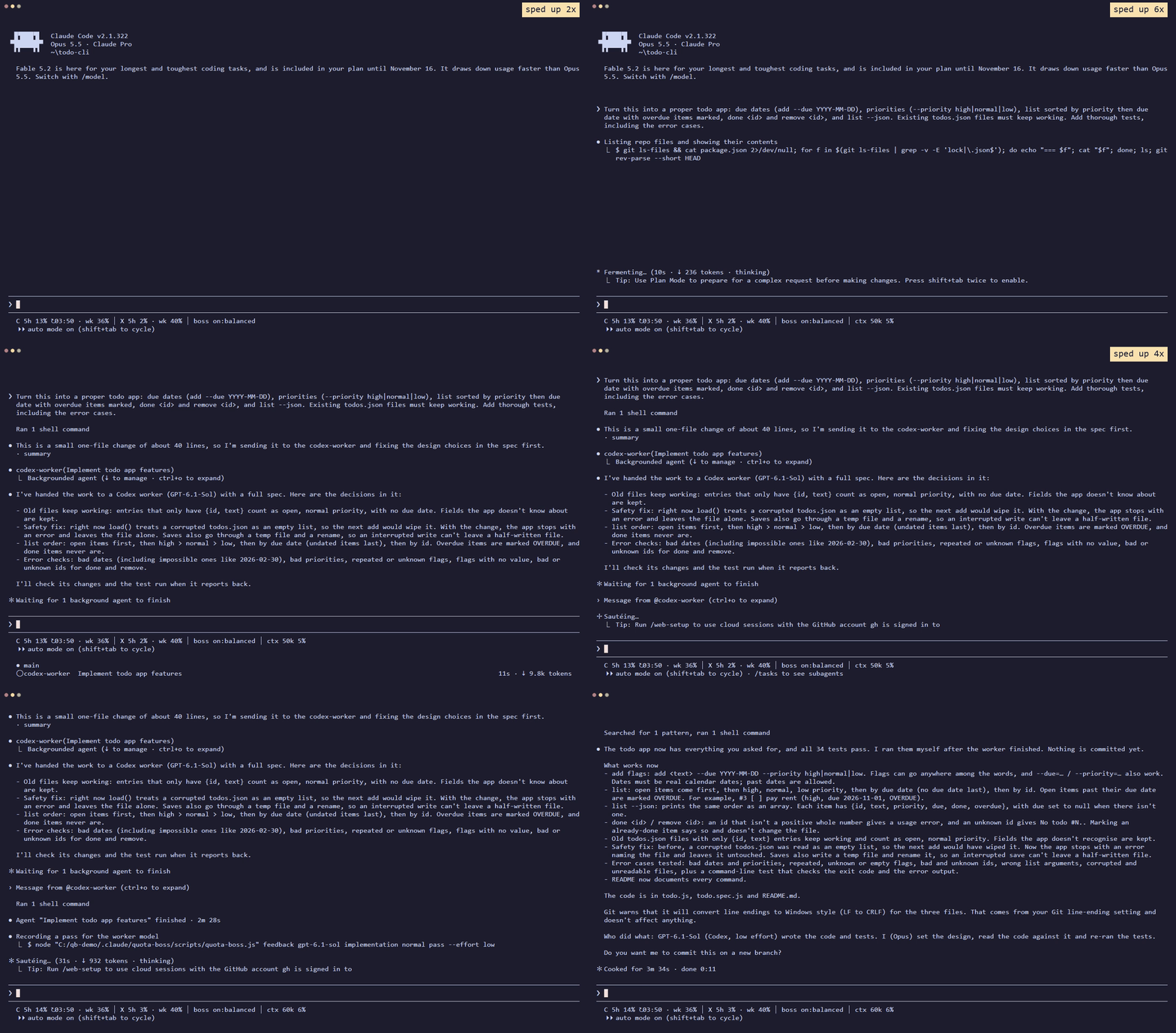
Quota Boss is a harness around Claude Code or Codex: it adds the rules, the workers and the live quota numbers
that turn your agent into an orchestrator. Your best model plans, decides and checks the results. Everything else goes
to a cheaper model on one of your subscriptions (Claude, ChatGPT / Codex, GitHub Copilot, Grok,
Google Antigravity / Gemini, JetBrains AI), to Perplexity for research, or to a free offer such as
Junie Lite, Devin's free model or a local model you have switched on. When a free route is about as likely to succeed as a paid
worker, it gets the job, so your paid limits last longer. An untested free route gets a few small jobs to prove itself;
its own results decide after that.
- It saves Claude where it counts. On a large benchmark task with the Claude 5-hour limit 75% used, the boss used
about a third less Claude for the same hidden test results (numbers).
- It picks the model for each job. Every pick weighs how important the task is, how good each model is at that
kind of work, and how much quota you have left.
- It knows your limits live. On Claude Code the 5-hour and weekly limits are on screen with every prompt; Codex
gets the routing table and quota at session start. A subscription that is running low gets less work.
- It uses only the providers' official programs, signed in as you. It never reads your keys or tokens, shares
accounts or automates websites.
Install
You need Node.js 18 or newer and Claude Code with a Claude plan.
The Codex CLI with a ChatGPT plan is recommended, because most delegated work goes
there. Everything else is optional and offered during setup.
npx quota-boss@latest
This works the same on Windows, macOS and Linux. To see first what would change, add --dry-run. The installer backs
up your Claude Code settings, keeps your existing status line, and npx quota-boss@latest --uninstall removes
everything again. It asks whether to delete your settings too and asks about each program Quota Boss installed
itself; programs you already had, such as Graphify, are never touched.
Run the same command again to update and set up only what is new. A yes, in setup, after an update
or through quota-boss use <id> on, installs the CLI if needed, starts the login and runs the self-test (free
providers skip it and start with small jobs).
- Keep the short
quota-boss command: npm install -g quota-boss, then quota-boss.
- From source:
git clone https://github.com/CrazyToto/quota-boss && cd quota-boss && node install.js. The same
flags work: node install.js --dry-run and node install.js --uninstall.
Quick start
- Set it up. Type
/boss-setup in Claude Code. It gives you one command that walks you through your
subscriptions and the free offers in your own terminal. Nothing changes until you confirm the summary at the end.
- Turn it on in a project. Type
/boss on. Projects without it stay untouched.
- Work as usual. The boss splits your task, hands out the parts, checks the results and tells you which model
did what.
The step-by-step guide is in docs/GETTING-STARTED.md. If something looks wrong, run
quota-boss doctor: it lists each problem with its fix and spends no quota. To report a bug, paste the output of quota-boss doctor --report into the issue: it lists versions,
providers, self-tests and failure counts, never paths, names or keys.
Commands
Inside Claude Code:
| Command |
What it does |
/boss-setup |
Start the step-by-step setup |
/boss on [quality\|balanced\|frugal] |
Turn boss mode on for all projects, with a profile; add --project for this one only |
/boss off |
Turn it off |
/boss status |
Show limits, mode, profile and workers |
/boss settings |
Show every setting with its current value and the command that changes it |
/boss route |
Show which model gets which kind of work right now |
/boss-add-api |
Add any API or free offer as a provider |
/boss-local |
Use a local model through Ollama |
/handoff |
Save notes so a fresh session continues where this one stopped |
/boss help |
List all commands |
In your terminal:
| Command |
What it does |
quota-boss doctor |
Check the installation and list each problem with its fix |
quota-boss savings |
Show how your work was spread across models and what that saved |
quota-boss route --explain |
Show every candidate model with its numbers and why it won or lost |
quota-boss use <provider\|model> on\|off |
Choose which subscriptions and models may get work |
quota-boss settings |
Show all settings, what each does and the command that changes it |
quota-boss config |
Change settings in an interactive list |
The short quota-boss form needs npm install -g quota-boss. Without it, use npx quota-boss <command> or
node ~/.claude/quota-boss/scripts/quota-boss.js <command>. All settings are explained in
docs/SETTINGS.md.
How it works
You ─► Claude Code (Opus = boss: plan, classify, delegate, verify)
        │  every prompt: "Claude 5h 41% wk 49% | Codex 5h 3% wk 12% | profile balanced | mode normal"
        ├─► codex-worker  ─► Codex (GPT-6.2-Sol) ─► implements, runs tests, 10-line report
        ├─► gpt-advisor   ─► Codex read-only ─► independent second opinion
        ├─► sonnet-worker ─► Sonnet, larger implementation
        ├─► haiku-worker  ─► Haiku, small edits, tests, docs
        ├─► scout         ─► Haiku, code search
        ├─► Explore       ─► Haiku, replaces the built-in search agent
        ├─► reviewer      ─► Sonnet, reviews diffs
        ├─► cli-worker    ─► another official CLI: Copilot, Grok, Antigravity, Junie, Devin, Kilo, OpenCode
        ├─► self-worker   ─► the boss model in a separate context for large or parallel jobs
        └─► researcher    ─► web search, or a ready-made prompt for Perplexity
For every sub-task the boss sets a tier (critical, normal or trivial) and a category (architecture, debugging,
implementation, review, research or mechanical). Quota Boss then scores every model you have:
utility = P(success) ^ alpha(tier, profile) / ( cost × quota price )
- P(success) starts from a quality score per model and category, and is updated from the results the boss
verifies. Failures count double.
- Quota price rises when a subscription would run dry before its reset, and falls when plenty of quota is about
to reset unused.
- Alpha sets how much quality matters. For critical work quality wins; for trivial work the cheapest adequate
model wins. The profile (
quality, balanced or frugal) shifts it.
- When a result fails its check, the same model gets more reasoning effort first, then the next better model.
- Small jobs stay with the boss, because handing over a few minutes of work costs more than it saves.
- Jobs that need a special skill go to a model that has it: images, PDFs, video, audio and YouTube links,
image generation, web search or a large context. See Capabilities.
The full algorithm is in docs/ROUTING.md. Model scores, prices and their sources are in
docs/MODELS.md.
Does it pay off?
Quota Boss hands down the work your expensive model does not need to do, and keeps the work where handing it over
would cost more than it saves. The numbers so far:
| Measurement |
Result |
| Benchmark, large task with the Claude 5-hour limit 75% used (Opus boss) |
About a third less Claude usage than without boss mode, with the same hidden test results. Codex did the build; the run took about twice as long. |
| Benchmark, medium task with the Claude 5-hour limit 75% used |
Handing it to Codex saved no Claude, so the boss now keeps jobs of this size. |
| Benchmark, small to large tasks and a read-heavy change with quota to spare (Opus boss) |
The boss keeps the work: about the same cost as without boss mode (-2% to +3%), same results. |
| Benchmark, nine questions over an 80 KB manual with quota to spare |
10% less Claude usage with the same answers, about 20 s slower: the boss reads the sections it needs instead of the whole saved output. |
| Benchmark, Codex as the boss, small to large tasks |
No extra cost at any size, same results. |
Real work in this repository over 9 days (quota-boss savings) |
Workers did 14% of the work. Estimate: 29% less Claude usage than Opus doing everything, about 1.4 times the work per Claude limit. |
Most is handed down when a job is large and your Claude limit runs low. The benchmarks are small: two to five runs
per row, in short sessions. All numbers and the method are in docs/BENCHMARKS.md, the harness is
in bench/, and quota-boss savings shows the numbers for your own work.
Providers and free offers
| Kind |
Examples |
How it is used |
| Subscriptions |
Claude, ChatGPT / Codex, GitHub Copilot, Grok, Google Antigravity (Gemini), JetBrains AI |
Through each provider's official CLI, signed in as you |
| Research |
Perplexity Pro |
The boss writes the prompt and copies it to your clipboard; you paste the answer back with /pplx-result |
| Free CLI offers |
Junie Lite, Devin, Kilo, Gemini media |
Junie Lite is on by default: one yes installs Junie, opens the login and tests it. Devin uses only its free SWE-2 Flash model. Gemini media (Google's gemini-api CLI) is the route for video, audio and YouTube links |
| Free API offers |
OpenCode Zen, OpenRouter, Cloudflare, Cohere, Gemini, NVIDIA, Z.ai |
Off until you choose them; each shows its limit and data warning first |
| Local models |
Ollama |
/boss-local |
| Anything else |
Any API with a key |
/boss-add-api |
Claude, ChatGPT / Codex, Junie Lite and Devin are tested end to end. Copilot, Grok, Antigravity and JetBrains AI are
built from their official documentation and stay off until you turn them on; Grok has not been run by the maintainer
yet, and Antigravity carries an account warning because of Google's terms. A paid one gets work only after its self-test
passes on your machine (setup runs it for you); a free one starts with small jobs and earns more with each verified pass.
Free offers can take simple work instead of your paid quota. Some of them train on what you send, so those stay off
unless you allow them for a project. Details are in docs/PROVIDERS.md.
[!IMPORTANT]
You use your own accounts under each provider's own terms, and following them is up to you. Terms differ and
change. Read the summary in Provider terms before you turn a provider on.
Safety and privacy









