
TL;DR
- Secure software delivery isn’t just about scanning code and dependencies anymore – it now spans containers, APIs, ci/cd security pipelines, and AI-assisted development, each layer introducing drift and non-determinism that an SBOM snapshot alone was never designed to track.
- SBOMs gave teams visibility, but not control. Sonatype research shows 80% of dependencies remain un-upgraded for over a year—even when 95% of vulnerable versions have safer alternatives.
- SBOMs give you an inventory — but in 2026, inventory isn’t enough. Execution lineage and PBOM reveal which dependencies actually create risk.
- The 2025 IBM Cost of a Data Breach report clearly shows the impact: breaches driven by third-party and supply chain risks still cost organizations millions.
- OX turns SBOMs into execution-aware security signals — connecting dependencies, code, pipelines, containers, APIs, and runtime into actual attack paths.
- In this article, I’ll explain why 2026 is a turning point for SBOM security, where traditional approaches fall short, and how to turn SBOM data into real supply-chain risk reduction.
Software supply chains got complicated fast. Your applications now rely on hundreds of open-source packages, third-party components, containers, and build pipelines that change every day. Software Bills of Materials (SBOMs) promised visibility into that complexity — a clear inventory of what’s inside your software and where it came from.
But visibility isn’t the same as security.
An Industry report shows that supply chain attacks keep rising because attackers target the dependencies, build systems, and registries your application relies on. That’s why guidance from organizations like CISA now pushes teams to integrate SBOM data directly into security operations.
This is where most approaches break down. An SBOM tells you what exists, but it doesn’t tell you what actually exposes the business to real risk.
I’ve worked with AppSec teams dealing with this exact problem. SBOM programs generate inventories, vulnerability scanning tools generate long backlogs, and teams still struggle to understand which dependency actually creates an exploitable path in production – which is why combining SBOM data with execution-aware signals is the only way to turn inventory visibility into real risk reduction.
Why SBOM Security Became a Board-Level Topic by 2025
By late 2025, supply chain risk was no longer just an engineering problem — it was showing up in executive breach reports. Attackers were exploiting trusted components, inherited libraries, and build processes that teams didn’t fully control, and those lapses were costing millions.
Boards started asking the hard question their engineers had been dodging:
| “What is actually running in production — and where did it come from?” |
Regulatory guidance and industry expectations accelerated this focus:
- SBOMs became a common requirement for audits and compliance reviews
- Leadership teams began treating SBOMs as evidence of supply chain awareness
- Customers and partners frequently asked for SBOM transparency during procurement
The shift wasn’t about whether SBOMs existed – it was about why they weren’t stopping real risk. Teams realized that visibility alone will not stop exploitation, and that supply chain accountability starts long before code hits production.
What is SBOM?
An SBOM is a structured inventory of the components in an application — including libraries, dependencies, and their origins. It provides visibility into software composition, helping teams understand what’s in their systems, without automatically assessing risk or enforcing policy.
Components of an SBOM
The security value of an SBOM comes from the data it contains and, more importantly, from how that data supports security functions throughout the software lifecycle.
1. Vulnerability identification: SBOMs provide a clear view of which components are affected by known vulnerabilities. This allows security teams to quickly prioritize remediation and track risk as dependencies evolve.
2. Supply chain security: By mapping both direct and transitive dependencies, SBOMs help identify where untrusted or outdated components enter the software. Teams can catch risky patterns before they move through pipelines.
3. Compliance and audit support: SBOMs act as a formal record for regulatory, contractual, and internal security requirements. They reduce manual evidence collection and make audits and third-party assessments more efficient.
4. Risk management input: SBOMs feed risk evaluations by highlighting components that need closer scrutiny or additional controls. Refreshed SBOMs ensure teams can keep risk assessments current as applications change.
5. Incident response enablement: During vulnerability disclosures or active incidents, SBOMs let responders quickly see which services and applications are affected. This focused visibility reduces investigation time and improves remediation efficiency.
6. License management and governance: SBOMs track licensing for open-source and third-party components, helping teams spot conflicts or restrictive licenses early. They also support automated compliance checks during releases and audits.

How SBOMs Are Generated in Real Pipelines
SBOMs are created during the build process using Software Composition Analysis (SCA) tools in CI workflows, capturing all dependencies resolved at build time. For containerized workloads, they also include base image layers alongside application dependencies.
Build-time SBOMs can miss dependencies introduced at runtime, such as those from AI-generated code, conditional loading, or runtime package fetching, lowering their accuracy and security value without additional context.
SBOM Security Challenges in 2026 Environments
By 2026, SBOMs will operate in environments very different from what the original standards envisioned. Applications today rely heavily on AI frameworks, cloud SDKs, and platform tooling. These dependencies often enter without a thorough architectural review, making it harder to identify which components are truly important for security.
1. Fast Changing Infrastructure
Short-lived artifacts and ephemeral workloads mean that SBOMs often describe a state that no longer exists by the time a security issue is discovered. The relevant artifact may already have been replaced or deployed in a different configuration, making static assumptions insufficient to keep pace with these fast-changing environments.
2. On-going Delivery Challenges
Pipelines push changes dozens of times per day, generating SBOMs at build time that quickly become irrelevant. Execution paths, runtime configurations, and exposure evolve after deployment, so build-time inventories often only partially reflect the live security risk.
3. AI-Generated Code and Non-Deterministic Dependencies
AI-assisted development and non-deterministic libraries can introduce components without explicit developer intent, bypassing traditional governance. Frequent branch changes and PR churn mean SBOMs struggle to keep pace with runtime behavior, even with regular updates.
4. Containers, Layers, and Shared Runtimes
Base images and shared runtimes include many inherited components that teams may not directly control, yet these components still carry security implications. Common libraries and shared services blur ownership boundaries, as a vulnerable component might appear in multiple services but have different impacts depending on usage.
Teams often end up with multiple SBOMs describing the same components, increasing inventory without improving clarity on actual exposure.

Common SBOM Security Use Cases and Their Limitations
SBOMs are widely used in security, risk, and compliance workflows because they provide a reliable inventory of software components. Most organizations use them to gain visibility and fast response, but relying on inventory alone introduces blind spots.
Typical use cases of SBOM security
- Audit readiness and compliance reporting: providing clear evidence of software composition.
- Vulnerability lookup via CVE correlation: checking whether newly disclosed vulnerabilities affect components in the software.
- Faster incident response for zero-day events: quickly scoping which applications or services may be impacted.
While these workflows provide value, they share a critical limitation: they rely on static inventory to answer questions that change in real time.
Why CVE Matching Alone Does Not Equal Risk
CVE correlation is one of the most common SBOM-driven security workflows: teams check whether newly disclosed vulnerabilities affect any components in their inventory.
The challenge lies in scale and relevance:
- Large applications can contain hundreds or thousands of dependencies, many of which are never executed or are only reachable in non-production paths.
- CVE counts grow quickly, but most findings have low real-world exploitability.
The result:
SBOMs provide alerts and visibility, but not actionable, risk-prioritized insight.
The Blind Spot: Build-Time SBOMs
SBOMs describe what was assembled during a build, not how software behaves at runtime. Applications introduce drift through dynamic dependency loading, conditional feature flags, and environment-specific configurations. As a result, build-time SBOMs can fail to reflect live exposure, leaving teams with inventories that are accurate on paper but limited for ongoing risk decisions.
How OX Turns SBOM Data into Active Risk Reduction
OX treats SBOMs as one input in a larger security context rather than as static artifacts to be archived. An SBOM only becomes meaningful when correlated with how applications are built, deployed, and executed. By connecting SBOM data across the software delivery lifecycle, OX ensures component information drives real security decisions, not just reporting.
SBOMs Inside an Active Application Security Posture Model
Rather than analyzing inventories in isolation, OX correlates SBOM data with source code changes, CI/CD pipeline activity, build artifacts, deployment targets, APIs, and runtime behavior.
This approach reframes SBOM usage around actual execution paths, ensuring that security decisions are driven by production behavior rather than simple list membership.
OX’s Code-to-Runtime Correlation Advantage
OX’s AI Data Lake connects SBOM data with live SDLC signals to create a unified view of how dependencies behave in production. This includes:
- Correlating SBOM data with code paths and pipeline executions to understand how components move through the delivery process.
- Linking deployed artifacts with API exposure to identify where components are externally reachable.
- Analyzing runtime access patterns to determine how components execute and what privileges they use.
With this context, OX can identify reachable, exploitable, or high-privilege components, deprioritize dependencies that never execute or remain isolated, and embed security insight directly into development and delivery workflows.
SBOM Security Best Practices That Actually Reduce Risk
Effective SBOM security depends on more than producing inventories. SBOM data must stay aligned with how software is built and how it runs in real environments to remain useful. Teams that reduce risk use SBOMs as active inputs to security decisions, not static artifacts created for audits.
1. Prioritize by Exposure, Not Just Severity
Risk is driven by execution and exposure, not by inventory size or severity scores alone.
- Components should be evaluated based on whether they execute, how they are exposed, and what access they have.
- A high-severity issue in an unused library rarely carries the same risk as a moderate issue in a component on a public API path.
2. Correlate SBOMs With Delivery and Runtime Context
SBOMs are most effective when linked to how software is delivered and operated.
- Correlating SBOM data with CI activity, deployment targets, and runtime behavior reveals which dependencies matter as systems change.
- This context keeps SBOM-driven decisions aligned with current execution, not historical builds.
3. Generate SBOMs Across Code, Artifacts, and Containers
SBOM generation should happen at multiple points, not just once per release.
- Capture SBOMs from source repositories, build artifacts, and container images to see how dependencies enter and propagate through the system.
- Relying on a single SBOM generated late in the pipeline often misses risk inherited from base images or shared artifacts.
4. Connect SBOM Data to Reachability and Entry Points
Component inventories become far more useful when mapped to where software is exposed.
- Tie dependencies to APIs, services, and user-facing functionality to identify which components sit on reachable attack paths.
- Distinguish between externally reachable and internally isolated dependencies so attention matches actual exposure.
5. Use SBOMs to lower Risk, Not Just Respond to It
SBOMs provide the greatest value when they inform decisions prior to deployment.
- Identifying risky dependency patterns early allows issues to be addressed while changes are still inexpensive.
- Policies based on execution and exposure, rather than raw inventory or CVE counts, help teams avoid unnecessary churn.
Implementing SBOM Security with OX: From Inventory to Active Risk Control
SBOMs become valuable only when they are connected to how software is written, built, and executed. This walkthrough demonstrates how OX operationalizes SBOM data by linking component inventories to dependency usage, vulnerability context, and policy enforcement, using a real application and actual findings.
Step 1: Getting started with OX Security
- Log in to OX Security and create an organisation if one does not exist.
- Log in to OX Security and connect your source control provider (GitHub, GitLab, Bitbucket, or Azure Repos).
- Step-by-step guide to get started. Link
Once connected, OX automatically scans and discovers repositories, branches, and recent commits, without requiring additional configuration to enable SBOM, API BOM, or artifact analysis.
Step 2: Automatic SBOM generation and initial analysis
- Wait for the initial scan to complete after the repository connection is established.
- Allow OX to analyze source code, dependencies, and build context.
At this stage, OX generates SBOM data directly from the codebase and correlates it with other signals such as APIs, artifacts, and infrastructure definitions.
Reviewing SBOM data in the Assets view
- Navigate to Assets.
- Review the high-level overview showing:
- API BOM distribution
- SBOM libraries detected
- SaaS BOM (if applicable)
- Artifact BOM
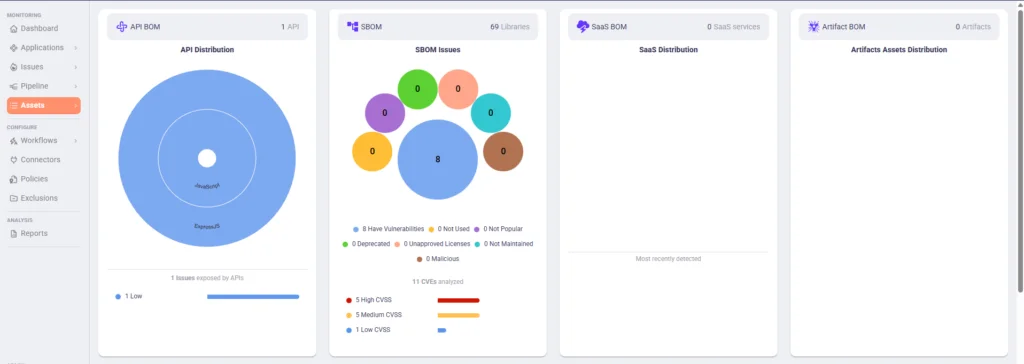
This view provides a consolidated snapshot of all material discovered in the application, not just dependencies.
Step 3: Exploring the full SBOM inventory
- Click into the SBOM section from Assets.
- Expand the SBOM list to view all detected libraries and versions.
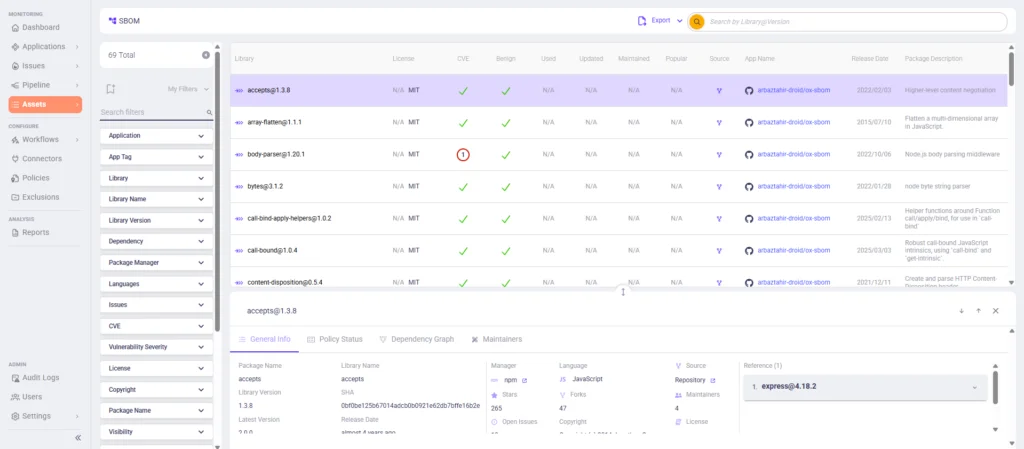
This shows the complete dependency inventory generated from the application, including direct and transitive dependencies.
Step 4: Filtering SBOMs to direct dependencies
- Apply the Dependency → Direct filter in the SBOM view.
- Narrow the list to only libraries explicitly declared in the code.
This helps separate developer-introduced dependencies from inherited transitive ones, lowering noise early in analysis.
Step 5: Analyzing dependency relationships
- Select a dependency from the SBOM list.
- Open the Dependency Graph view.
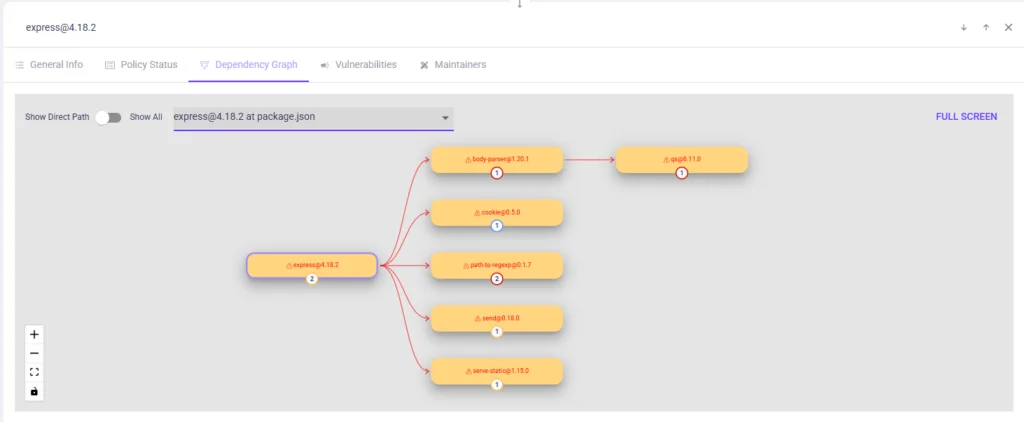
The graph visualizes how a dependency is introduced, which packages rely on it, and how transitive libraries propagate risk through the application.
Step 6: Pivoting from SBOM to issues
- Navigate to the Issues panel.
- Locate issues related to open-source or dependency findings.
- Open an issue associated with a specific library.
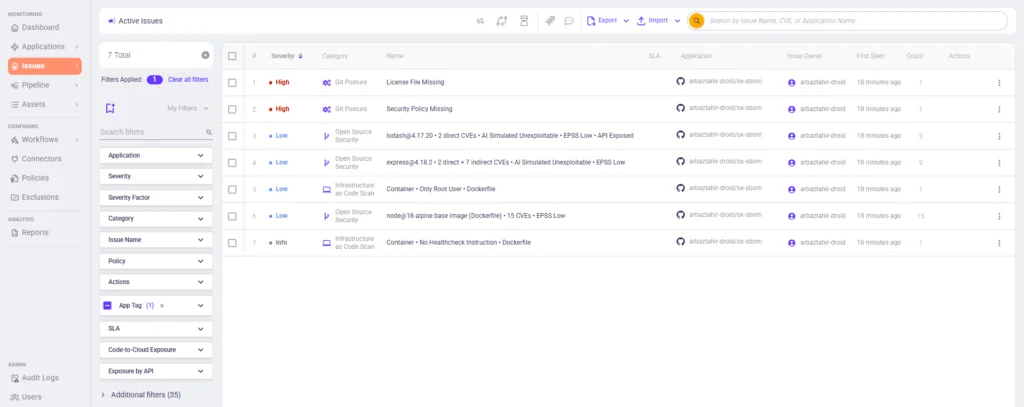
Issues act as the pivot point where SBOM data connects to code, commits, and security context.
Reviewing code and SBOM context inside an issue
- Click on an issue to open it in an expanded view:
- Code context showing where the dependency is defined.
- Commit details linking the dependency to source changes.
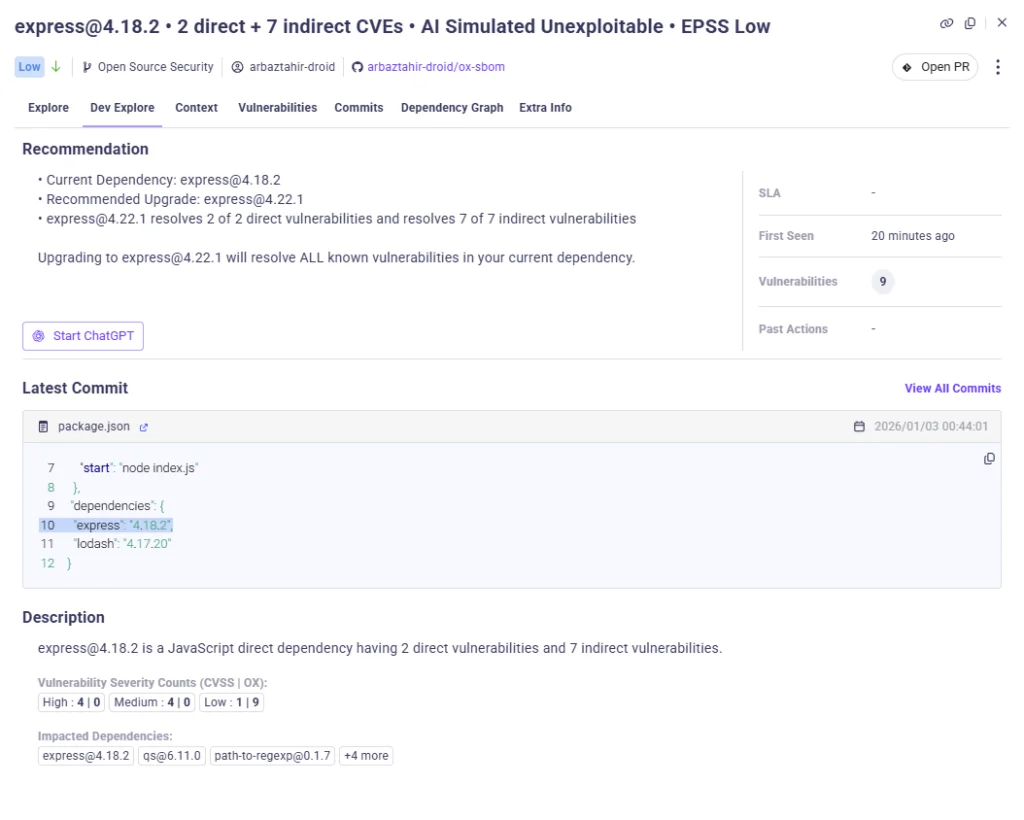
- Open the SBOM Info section from Extra Info tab within the issue.
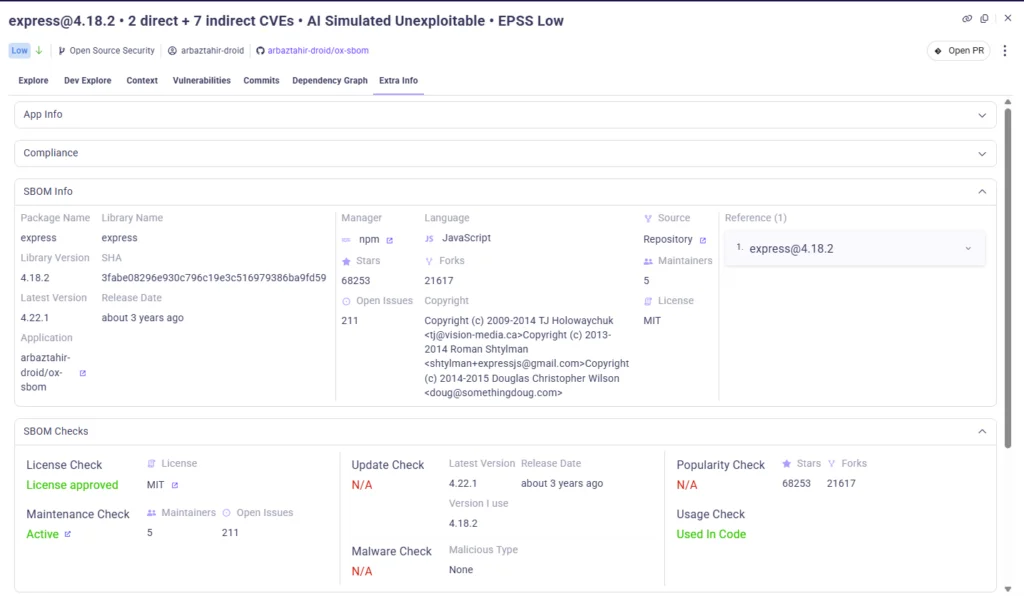
This confirms how SBOM data is tied directly to code rather than existing as a separate inventory artifact.
Step 7: Checking reachability and exploitability context
- Switch to the Context tab within the issue.
- Review indicators such as:
- Reachability
- Direct or indirect usage
- Exploitability signals
- EPSS and AI-based analysis

This step demonstrates where OX goes beyond SBOMs by adding execution and exposure context to dependency risk.
Step 8: Apply an Exposure-Based Policy
- Navigate to Policies.
- Enable a policy like: Outdated direct dependency in code under SBOM
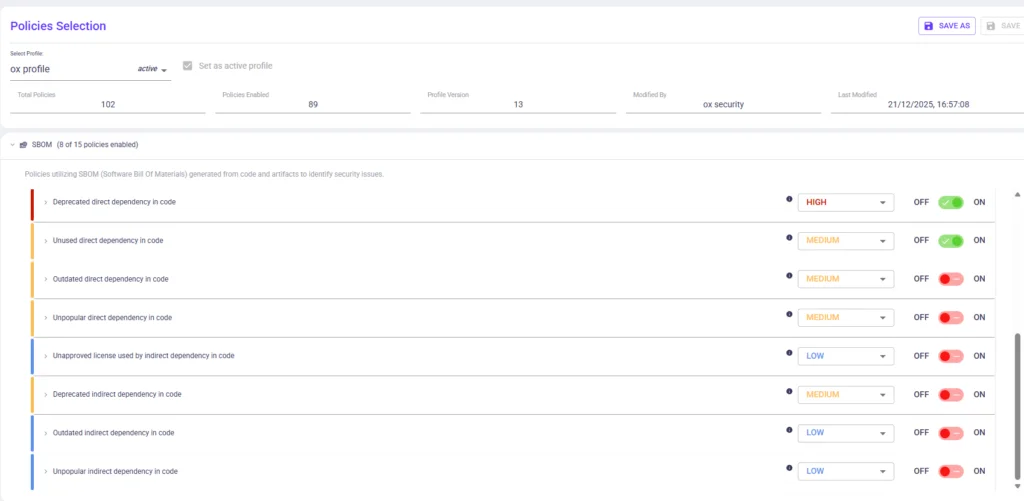
Once enabled, OX proactively enforces policy rules (e.g., SBOM rules), ensuring that risky dependency patterns are flagged or blocked before they propagate further.
Conclusion
SBOMs have become a standard part of software delivery, but their role is often misunderstood. Listing components and dependencies gives you visibility, but it doesn’t tell you how your software actually behaves in production or which parts of your system are truly exposed. With AI-assisted development, containers, and lightning-fast pipelines, that blind spot is no longer minor – it’s a problem we can’t ignore.
Most SBOM tools show these limitations because they primarily generate and report inventories, leaving security teams to work through long lists of components without visibility into runtime behavior or attack paths. Without tying SBOMs to what actually happens across code, pipelines, artifacts, APIs, and live execution, you’re stuck reacting to risk instead of guiding security decisions.
This is where OX makes a difference. We embed SBOM data into an active application security posture, connecting component information to both how software is built and how it runs. That way, you can finally see which dependencies truly matter and why. Moving into 2026, the teams that will reduce real risk are the ones that treat SBOMs as living inputs, not static inventories, and fold them into a broader, exposure-aware security model.
FAQs
SBOM security focuses on identifying which components exist within software, but it does not reveal how those components behave in production. OX extends this visibility by correlating SBOM data with code paths, CI/CD pipelines, deployed artifacts, APIs, and runtime behavior, showing which dependencies actually form exploitable attack paths rather than treating all components as equally risky.
OX addresses SBOM drift by correlating component data with actual execution and deployment signals. Even when inventories fall behind changes in the environment, OX identifies which components are active and exposed, ensuring that risk assessments remain grounded in how systems actually operate.
At a minimum, an SBOM must list all direct and transitive components, including accurate versions, provenance, licenses, and dependency relationships. OX uses this SBOM data and connects it to code, CI/CD pipelines, deployed artifacts, APIs, and runtime behavior, so teams can see which components are actually executed, exposed, and part of real attack paths rather than treating the SBOM as a static inventory.
No. SBOM data alone only shows which dependencies are present; it does not reveal whether they are executed, reachable, or exposed. OX combines SBOM information with code paths, CI/CD pipelines, APIs, and runtime behavior, allowing teams to see which dependencies participate in real attack paths and are truly exploitable, rather than just listed in an inventory.