
TL;DR
- A secure SDLC integrates security into software development so risks are addressed from design through production.
- Traditional SDLC controls like design reviews, Static Application Security Testing (SAST), Software Composition Analysis (SCA), and ci/cd security approval gates assume software is deliberately written and reviewed by humans – an assumption AI-driven pipelines have already broken.
- AI-driven development now auto-generates code, dependencies, CI workflows, and infrastructure, allowing security flaws to enter pipelines and runtime without review – precisely the gap VibeSec was built to close, intercepting unsafe AI-generated patterns at the moment of creation rather than discovering them downstream when remediation costs are highest.
- A 2025 Cloud Security Alliance analysis shows AI-generated artifacts routinely bypass these controls, introducing insecure defaults, excessive permissions, and unsafe logic that weaken SDLC enforcement.
- OX supports a secure SDLC by correlating AI-generated code, pipelines, artifacts, APIs, and runtime signals to identify which risks are actually reachable and exploitable.
Understanding SDLC security in the context of AI-driven development is critical. Your developers are already using AI to write code, software moves from idea to production faster than ever but the security processes around it were designed for a very different development model.
Traditional secure SDLC assumes clear checkpoints: engineers write code, reviewers inspect it, and security controls gate releases at defined stages but AI-driven development compresses those phases.
Industry data shows the impact of this shift. A 2025 analysis by the Cloud Security Alliance found that 62% of AI-generated code contains design flaws or known vulnerabilities due to missing threat models and policy context. At the same time, the 2025 Cost of a Data Breach report from IBM highlights how small SDLC gaps can quickly translate into real runtime exposure.
I’ve worked with AppSec teams trying to keep up with AI-driven pipelines. AI-generated changes move through development pipelines faster than traditional controls can keep up, while security tools still operate on static snapshots of code or dependencies. In this article, I’ll explain what secure SDLC means in AI-driven development, and why traditional SDLC phases begin to break down
Why Build-Time Security Is Not Enough for AI-Generated Applications
AI can generate entire applications in a single step, including code, dependencies, pipelines, and deployment configurations, you name it. These changes are often committed by AI agents, merged via preconfigured CI rules, or approved in bulk as a single pull request, thereby removing the step-by-step reviews and approvals that secure SDLC processes rely on.
This means security risk no longer comes only from bugs in the code. Even “correct” code can be dangerous depending on the APIs it calls, the permissions it has, and the data it can access in production. Build-time checks alone miss this, because they can’t see how the application actually behaves at runtime – which is the visibility gap that OX Cloud fills, monitoring deployed workloads across Kubernetes, AWS, and other cloud environments to track which vulnerabilities are actually active in production rather than just present in code.
Secure SDLC vs Traditional SDLC
A traditional SDLC relies on defined human actions — architecture, manual coding, peer reviews, and security checks, performed at known stages such as build or release. These workflows assume that logic, dependencies, and configurations represent deliberate choices that can be evaluated at fixed points.
A secure SDLC in AI-driven pipelines operates in a different environment, where application logic, libraries, CI workflows, and infrastructure definitions may be generated or modified automatically, making it harder to infer intent from code alone. Security depends on how these elements behave once deployed, not just how they appear at commit time.
Secure SDLC vs Traditional SDLC: Key Differences
| Aspect | Traditional SDLC | Secure SDLC in AI-Driven Pipelines |
| Code authorship | Human-written code reviewed line by line | Code, dependencies, and configurations generated by models and agents |
| Design validation | Architecture reviewed before implementation | Design and implementation created together |
| Security checks | Performed at fixed phases (build, release) | Applied across creation, pipeline activity, and runtime |
| Risk visibility | Based on static findings and known issues | Based on behavior, access paths, and execution context |
| Ownership | Clear developer or team responsibility | Shared between humans and automated systems |
| Decision timing | Deliberate and review-driven | Fast, automated, and context-dependent |
Secure SDLC Phases in AI-Driven Pipelines
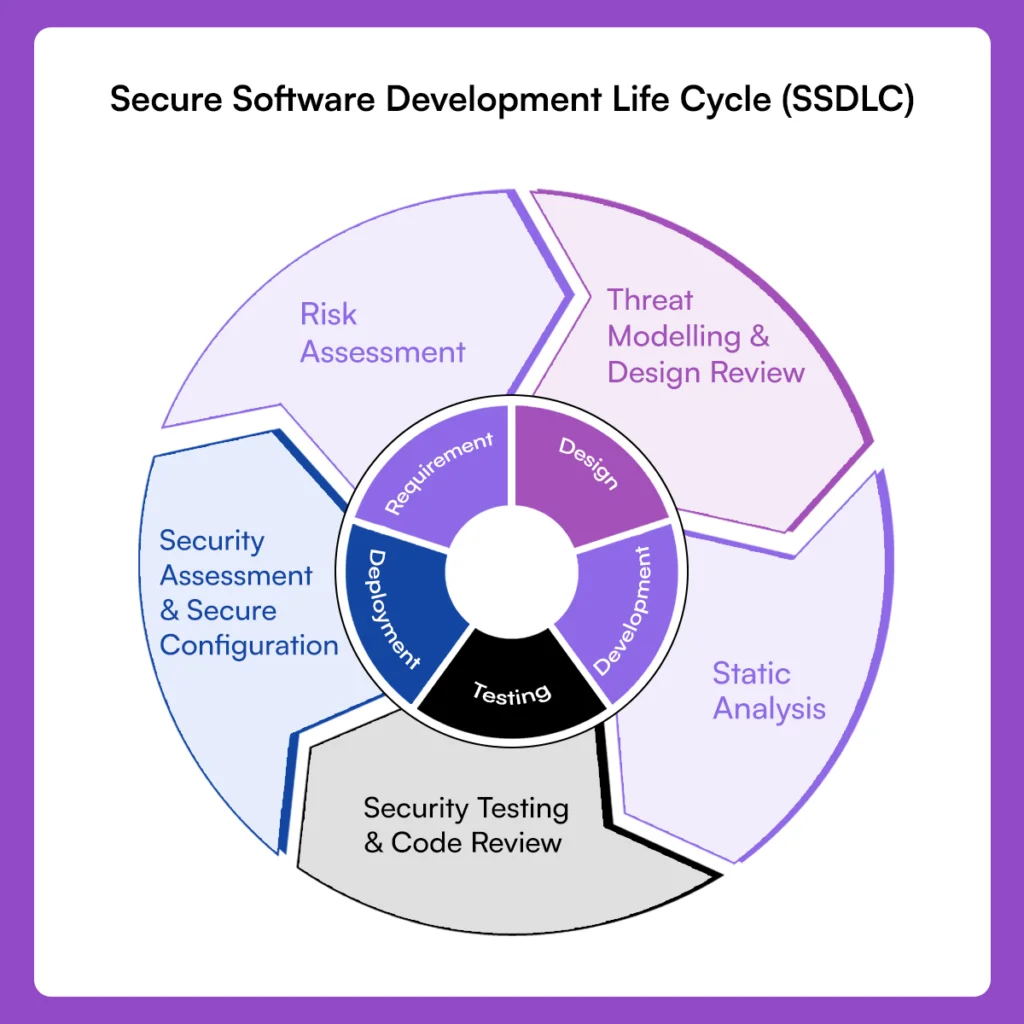
A Secure Software Development Lifecycle (SSDLC) is not just the standard SDLC with security added later. It introduces security-specific activities that run alongside development stages. In AI-driven pipelines, where code, dependencies, and infrastructure are generated together, security gaps can propagate quickly if not addressed at every phase.
You can think of SSDLC phases as security overlays that track how software is built and operated in real time – and for teams shipping into containerized, multi-cloud environments, those overlays must be grounded in cloud-native security practices that account for the unique risks those environments introduce.
1. Risk Assessment and Requirements Definition
The SSDLC begins by identifying security requirements alongside functional requirements. In AI-driven development, this includes defining acceptable use of AI-generated code, dependency sources, model inputs, and access boundaries – which is why sbom security belongs in scope from day one: without a continuously validated component inventory, dependency source requirements exist on paper but can’t be enforced in the pipeline.
2. Threat Modeling and Secure Design Review
This phase focuses on identifying potential attack paths before implementation. In AI-generated systems, threat modeling must account for automated architecture decisions, API exposure, permission inheritance, and data access patterns suggested by models. Skipping this step risks systemic vulnerabilities that are hard to fix later.
3. Secure Implementation and Static Analysis
During implementation, SSDLC emphasizes secure coding practices and static analysis to identify weaknesses early. In AI-driven pipelines, static analysis evaluates code that may not have been consciously written by a developer, increasing the importance of understanding what the code does rather than how it was created.
4. Security Testing and Code Review
Security testing expands beyond functionality to analyze how the application behaves under misuse or attack conditions. In AI-generated codebases, human code review often shifts toward approval rather than deep inspections, whereas automated tests highlight issues abstractly. Without linking findings to runtime behavior, the results are incomplete.
5. Secure Configuration and Deployment Validation
Before release, SSDLC requires verification of configurations related to authentication, authorization, secret handling, and environment isolation. AI-generated pipelines and Infrastructure as Code (IaC) frequently introduce overly permissive settings that slip into production. This phase ensures earlier controls translate into safe operations.
6. Security Assessment and Monitoring
The final SSDLC phase evaluates the system after deployment, focusing on how it behaves in production. Live permissions, API usage, and data access patterns determine whether identified weaknesses are reachable. In AI-driven environments, this phase is important for validating whether earlier assumptions hold once the system is exposed to real traffic and inputs.
Where Security Development Models Fail at Scale
Most security development models in use today are extensions of established SDLC frameworks such as Waterfall, Agile, DevOps, and DevSecOps, where security is added through defined controls like reviews, vulnerability scanning tools, and CI approval gates. These models assume bounded changes, human authorship, and predictable sequencing of work.
At scale, especially in AI-driven environments, several limitations become apparent:
- Waterfall and gated SDLC models rely on upfront design reviews and late-stage security testing, which break down when AI systems generate architecture, code, and configuration simultaneously rather than sequentially.
- Agile and DevSecOps models place security checks inside sprints and CI pipelines, but still assume developers understand and intentionally author the changes being reviewed.
- Policy- and approval-based models depend on human validation at merge or release time, while autonomous tools modify multiple layers of the system outside a single developer’s mental model.
- Scan-centric models focus on detecting issues after artifacts exist, meaning security decisions occur once risk is already embedded in code, dependencies, and infrastructure.
These limitations explain why oversight weakens as delivery speed increases. The models themselves were not designed for environments where software behavior emerges from automated decisions rather than explicit design intent.
AI-Driven Development and Secure Development Process Gaps
The secure development process was built to guide how security decisions are made, reviewed, and enforced as software moves from idea to production. This process depends on developers’ understanding of the changes they introduce, reviewers being able to reason about impact, and security controls influencing decisions before they are finalized.
When AI systems generate application logic, supporting libraries, pipeline definitions, and configuration files together, the secure development process loses its natural checkpoints.
Several gaps consistently appear in this model:
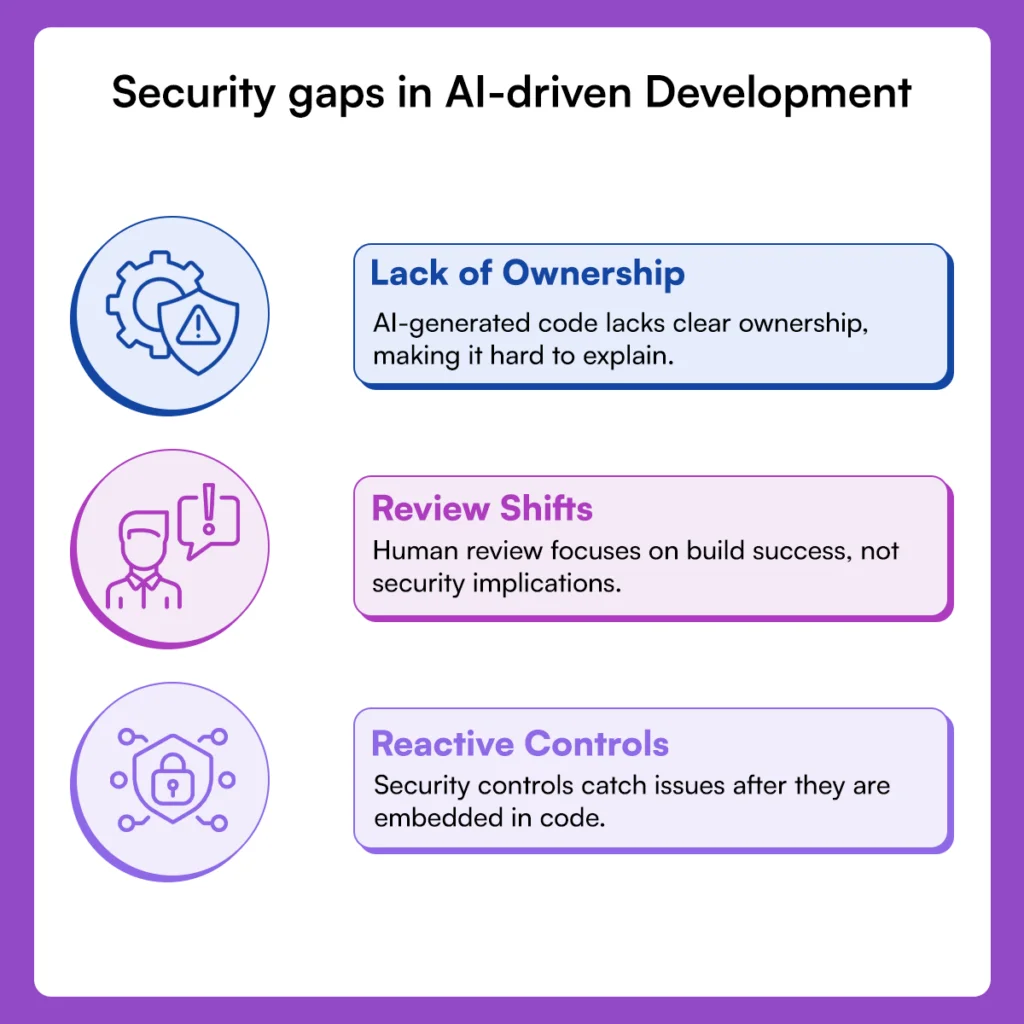
- End-to-end project generation removes explicit security ownership, as no single individual can confidently explain how code paths, dependencies, and configurations were selected.
- Human review shifts toward approval rather than understanding, with reviewers focusing on build success or test results instead of security implications across the stack.
- Security controls that operate only after artifacts exist rely on catching issues that were already embedded automatically and at scale.
These gaps expose limitations of the secure development process when applied to AI-driven pipelines. Without a security context present during generation, review, and enforcement, the process becomes reactive. The process remains intact on paper, but automated systems introduce risk before humans can intervene.
Active ASPM as the Foundation of a Secure SDLC with OX Security
Active Application Security Posture Management treats secure SDLC as an interconnected system. Security decisions are derived from how code, pipelines, artifacts, APIs, and runtime services relate to one another, rather than from isolated scan results.
Correlating Signals Across the SDLC
OX links source code findings to the pipelines that build them, the artifacts that are created, and the services that run in production. This relationship-based view allows teams to understand how a change introduced during development manifests as exposure at runtime, rather than treating each signal independently.
- Code findings connected to specific builds and deployed images
- Pipeline activity tied to artifact provenance and deployment targets
Risk Determined by Reachability and Exposure
Not all findings represent meaningful risk. OX evaluates issues based on whether they are reachable under real execution paths and permissions. This approach shifts attention away from long lists of theoretical issues toward conditions that can actually be exploited.
Security posture is therefore shaped by how software behaves in production, not by the number of findings generated during scans.
Security Context at Code and Pipeline Creation
Security context is introduced at the moment changes are generated. OX integrates with AI coding tools, developer environments, and CI workflows so that risky patterns are identified while code and configuration are being formed.
- Context applied before commits and pipeline artifacts are finalized
- Reduced reliance on post-merge or post-deploy discovery
VibeSec™ Guardrails for AI-Generated Changes
VibeSec™ functions as a control layer for AI-generated development. It identifies insecure coding and configuration patterns as they are created by models, rather than waiting for those patterns to appear in repositories or production systems.
This helps limit the spread of unsafe defaults, permissions, and dependencies across projects and pipelines.
Alignment with the AI Data Lake
OX’s AI Data Lake preserves relationships between build-time intent and runtime behavior. Signals from code analysis, SBOMs and PBOMs, pipeline executions, API exposure, and runtime services are stored and correlated over time.
- Visibility maintained across versions and environments
- Assumptions validated against live behavior
From Phase Gates to Posture Awareness
Secure SDLC enforcement is no longer anchored to passing checks at individual phases. Instead, posture reflects how components interact across the lifecycle and whether those interactions introduce real exposure.
This approach grounds secure SDLC in execution reality, allowing teams to reason about risk as systems evolve rather than relying on static validation at isolated points.
Example Workflow: Example Scenario: Secure SDLC Enforcement from Code to Runtime with OX
This walkthrough shows how secure SDLC controls are applied across the development lifecycle using OX, starting where code is written and continuing through pipeline execution and runtime visibility.
Step 1: Getting started with OX Security
- Log in to OX Security and create an organisation if one does not exist.
- Log in to OX Security and connect your source control provider (GitHub, GitLab, Bitbucket, or Azure Repos).
- Step-by-step guide to get started. Link
This step establishes visibility into repositories where AI-generated and human-written code enters the SDLC, creating the baseline for tracking risk from the earliest point.
Step 2: Install and configure the OX Security VS Code extension
- Open Visual Studio Code → Extensions.
- Search for “OX Security”.
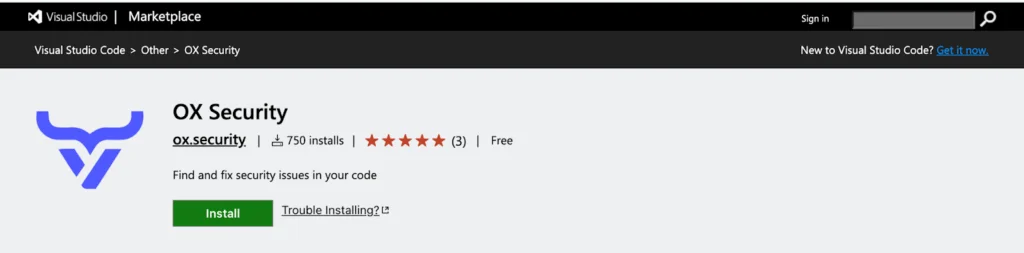
- Install the extension and enable Auto Update.
- Follow the official setup guide and configure the extension using the API key created on the platform.
This ensures code is evaluated at creation time, before it reaches version control or CI pipelines.
Step 3: Detect and Block Unsafe Code Inside the IDE
As developers write code or paste AI-generated snippets, the OX extension performs real-time analysis directly in the editor.
Common issues identified at this stage include:
- SQL injection vulnerabilities, such as unsafe string‑based query construction
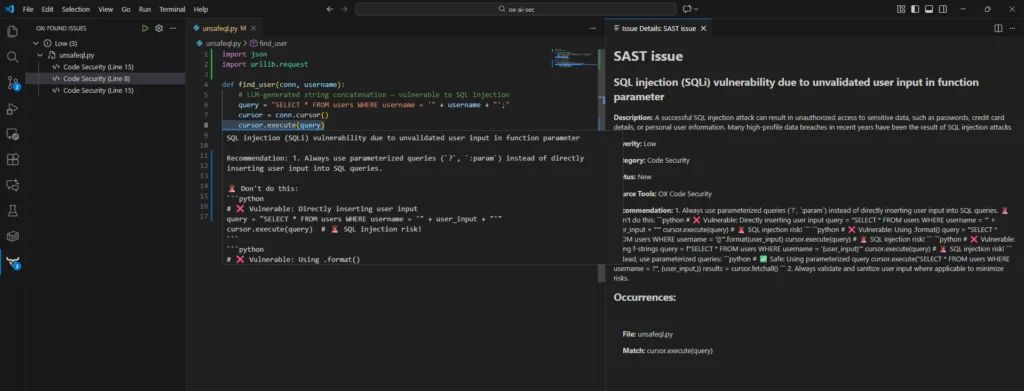
- Information leakage, including secrets or tokens embedded in code

These warnings appear instantly in the editor, ensuring vulnerable code is caught long before it reaches production.
When a developer attempts to commit unsafe code, policy enforcement is applied:
- The pre-commit scan displays detailed diagnostics
- The commit is rejected if policy violations exist
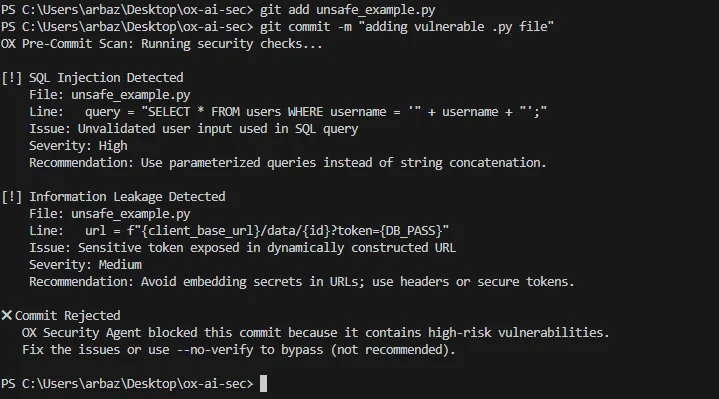
This enforces secure development practices before code becomes part of the repository.
Step 4: Validate Artifacts in the CI Pipeline with SBOM and PBOM Checks
This step introduces explicit supply-chain controls into the CI pipeline by generating an SBOM and enforcing PBOM requirements before artifacts can advance.
Configure the CI pipeline so that every build performs the following security checks:
- Generate an SBOM for the built artifact
- Verify that provenance metadata exists and meets trust requirements
- Block the build if provenance is missing or dependencies violate policy
This ensures that artifacts entering later SSDLC phases have verifiable lineage.
- Create the CI workflow
For example, using GitHub Actions, create a .github/workflows/ci.yml file as shown in the template below:
name: Secure Build with SBOM and PBOM Validation

on:
  push:
    branches: [ main ]
jobs:
  build:
    runs-on: ubuntu-latest
    steps:
      - name: Checkout source
        uses: actions/checkout@v4
      - name: Build container image
        run: |
          docker build -t ox-demo:${{ github.sha }} .
      - name: Install SBOM generator
        run: |
          curl -sSfL https://raw.githubusercontent.com/anchore/syft/main/install.sh \
          | sh -s -- -b /usr/local/bin
      - name: Generate SBOM
        run: |
          syft packages ox-demo:${{ github.sha }} \
            -o json > sbom.json
      - name: Validate provenance (PBOM check)
        run: |
          if ! grep -q '"provenance"' sbom.json; then
            echo "PBOM validation failed: provenance metadata missing."
            exit 1
          fi
          if grep -q '"openssl"' sbom.json; then
            echo "PBOM validation failed: restricted dependency detected."
            exit 1
          fi
How This Fits the Secure SDLC
When a developer commits and pushes code:
- The CI workflow runs automatically
- The artifact is built and analyzed before deployment
- Provenance and dependency integrity are validated early
If the PBOM or SBOM checks fail, the pipeline exits with an error, and the artifact is blocked from progressing further in the SSDLC.
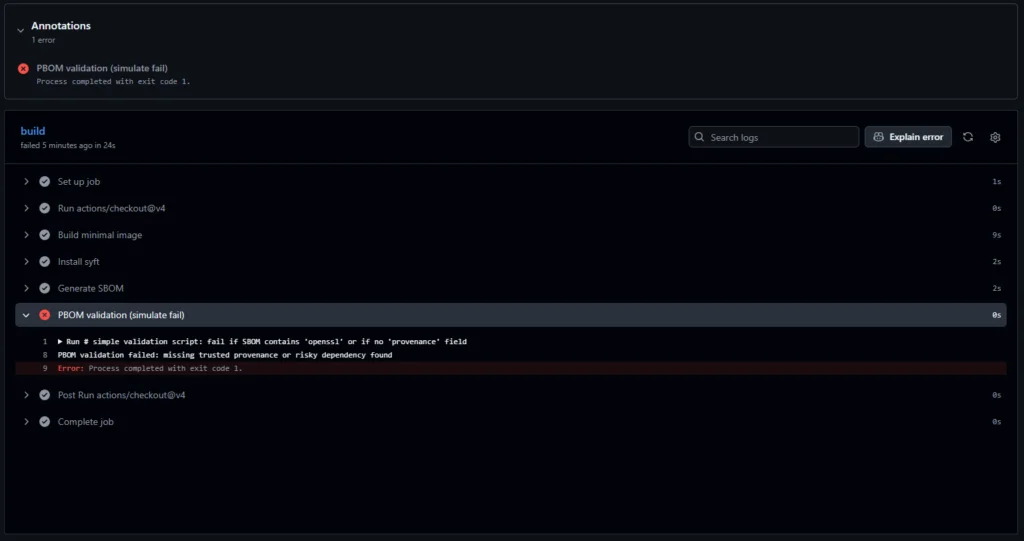
This step enforces supply-chain assurance during the build and deployment phases, ensuring that unverified or high-risk artifacts never reach production environments.
Step 5: Viewing the Application and Its Issue Summary
At this stage, the repository and CI pipeline are already connected to OX.
- Log in to the OX platform and navigate to Applications.
- Select the application associated with the connected repository.
- The summary view shows:
- Categories of issues (Open Source Security, Code Security, SBOM, IaC)
- Severity distribution
- Total dependencies detected
- Issue statistics by tool type
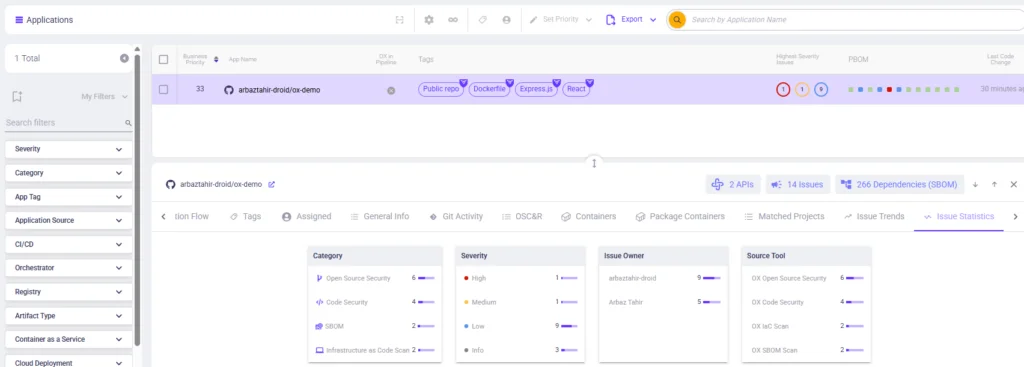
This step provides a consolidated view of security signals that were previously scattered across IDEs, pipelines, and scanners.
Step 6: Run a Posture Scan Across the SDLC
Trigger a full security posture analysis either from the UI or the GraphQL API to stitch together code, pipelines, and cloud runtime. This step is where OX differentiates itself, showing not just raw vulnerabilities but the actual pathways attackers could exploit.
In the OX UI, open your application and click “Run Posture Scan”.
Step 7: View the Secure SDLC Dashboard
Once the repository and CI pipelines are connected, OX automatically builds a unified dashboard for the application. This represents the current security state of the Secure Software Development Lifecycle, showing how security controls are applied across stages rather than isolated tools.
This step gives teams a lifecycle-level view of whether SSDLC controls are functioning as intended, rather than checking individual scan outputs.
Step 8: Analyze Risk and Prioritize Fixes Within the Secure SDLC
All pipeline scans and security signals generated during the SSDLC are automatically ingested into the AppSec Data Fabric.
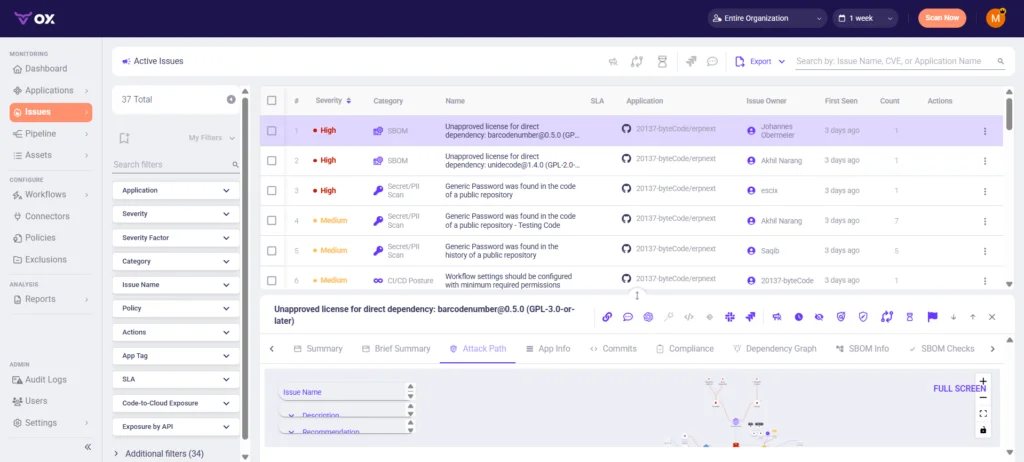
By structuring analysis around the SSDLC context, teams prioritize fixes that reduce downstream risk instead of reacting to disconnected alerts.
Step 9: Inspect Attack Paths and Reachability
- Go to Applications → [Your App] → Attack Path / Reachability.
- Use filters like Reachable, Exploitable, and Business Impact in the UI.
The attack path graph shows how issues connect across code functions, dependencies, CI artifacts, and deployed services and APIs
This step reveals how vulnerabilities propagate across the SDLC and which paths represent real risk in production.
Step 10: PBOM/SBOM Enforcement in the Model Registry (OX Control)
- Enable PBOM/SBOM generation in CI (OX integrates automatically with GitHub Actions, GitLab CI, Jenkins, or any pipeline).
- Connect your model registry (S3, GCS, MLflow, HuggingFace Spaces, container registry, etc.) through the OX integration panel.
- OX enforces PBOM verification automatically when artifacts arrive.
This step enforces SSDLC supply-chain controls beyond code and pipelines, addressing model and artifact integrity.
Step 11: Runtime Protection for AI Inference APIs (OX Runtime Module)
OX flags and blocks suspicious runtime prompts that attempt to bypass model safeguards.


- Deploy OX Runtime Agent or connect logs/events via OX’s API gateway integration.
- Enable inference monitoring for deployed models.
- View prompt-level alerts directly in the OX dashboard.
OX then correlates these runtime anomalies back to:
- Code changes
- CI pipeline executions
- PBOM lineage and model configurations
This completes the secure SDLC loop by tying runtime behavior directly to earlier development and deployment decisions.
Conclusion
The way software is built today is pushing the limits of secure SDLC. AI systems now generate code, dependencies, pipelines, and configurations with minimal human friction, creating risks that move dynamically across the lifecycle. Security can’t rely on assumptions about intent or on controls that only trigger at fixed stages.
The discussion so far highlights where secure SDLC practices and traditional security development models face challenges in AI-driven pipelines. We’ve seen how AI-generated changes compress phases, blur ownership, and create risks only when components interact at runtime. Fragmented tools operating on isolated snapshots of code or dependencies often miss these interactions, leaving significant gaps in visibility and control.
Solving these challenges requires treating the secure SDLC as an end-to-end system rather than a series of isolated phases. By correlating signals across code creation, CI/CD pipelines, artifacts, APIs, and runtime behavior, teams gain a holistic view of exposure. This is where Active ASPM comes in, linking decisions made early in development to their impact in production.
As AI-driven development becomes more widespread, secure SDLC will succeed only if teams apply security context at creation, track provenance throughout delivery, and connect runtime behavior back to development decisions. With this approach, organizations can provide software reliably without losing control over risk, even in highly automated, dynamic pipelines.
FAQs
OX Security provides end-to-end visibility across the secure SDLC by linking AI-generated code, CI pipelines, artifacts, APIs, and runtime behavior. Instead of reviewing isolated scan results, teams see how risks introduced at one stage propagate across the lifecycle and where real exposure exists.
Yes. OX surfaces secure SDLC gaps that static tools miss by correlating findings across development, build, deployment, and runtime. This includes issues that appear low risk in code or dependencies but become exploitable once combined with pipeline behavior, permissions, or runtime access paths.
Yes. OX embeds security context into IDEs, AI coding workflows, and CI pipelines, allowing unsafe patterns and untrusted artifacts to be identified before they are merged or deployed. This supports secure SDLC enforcement at creation and build time rather than relying on post-deployment discovery.
OX correlates runtime signals such as API activity and inference behavior with the code changes, pipeline executions, and artifacts that introduced them. This allows teams to trace runtime issues back to specific secure SDLC decisions and address the root cause instead of treating production events as isolated incidents.